What label you need for Wildberries: 58×40 mm with the barcode from the product card, colour and size. You get the barcode from the manufacturer or generate it in the WB seller portal, it comes out as 13 digits. Print the bars no thinner than 0.33 mm: that's what the WB instructions require, otherwise the scanner won't read the code at inbound acceptance. At that width the WB barcode takes up 37.3 mm and fits comfortably on the 58×40 label, but on the 43×25 and 30×20 labels from the same portal it doesn't fit under WB's requirements. You can download labels for free right from the supply, up to 100 at a time, or assemble them in any generator.
"Wildberries barcode" and "Wildberries label" are searched almost 3,500 times a month, and nearly every guide in the results repeats the same thing: size 58×40, Code-128 format, stick it on every unit. We went further than just retelling that. We took the minimum bar width from the WB instructions, calculated from the barcode standard how much space the code takes on the label, and checked 118 real barcodes from the product cards of our test store. The result will be useful for those who print the barcode themselves and put their own vendor code on the label instead of WB's digits.
What a barcode on WB is and how it differs from WB's ШК codes and the marking code
A barcode is a code for the product in the "vendor code, colour, size" combination. It's not unique to each unit: every blue dress in size 42 under the same vendor code has the same barcode, and it can even match across different sellers' identical products. So one vendor code has as many barcodes as it has sizes and colours.
The confusion starts when other codes show up alongside it. WB has seven of them, and each has its own job:
| Code | What it identifies | Who creates it | Where it's used |
|---|---|---|---|
| Barcode | product in the "vendor code, colour, size" combination | manufacturer or seller in the portal | on every unit of goods and in the product card |
| Item ШК (WB unit code) | a specific unit at the WB warehouse | warehouse, at inbound acceptance | FBW, applied by WB itself |
| Box or pallet ШК | a box or pallet within a supply | seller, at the «Упаковка и печать ШК» (packing and ШК printing) step | FBW, on every box |
| Supply ШК | the whole supply | portal, when generating the pass | FBW, at the entrance to the acceptance point |
| Order sticker | a sold unit under FBS | portal, at the assembly task step | FBS, on every shipment |
| Marking code (DataMatrix) | a unit of marked goods in Chestny Znak | Chestny Znak | marked categories |
| GTIN | a product item in the international GS1 system | manufacturer, via GS1 RUS | marked goods, in the barcode field |
Source: WB's "Product and supply marking" instructions, updated 23 September 2026
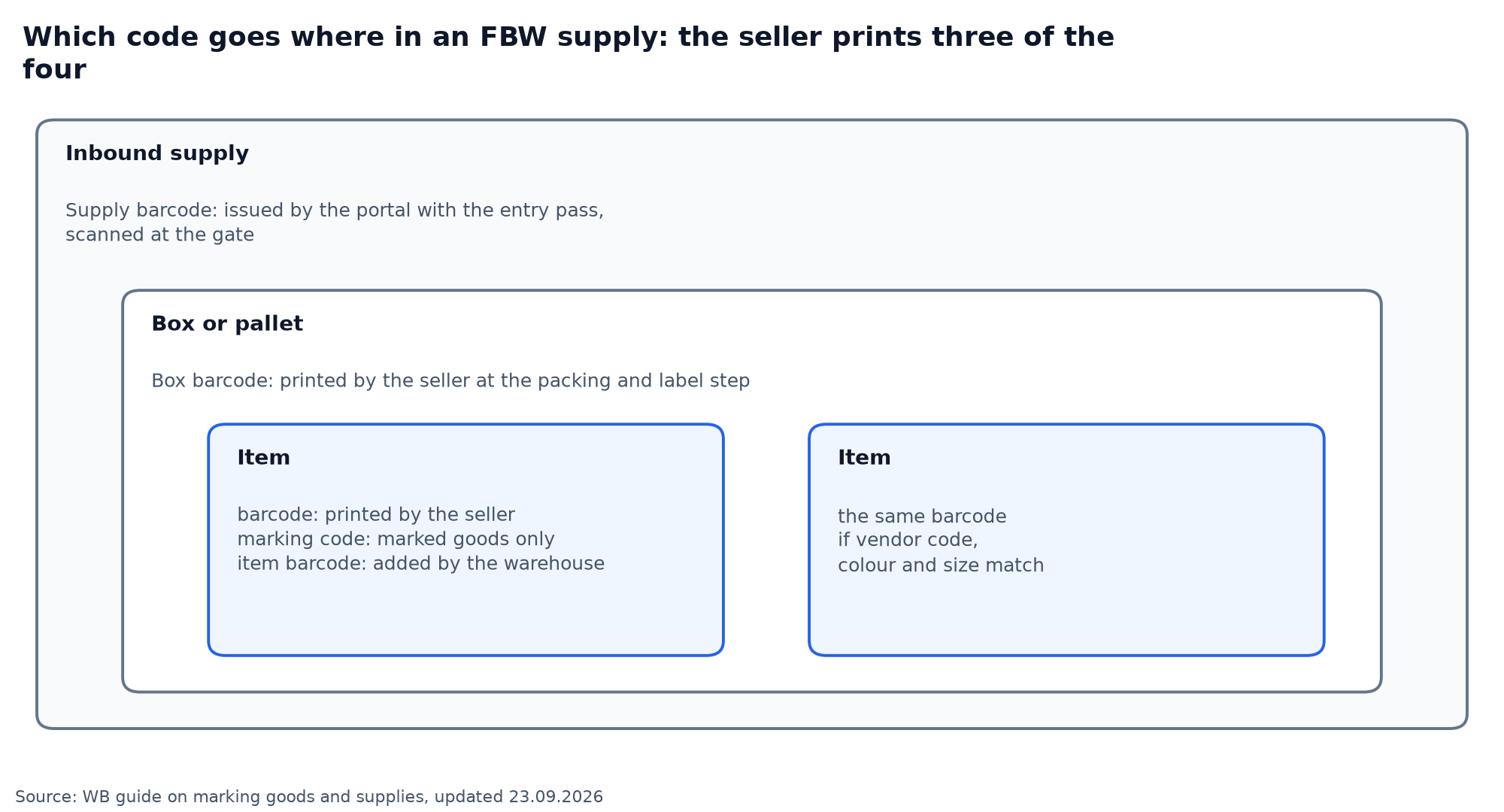
Sellers rarely make mistakes with FBS stickers, supply QR codes or box ШК codes: the portal generates them, all that's left is to print them out. Mistakes happen with the barcode, because the seller creates and applies it themselves. We've covered the marking code and marking deadlines separately in our piece on Chestny Znak on Wildberries.
Where to get a barcode for WB
There are three ways, and you should choose between them by one WB rule: you can't generate a barcode twice. If a product already has one, don't make a second.
- Manufacturer's barcode. If the packaging already has a barcode, enter its digits in the card when you create it. EAN, UPC, GTIN and UIN all count as types of barcode and go in the same field.
- WB barcode. The «Сгенерировать баркоды» (generate barcodes) button in the card, or an empty field: the barcode will appear on its own when you save.
- Your own code from a third-party service. Up to 30 characters, no spaces, Latin letters, digits and the symbols / * - + @ № % & $ ! = ( ) { } [ ] only.
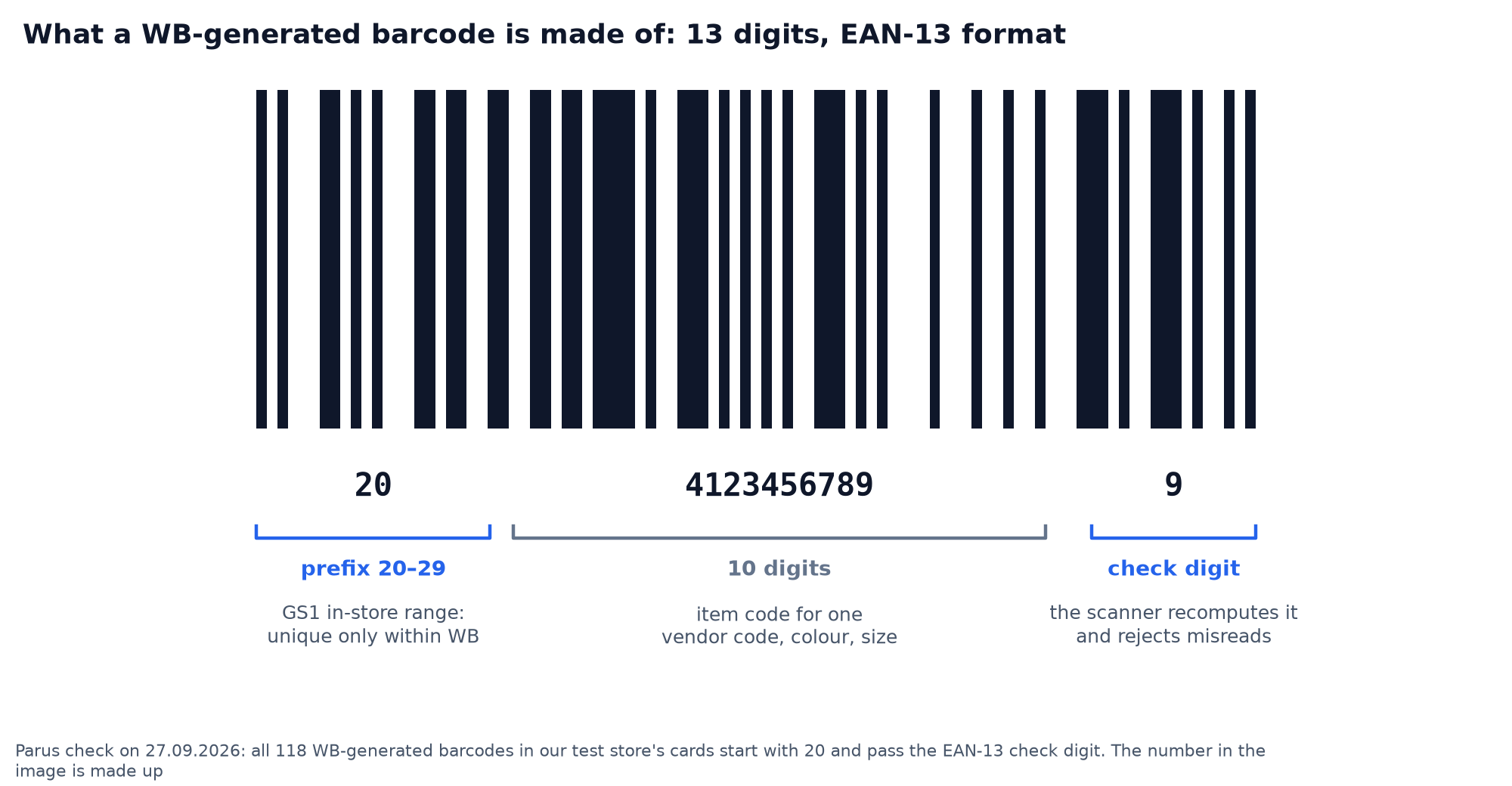
We checked which barcodes WB generates on live product cards. All 118 barcodes in our test store's cards turned out to have the same structure: 13 digits, starting with "20," with the last digit matching as an EAN-13 check digit. The GS1 standard reserves prefixes 20 to 29 for stores' internal codes, so a barcode like this is only unique within Wildberries and won't work on other platforms.
For goods subject to mandatory marking, the rule is stricter. From 1 October 2026, WB checks the GTIN in product cards subject to mandatory marking for sellers based in Russia. The «Баркоды» (barcodes) field must contain the GTIN from Chestny Znak, the TN VED code must be filled in next to it, and the packaging must carry the same GTIN as a barcode. WB says it will block cards without a valid GTIN. If you sell clothing, footwear or cosmetics, check this field before the start of October.
Which label size to choose for Wildberries
The WB seller portal offers four label sizes: 58×40, 58×60, 43×25 and 30×20 mm, on thermal stickers or an A4 sheet. The instructions recommend Code-128, leaving the size up to the seller. But the choice isn't as free as it looks, because two paragraphs down WB sets a minimum size for the barcode itself.
The narrow bar width must be at least 0.330 mm, the bar height for EAN-13 at least 22.85 mm, plus a 1.65 mm bottom extension on the outer and centre bars. That's the full-size EAN-13 per the standard: with digits under the bars and clear margins on the sides, the code takes up 37.3 × 25.9 mm. From there it's simple geometry.
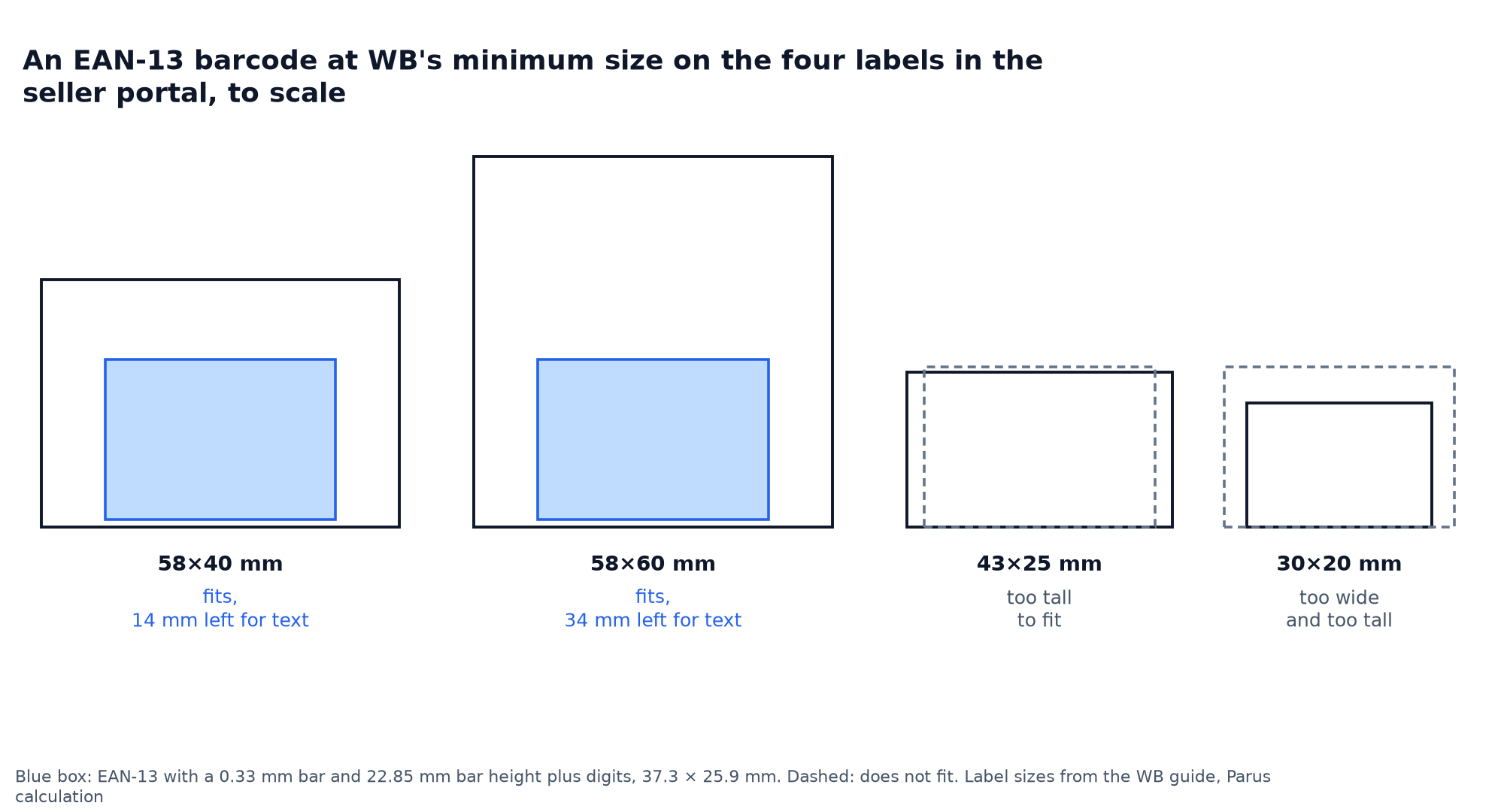
On 58×40 the code fits, leaving 14 mm above it for the name, vendor code, colour and size: four lines of small print. On 58×60 there's twice as much room, and this size is handy when the label also needs a DataMatrix marking code. On 43×25 the code doesn't fit by height, on 30×20 it doesn't fit by height or width. So the small sizes in the portal only work with a shrunk barcode, that is, around WB's own requirement. We'd use 58×40 for anything it can be stuck on, and 43×25 only for really small items.
| Size | What fits at WB's minimum barcode | Who it suits |
|---|---|---|
| 58×40 | EAN-13 and 4 lines of text; Code-128 of 13 digits | most products |
| 58×60 | EAN-13, text and DataMatrix marking code | goods subject to mandatory marking |
| 43×25 | EAN-13 without text, and even then with reduced height | earrings, bottles, small items |
| 30×20 | nothing without shrinking | better not to use |
Why a long barcode doesn't fit on a 58×40 label
The width of a barcode depends on its format and the length of the code. We calculated it for the minimum bar width of 0.33 mm, with clear margins on the edges, without which the scanner can't find the start of the code.
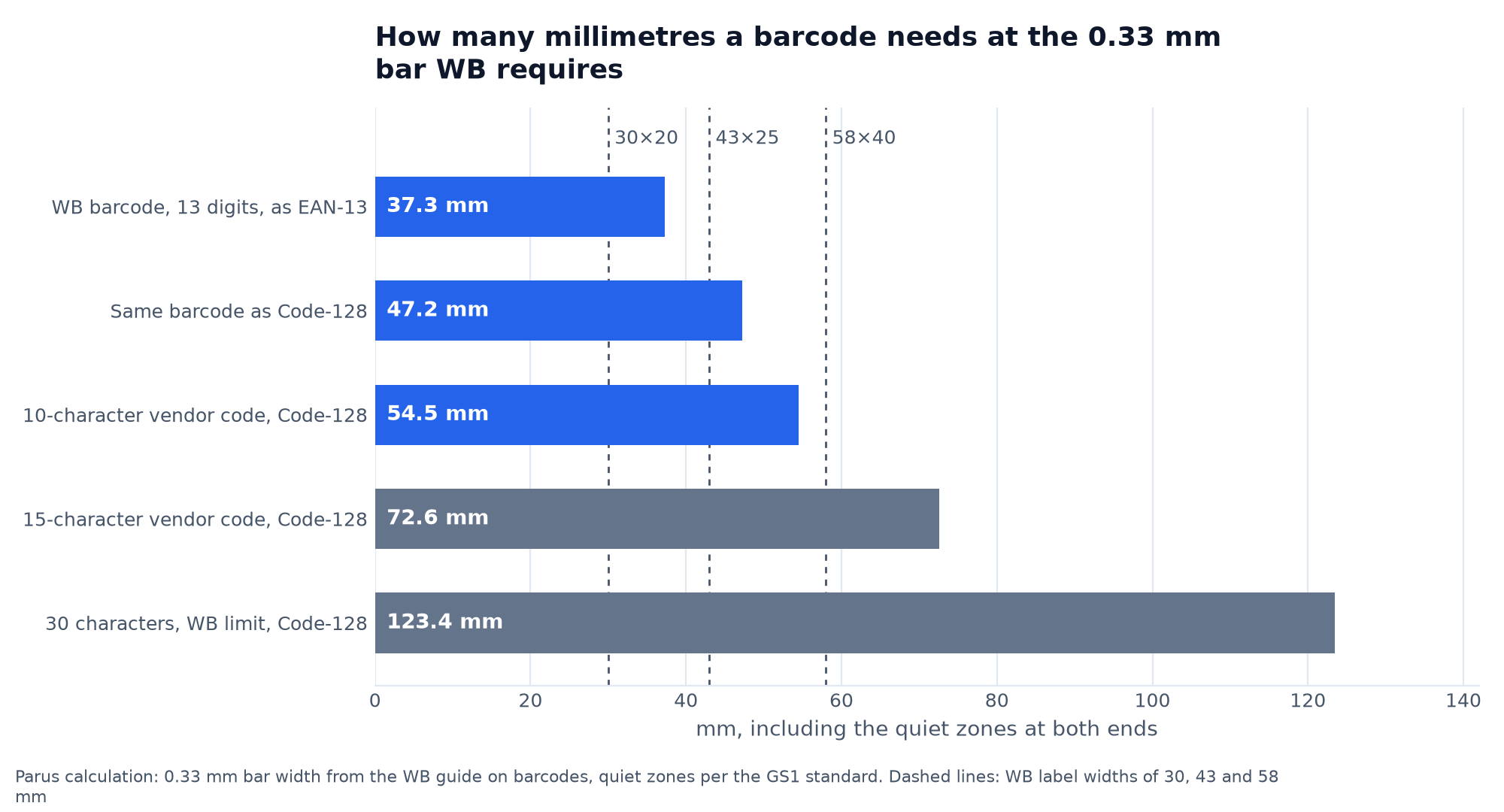
A WB barcode with 13 digits in EAN-13 format takes up 37.3 mm. The same barcode in Code-128, which WB calls the recommended format, is already 47.2 mm: it fits on a 58×40 label, but not on a 43×25 one. But an alphanumeric vendor code in Code-128 grows fast: each letter adds 3.6 mm. A 10-character code takes up 54.5 mm and barely fits on 58 mm, an 11-character one no longer fits, and a 15-character one needs 72.6 mm. The 30 characters WB allows, at a genuine bar width, won't fit on any label from the seller portal.
In practice, the generator doesn't refuse to print a long code. It just squeezes the bars to fit the label width, and the scanner stops being able to tell them apart. Here's what the same label looks like with two versions of the code:
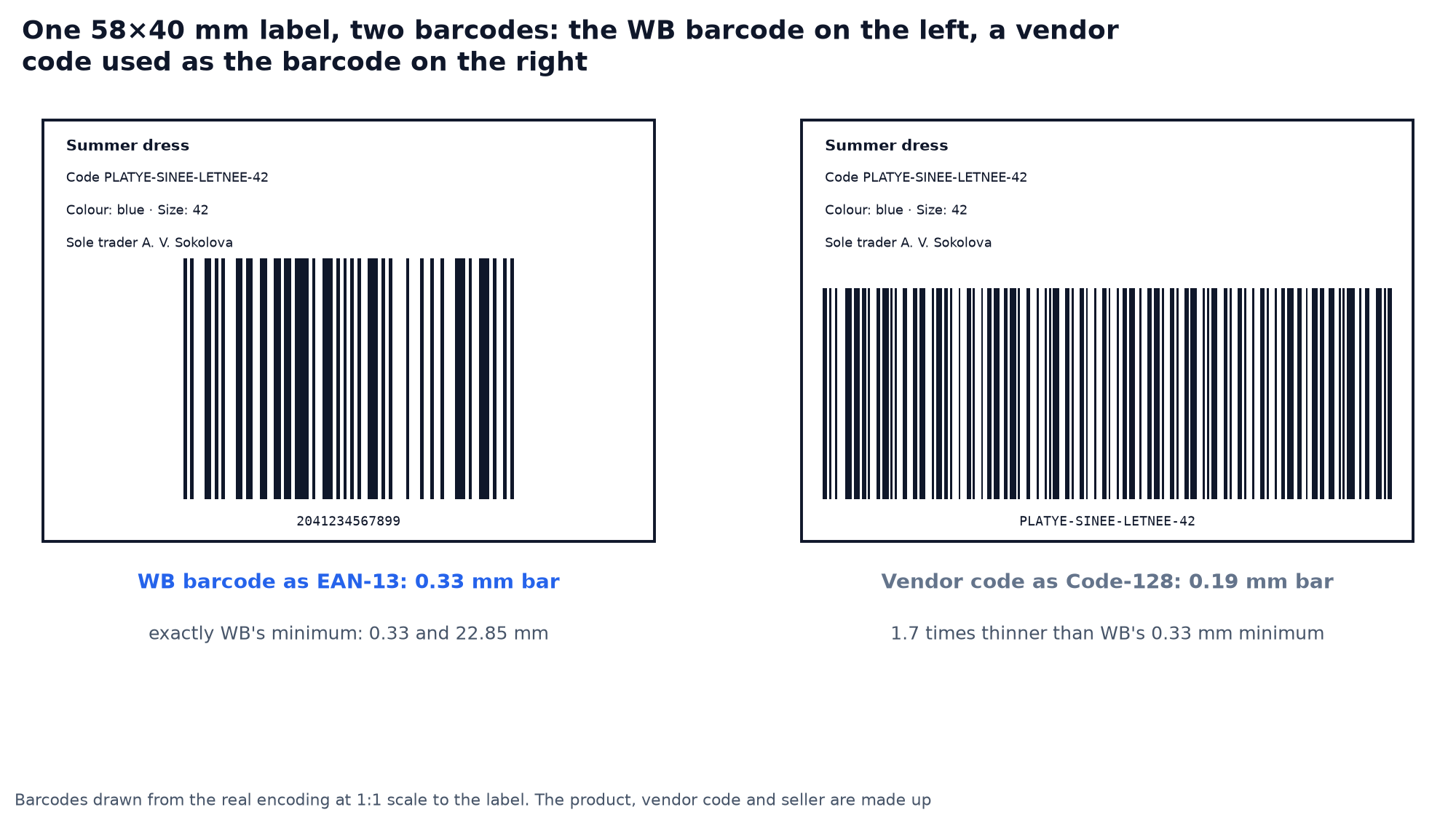
On the left is the WB barcode at exactly WB's minimum. On the right is a 22-character vendor code squeezed into 54 mm: a 0.19 mm bar, 1.7 times thinner than required. This gives us a practical conclusion that's not in the instructions: don't use the vendor code instead of the barcode if it's longer than 10 characters. For your own codes, use digits: in Code-128 a pair of digits is encoded as a single character, so a 13-digit code takes up the same space as 8 letters.
And about the leading zero. If the manufacturer's barcode starts with zero, like 0889655265315, WB requires printing it only in Code-128, so the first digit isn't lost when printed. There's no such restriction for a WB barcode starting with "20": it's a valid EAN-13, and its code is 10 mm shorter.
Wildberries label requirements: what must be on the sticker
In short, based on WB's instruction "How to work with barcodes" from 25 June 2026 and the list of common supply mistakes from 3 September 2026. First, the requirements from the instruction itself:
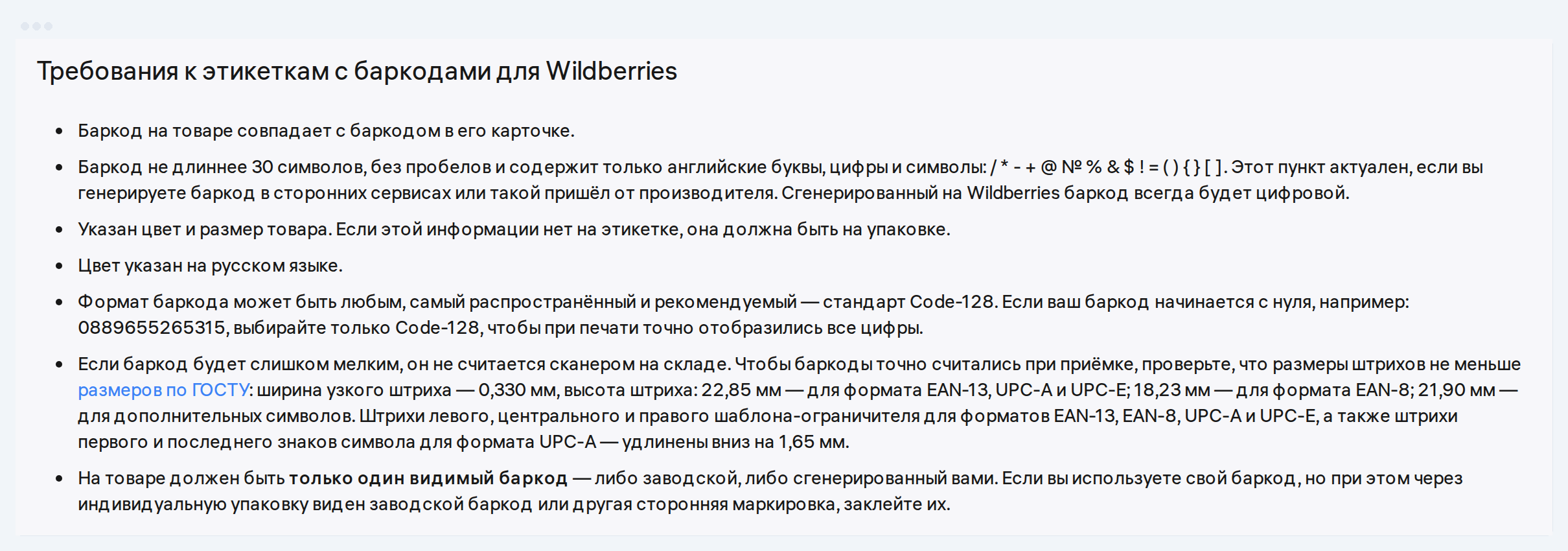
Worth adding to that are the rules from the review of common mistakes:
- the barcode on the product matches the barcode in the card and in the supply, in all three places;
- the product has one visible barcode; cover up the factory code or someone else's code under the packaging;
- colour and size are shown on the label or on the packaging, colour in Russian;
- it's recommended to add the manufacturer, name and vendor code: this speeds up acceptance;
- on 18+ products, only the barcode, no name or product attributes, packaging must be opaque;
- the product barcode isn't stuck on the transport box, otherwise the whole box gets accepted as a single unit.
If the barcode on the product doesn't match the supply, or it wasn't entered into the supply, the product ends up unidentified. Sorting out such cases takes longer than reprinting labels, so before shipping it's worth scanning a couple of items with your phone and checking the numbers against the card.
How to create a Wildberries label for free
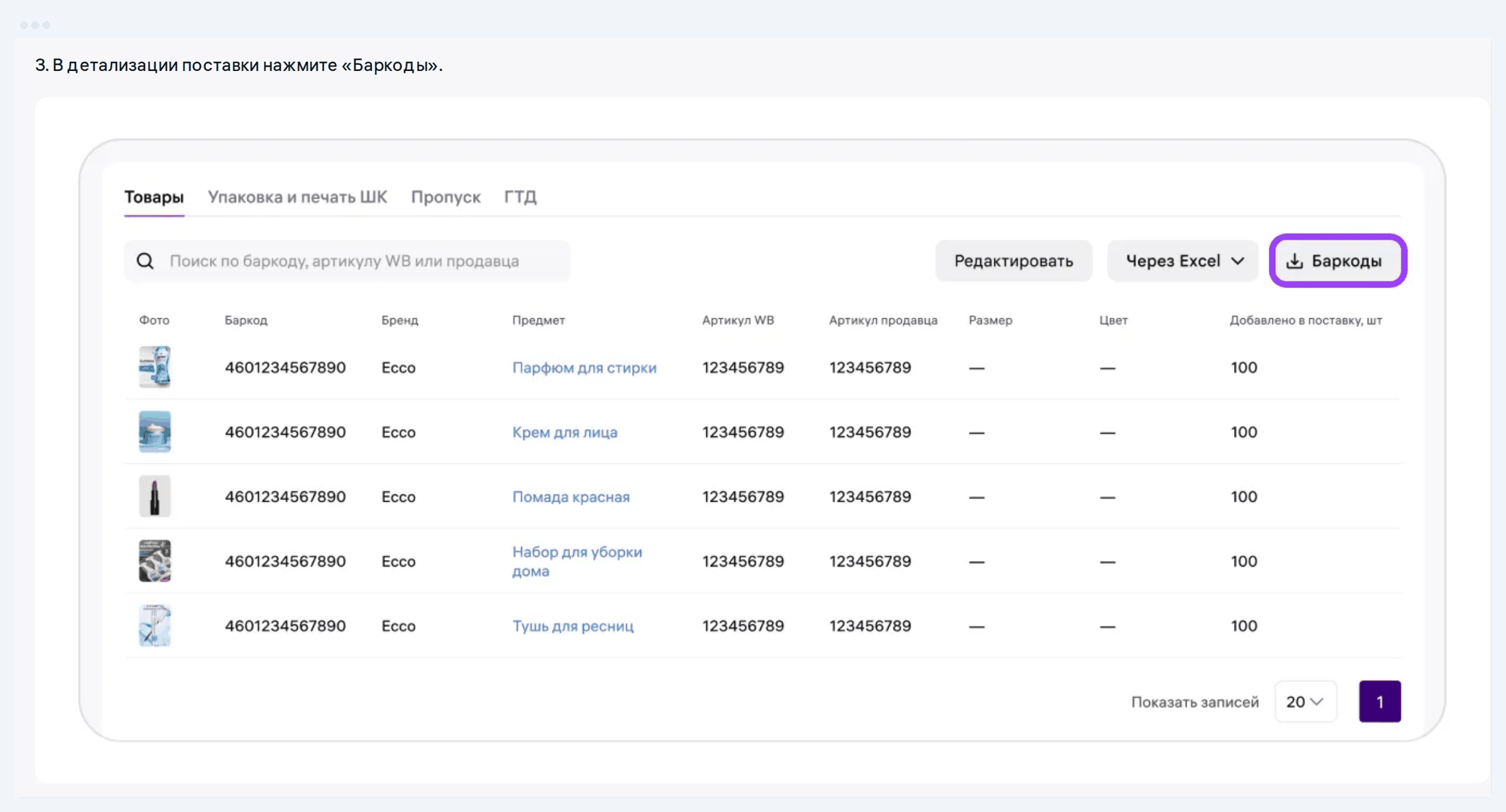
The shortest path is inside the seller portal. Open «Поставки и заказы» → «Поставки (FBW)», find the supply, and in the supply details click «Баркоды». Check the products, choose a thermal sticker or an A4 sheet and the size, click «Скачать» (download). WB will assemble the labels from the name, vendor code, colour, size, barcode and the legal entity's name. No more than 100 labels download at once: if the supply has more units, the list is split into pages of 100.
When there's no supply yet or you need to print labels in advance, the free label generator on our site works well. It works without registration, builds a PDF for 58×40, 58×30, 40×25 tape or an A4 sheet, and picks the format itself by WB's rule: 13 digits with no leading zero print as EAN-13, everything else as Code-128. No data is sent anywhere, the PDF is assembled in the browser.
You can print on a thermal printer, on a regular printer on label paper, or even on plain paper: WB allows a label like that to be taped on.
Printing WB labels: what printer do you need
For 58 mm tape, sellers use a thermal label printer, and it has a catch that printer sellers stay quiet about. The thermal head prints a bar only in whole dots, and dot width depends on resolution.
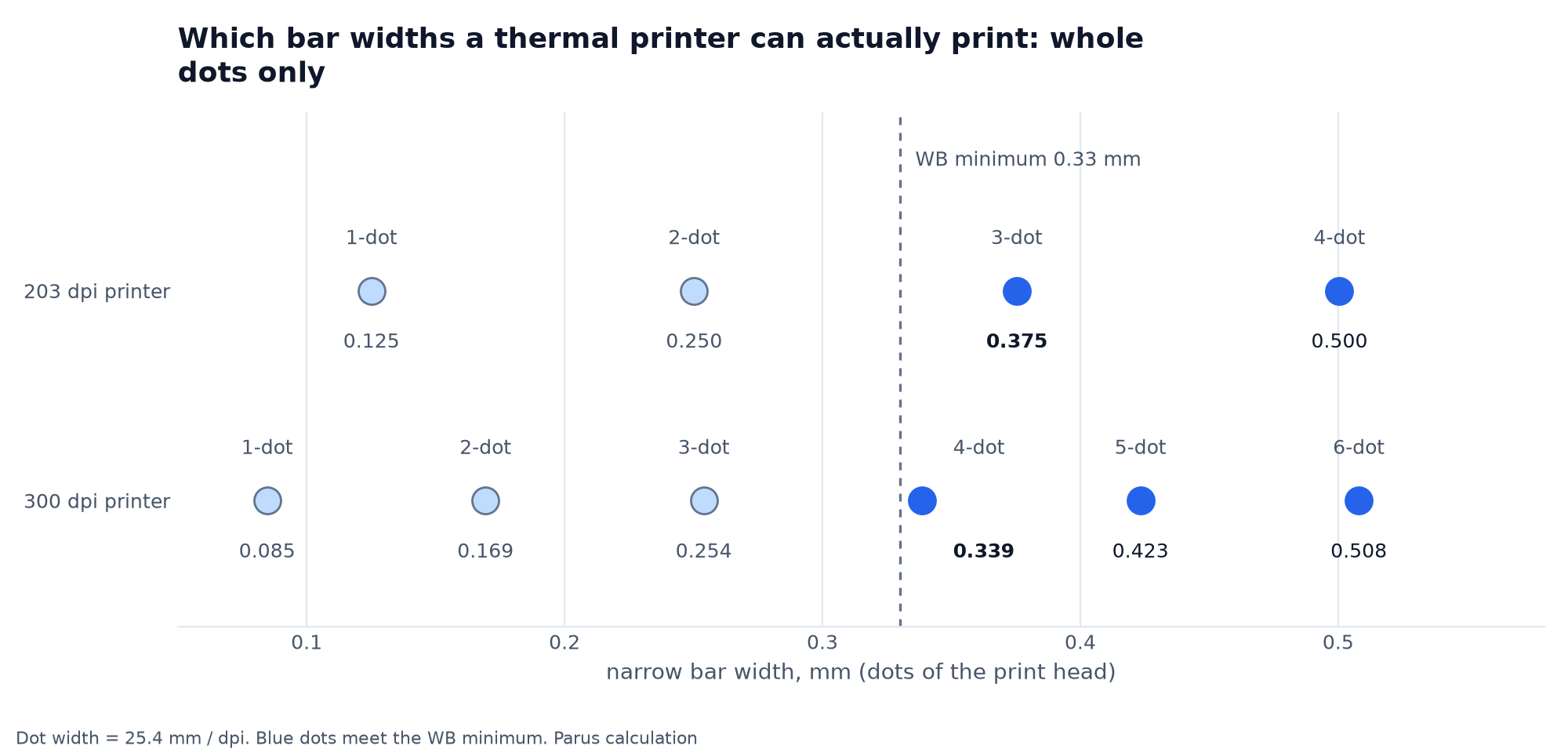
A 203 dpi printer has a dot 0.125 mm wide. Two dots give 0.25 mm, which is thinner than WB's minimum, so the narrow bar has to be three dots, 0.375 mm. That makes the code grow: EAN-13 already takes up 42.4 mm, a 13-digit Code-128 takes 53.6 mm, and on 58 mm tape that leaves it just 2 mm of margins. At 300 dpi, four dots give 0.339 mm, and the code barely grows.
If the generator scales the barcode "to fit label width," the printer will round the bars however it comes out, and some of them will end up thinner than the standard. So in your print settings, set the scale to 100% and don't turn on "fit to page."
For most sellers, 203 dpi is enough with a WB barcode in EAN-13. You need a 300 dpi printer if you print Code-128 or small 43x25 labels.
How to remove or replace a barcode on Wildberries
The question "how do I remove a barcode" usually means one of two things: two codes are visible on the product, or the wrong one ended up in the card. The first is fixed with a sticker: cover the second code so only one barcode stays visible on the product. The second is fixed by following the right order of steps. A card can have several barcodes, and WB accepts the product if the same code from the card appears both on the product and in the supply. Add the barcode you need to the card, include it in the supply, and print labels with that code.
An example. The card for a blue size-42 dress has two barcodes: 4601234567893 from the factory tag and 2041234567899, which WB generated earlier. The supply lists 4601234567893, so that is the only code that should scan on the dress. Don't stick on the WB label with 2041234567899, and if it's already on, cover it. You don't need to delete the second code from the card for acceptance.
The key rule: don't generate a new WB barcode on top of the manufacturer's barcode. Two different codes on one unit of product is a direct route to the item being logged as unidentified.
FAQ about barcodes and labels for Wildberries
Can you print labels for Wildberries on a regular printer? Yes, on label paper or plain paper. WB allows you to tape a paper label to the packaging. Set print scale to 100%.
Do you need to buy a barcode from GS1? For a regular product, no: the free WB barcode is enough. For goods subject to mandatory marking, you need a GTIN, issued through GS1 RUS or the Chestny Znak account.
Which barcode format to choose for Wildberries: EAN-13 or Code-128? WB accepts either. A 13-digit WB barcode starting with "20" can be printed as EAN-13, which is 10 mm shorter. Codes with a leading zero, letters or symbols should only be printed in Code-128.
How many labels can you download in the WB seller portal at once? Up to 100. If the supply has more units, the products are split across pages of 100.
What happens if the barcode on the product doesn't match the card? The product will be rejected at the shipping point or marked as unidentified. The barcode must match on the product, in the card and in the supply.
Once the barcodes are stuck on and the product has left for the warehouse, the accounting starts: how much is sitting in the warehouses, what's selling and how much is left after deductions. Parus Seller shows stock and net profit for every barcode, first two months free with promo code PARUS60, no card required: connect your store.