Where to find the buyout rate on Wildberries: in the seller portal, open «Аналитика» → «Воронка продаж». The chart shows buyouts, their amount and the buyout rate for the whole store, and the table below it breaks the same figures down by product card. The second place: «Аналитика» → «Оценка товара» → «Основные показатели», where the buyout rate sits next to the product rating.
Article 11 of 14 in the topic {hub}. All articles in the topic
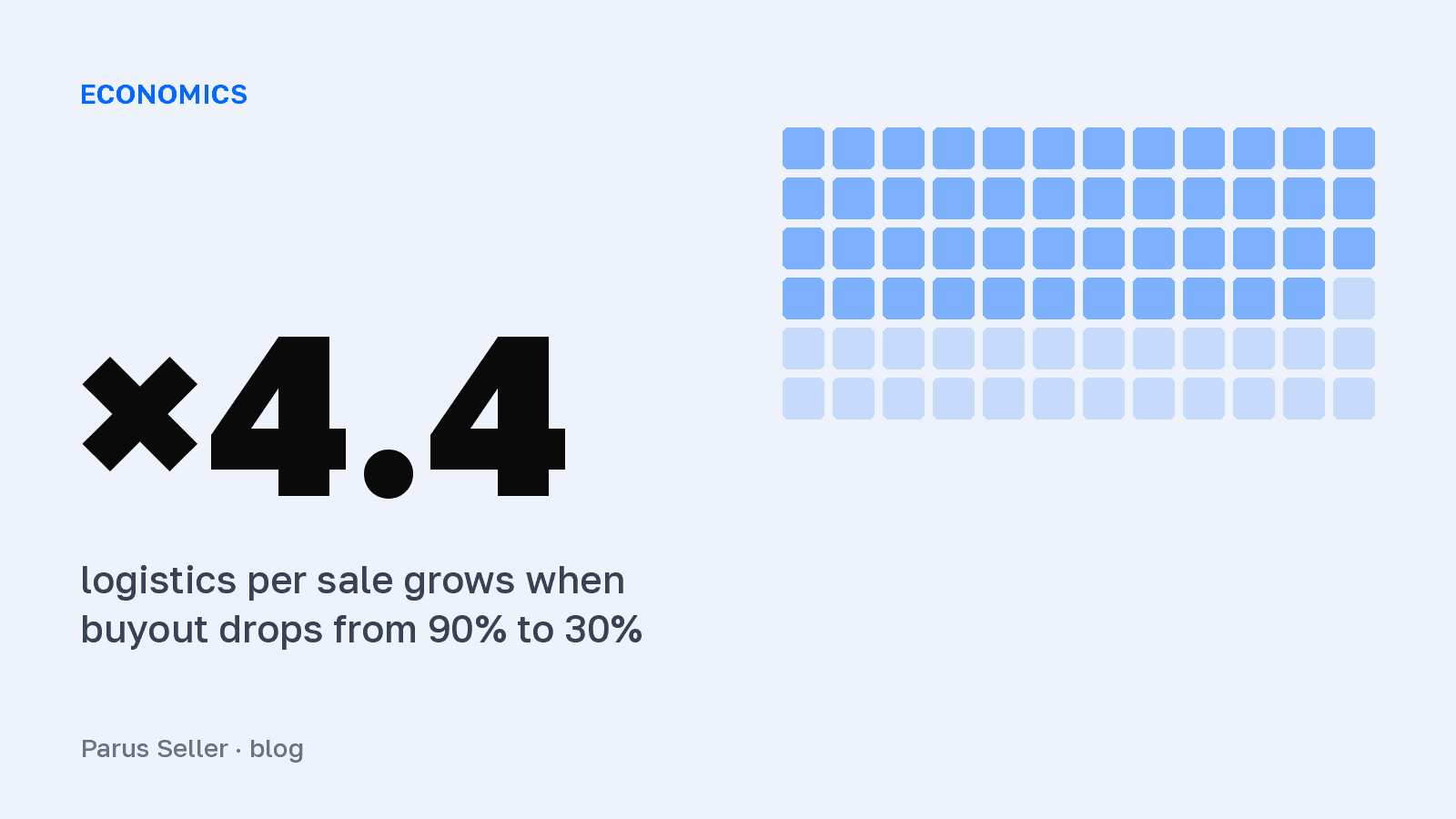
Sellers usually think about the buyout rate twice: when they pick a niche, and when profit suddenly melts away. That is a mistake. The buyout rate works as a multiplier on logistics, and the difference between 90% and 30% turns 72 roubles of cost per sale into 317. It is also counted in a tricky way: the figure for the last week is almost always worse than it will turn out to be a month later.
In short: buyout rate = buyouts / (buyouts + cancellations), items still in transit do not count, and WB attributes buyouts and cancellations to the order date. 6 days after the order the report shows only 65% of the future buyouts, after 14 days 94%. At a buyout rate of 30% logistics per sale costs four times as much.
Where to find the buyout rate on Wildberries
The main report is called «Воронка продаж», and the path in the seller portal is: «Аналитика» → «Аналитика продавца» → «Воронка продаж». At the top there is a chart for all products: card views, add-to-cart events, orders, buyouts and cancellations. Under the chart is a table for each card, and that is the one to look at. The store-wide buyout rate lies: a single vendor code with a buyout rate of 25% can quietly eat the profit of a whole category while the average holds at a respectable 80%.
The second entry point, «Оценка товара» → «Основные показатели», is handy when you are looking at a single product: orders, buyouts, the buyout rate and cancellations sit right next to its rating. A short summary for the current week also opens straight from the product list if you click a row in «Товары и цены» (T-J, 2026).
What adds to the confusion is that there are three buyout rates on Wildberries. Yours, the seller's, lives in the analytics of the seller portal. The customer has a rate of their own: they see it in their profile next to their personal discount. And there is the store's buyout rate, which the customer sees in the app under the "i" icon next to the seller's name. In the seller portal only the first one is available to you, and there is no data on the buyout rate of a specific customer.
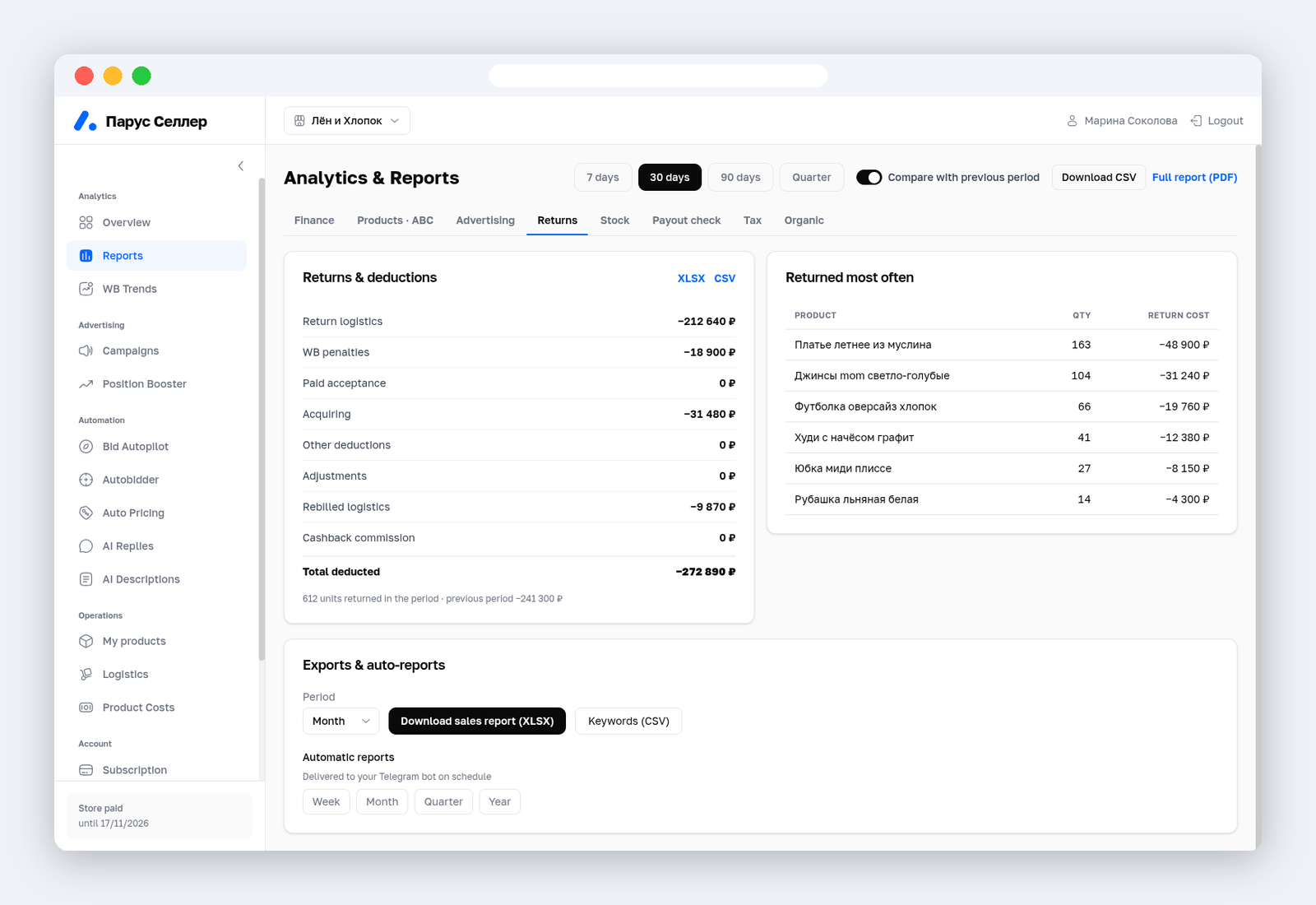
How much returns cost you is visible in Parus Seller on the "Returns" tab: return logistics and deductions in one table, and the products that come back most often, with the price of their returns.
How Wildberries counts the buyout rate
WB describes the formula in its instructions for the Sales funnel report (updated 9 October 2026): the buyout rate equals the number of buyouts divided by the number of buyouts and cancellations, and items in transit are not counted (seller.wildberries.ru).
Buyout rate = buyouts / (buyouts + cancellations) × 100%
WB puts everything that did not become a sale into cancellations: a cancellation by the customer before assembly, a refusal at the pickup point or on delivery, a return after receipt, and an order that was not collected before the end of the storage period. Buyouts also include those that were returned later. The only orders not counted are those cancelled in the first hour before assembly, unpaid ones and technical cancellations.
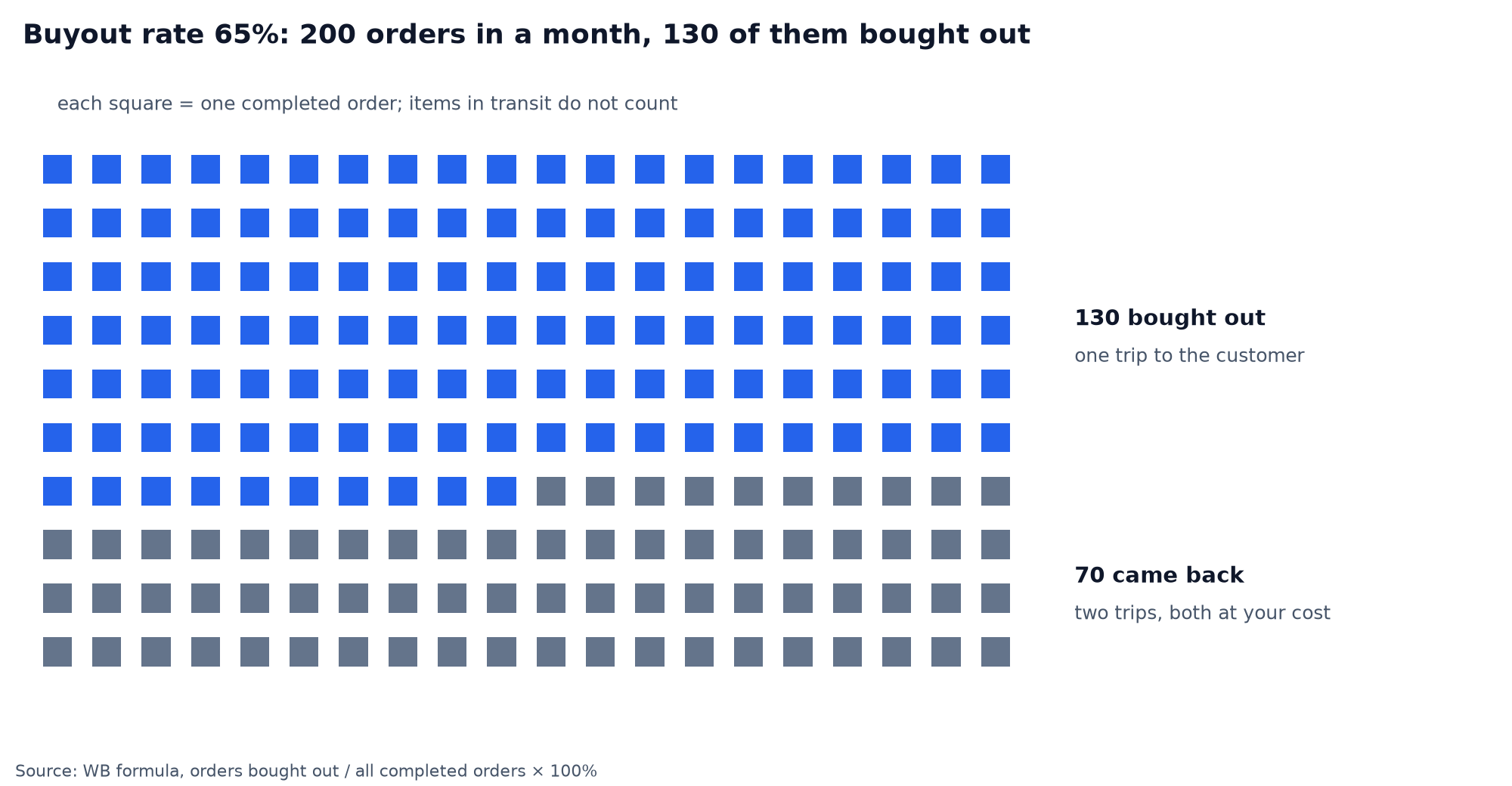
An example: over a month the product was ordered 200 times and collected from pickup points 130 times. The buyout rate is 65%. The other 70 units travelled to the customer and came back to the warehouse, and you paid for every trip back.
The problem from search suggestions, «было 90 платьев, купили 40», is solved the same way: 40 / 90 = 44%. If some of the dresses are still on their way, remove them from the denominator.
Next on this topic: Wildberries returns for sellers: what they cost in 2026
What period the buyout rate is counted over
The least obvious line in the instructions: buyouts and cancellations are attributed to the order date. An order placed on 1 October and bought out on the 9th is counted in 1 October, but shows up there only on the 9th. While the order is in transit, it is in neither the buyouts nor the cancellations.
To see how much this distorts recent days, we counted on 4,272 FBO buyouts from two stores connected to Parus Seller: from the order to the buyout record. Two days after the order, the report shows 9% of future buyouts, after 6 days 65%, after 10 days 85%, after two weeks 94%, after 20 days 99%.
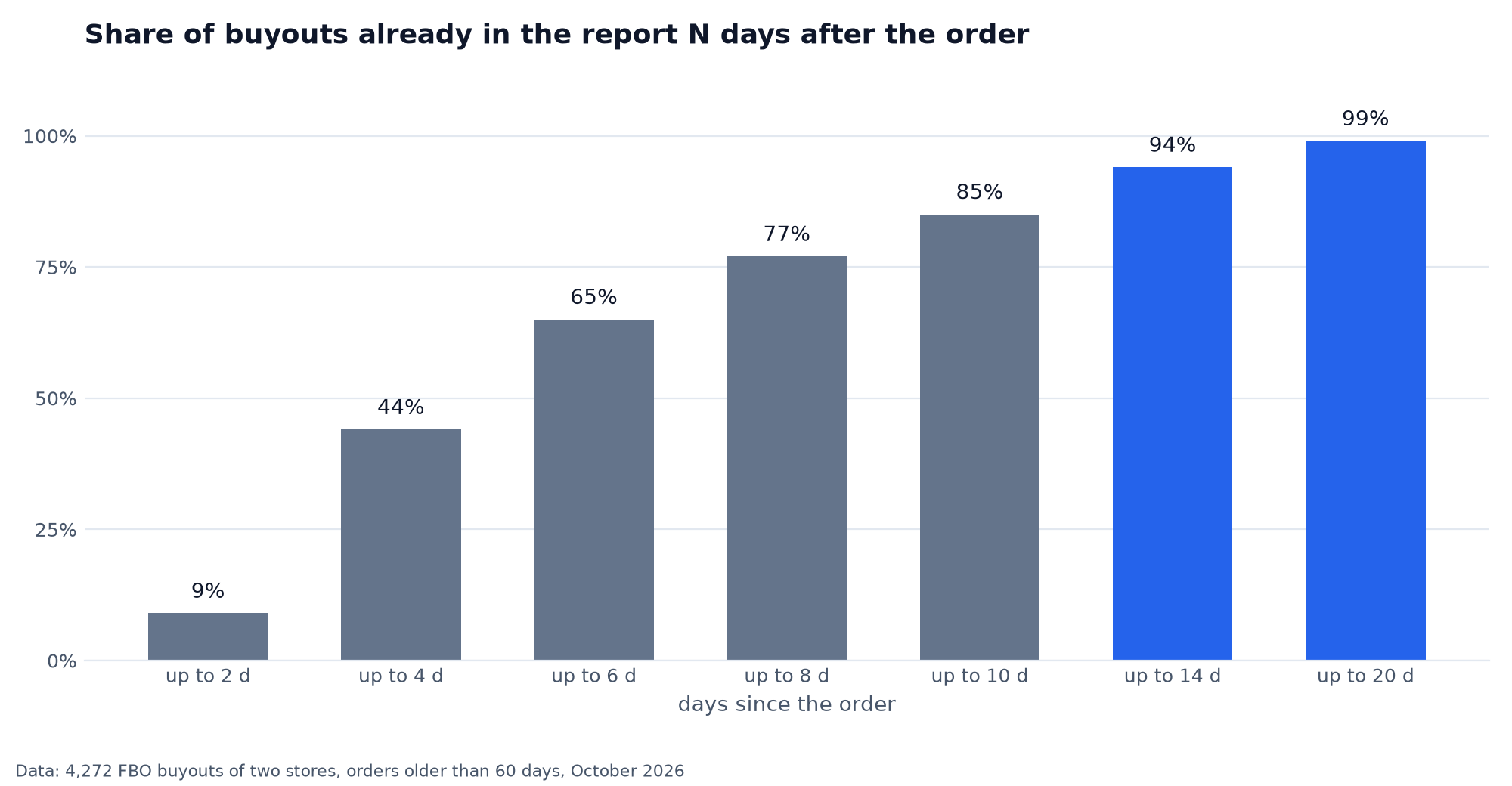
Cancellations before assembly, by contrast, arrive fast, in the first hours and days. So for the latest week the denominator is already full of cancellations while the buyouts are still on the way, and the buyout rate looks worse than the real one. The takeaway is simple: judge the buyout rate by a period that ended at least two weeks ago. The last 14 days show a trend, not a result, and it is too early to panic over them.
What a low buyout rate costs in roubles
Every refused order means two trips you paid for: delivery to the customer and the return to the warehouse. So honest logistics is counted not per shipment, but per sale that actually happened:
Logistics per sale = delivery + (delivery + return) × (1 − buyout rate) / buyout rate
Take a product with delivery at 60 ₽ and a return at 50 ₽. At a buyout rate of 90%, that is 72 ₽ per sale, at 70% already 107 ₽, at 50% 170 ₽. At 30% logistics for one sale costs 317 ₽, more than four times as much.
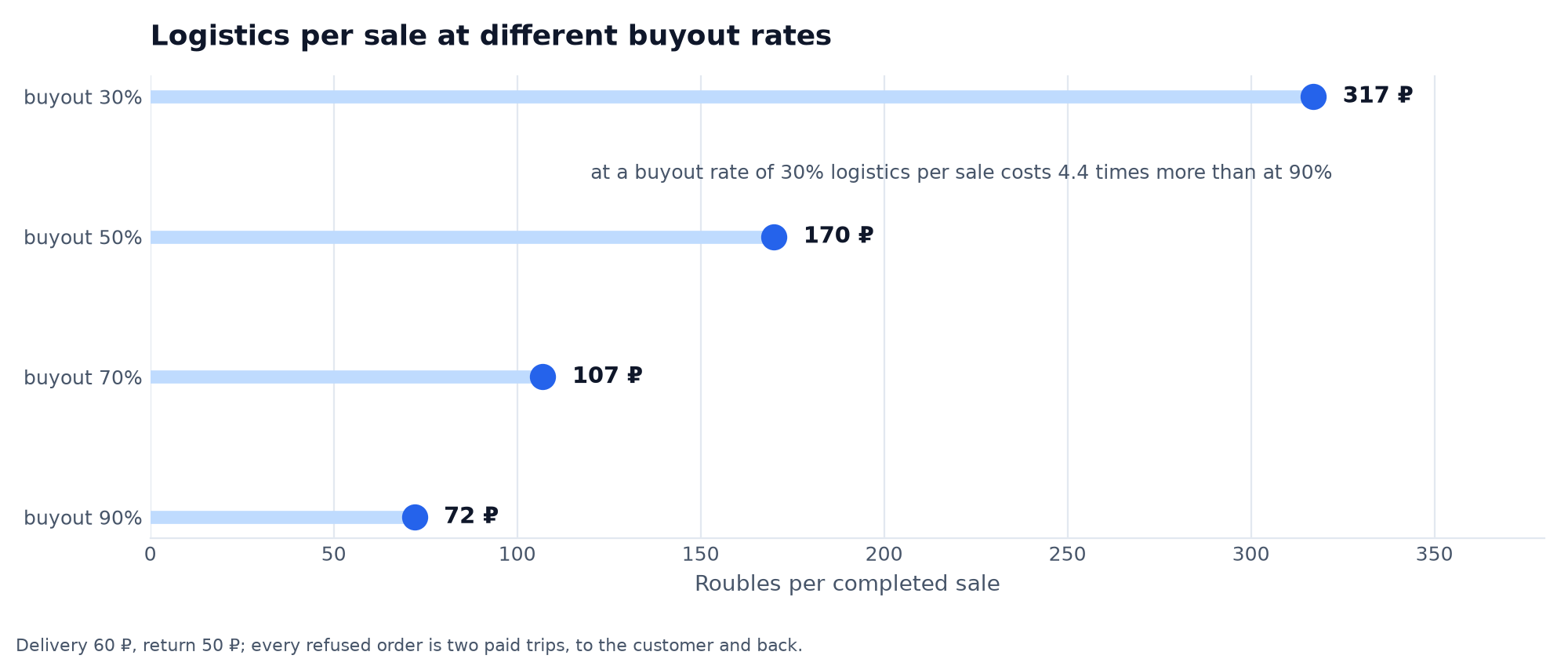
At 100 sales a month the difference between a buyout rate of 90% and one of 30% comes to 24,500 ₽ of pure overpayment for refused orders. That money is a separate line in no report at all, it is smeared across the «Стоимость логистики» column of the weekly report. To work out what a low buyout rate does to the profit of one particular product, use our unit economics formula with a free sheet, or go straight to the online Wildberries profit calculator, where the buyout rate is a field of its own.
What happens if the buyout rate is below 30%
For the seller there are no direct sanctions. WB does not fine you for a low buyout rate and does not hide such cards under any rules it has published. The economics does the punishing: at a buyout rate of 30% you pay for more than two extra round trips on every sale, and between trips the item is frozen and not selling. Below the break-even point every sale goes into the red.
For the customer it is different. From 2026 WB moves customers with a low buyout rate to prepayment and charges a fee for returns, and it does not publish the exact thresholds: the current terms are shown in the customer's profile (Pulse, 2026). For you this is an indirect plus: there are fewer "fitting-room" orders from such customers.
What buyout rate counts as good
A normal buyout rate depends on the category more than on how hard the seller tries. Clothes and shoes live at 30–60%, because customers order several sizes to try on. Jewellery and accessories hold at around 70–85%. Goods that need no fitting, meaning home, cosmetics and electronics, are bought out at 85–95%. These are benchmarks, not a WB standard: the marketplace does not publish norms of its own.
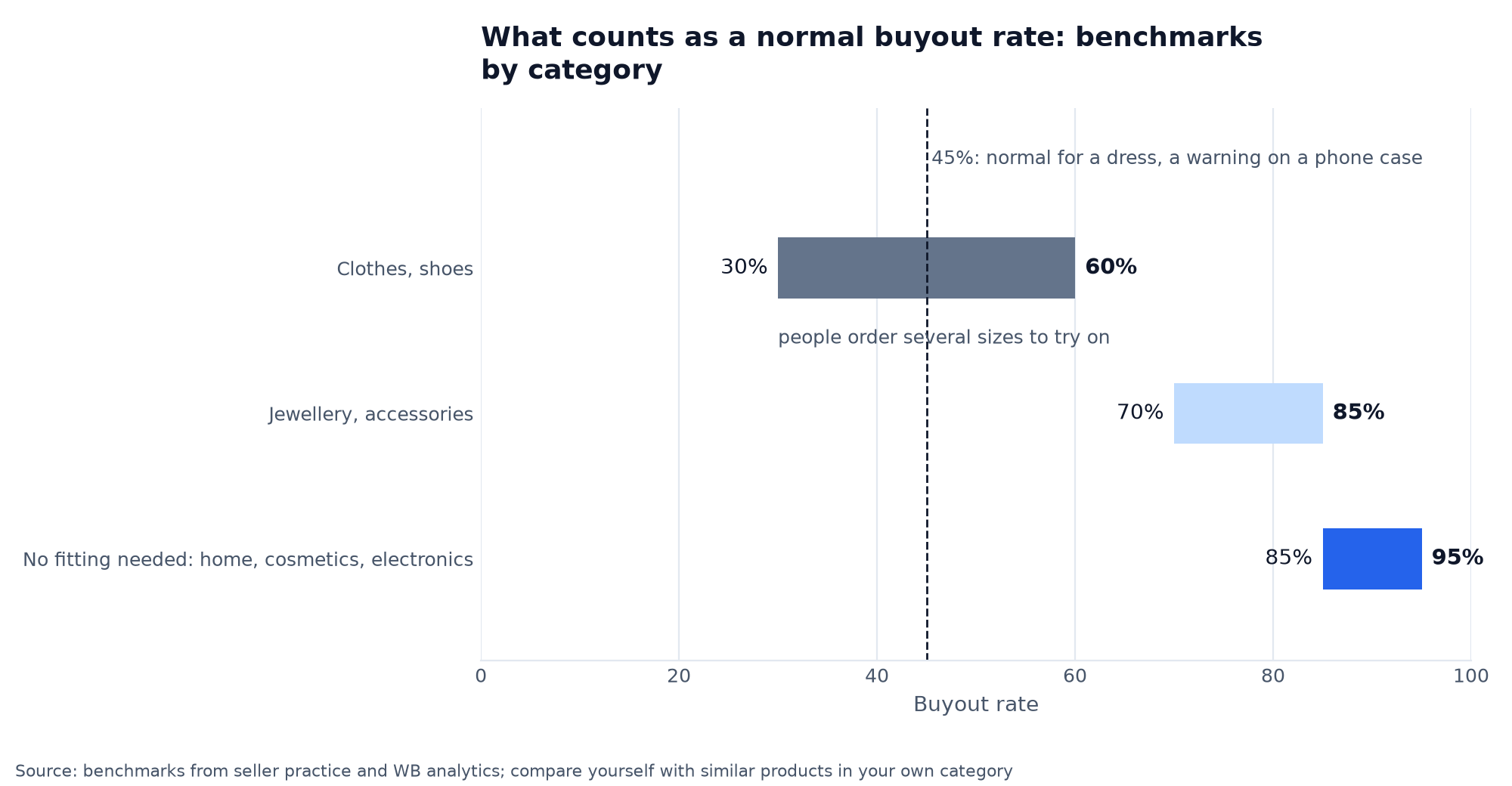
So 45% for a dress is still the norm, and it gets priced in. The same 45% on a phone case is already a signal that something is wrong with the card or the product. Compare yourself with similar products in your own category, not with the site average.
Why the buyout rate falls and how to raise it
Most often the culprit is a card that promises something other than what arrives: the colour in the photo is brighter, the size chart lies, the composition in the description is off. The customer compared and walked away. That is also the main lever for clothing: an honest size chart with measurements in centimetres. The more accurate the size, the less often a customer orders three to try on.
The second strongest factor is photos. Real colours, fabric close up and a short video cut refusals. A beautiful render that feels like a different item raises orders and sinks the buyout rate, and in total you lose.
Then come small things that add up to percentage points. A crumpled box at the pickup point kills the buyout rate as surely as a defect does, and bubble wrap is cheaper than a return. Slow delivery gives the customer time to change their mind: while the item spent ten days on the road, they found the same one at the pickup point next door, so a warehouse closer to the customer raises the buyout rate too. A refused order often starts with an unanswered question about composition or compatibility. Answering everything fast is exhausting, so we hand that work to AI.
Did the buyout rate drop sharply while nobody touched the card? Check three things: whether the dispatch warehouse changed, whether a batch arrived that differs from the previous one, and whether a sale season has started, when everyone orders "just to look". And remember the two weeks it takes to show: the effect of your changes is honestly visible only in orders that have had time to arrive.
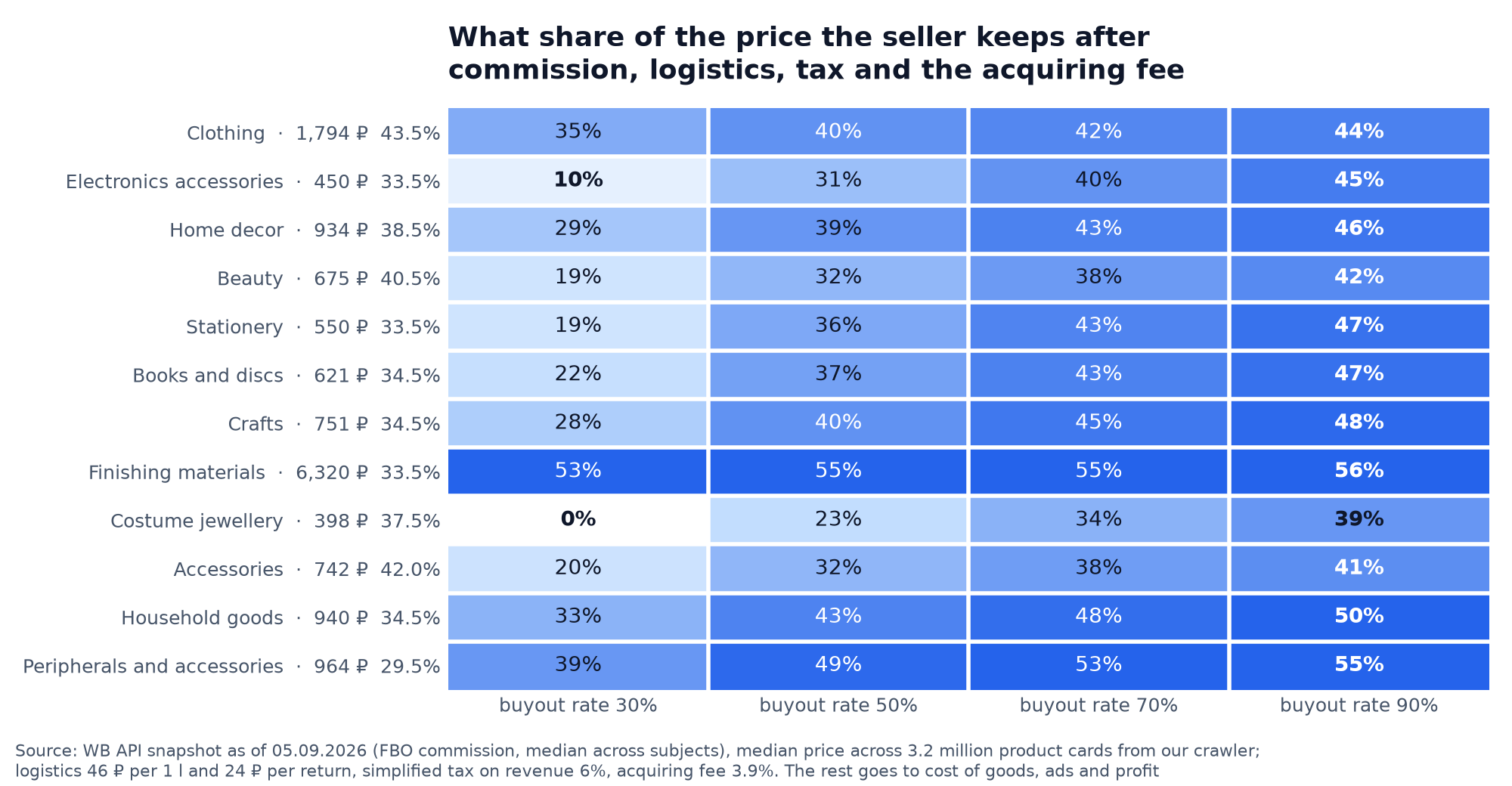
What each point of buyout rate is worth in money shows across the 12 largest categories: on cheap products the share of the price left to the seller after commission and logistics grows several times over.
How the buyout rate gets into your profit automatically
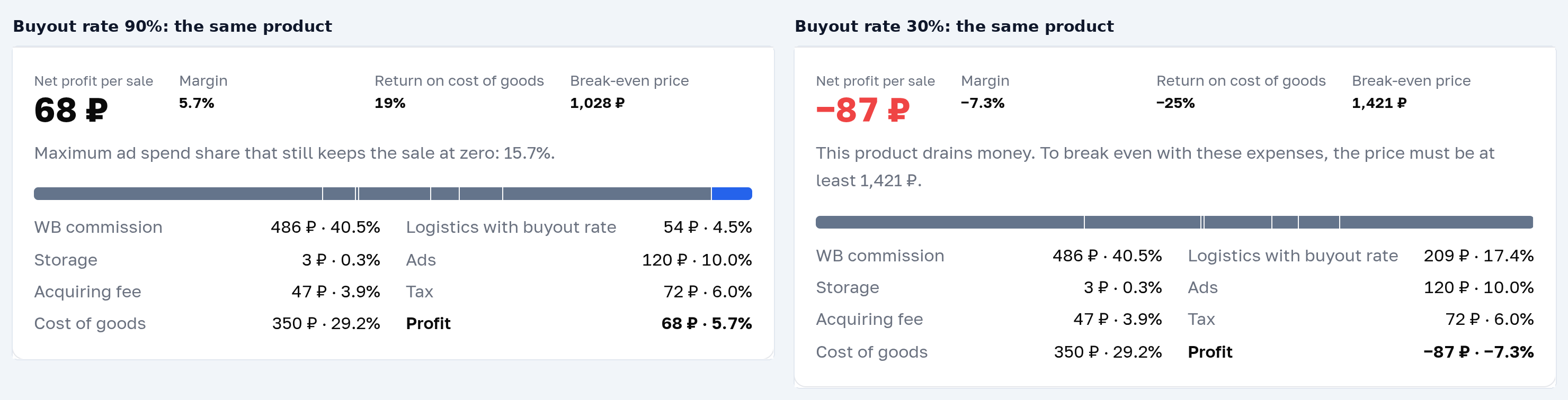
Counting "logistics adjusted for the buyout rate" by hand for every product costs you an evening, and a month later the calculation is out of date. Parus Seller does it itself: it takes the actual buyout rate of each product from WB reports, recalculates honest logistics and shows net profit with it included. The same screen shows which products ship losses because of returns, before that becomes visible in the bank account. The same effect on a single product is in the online Wildberries profit calculator: at a buyout rate of 90% a sale brings 68 ₽, at 30% it goes to −87 ₽.
First two months free with promo code PARUS60, no card required: sign up and connect your seller portal. Connecting by API key from the WB seller portal takes a couple of minutes, the key is created by the owner and revoked in one click.
And if you want to see where the rest of the price goes, we have breakdowns of unit economics with the formula for every deduction and 235 ad campaigns with their typical budget leaks.
FAQ
Where do you see the buyout rate on Wildberries in the app? A customer sees their own buyout rate in the profile, at the bottom of the page next to the personal discount. A store's buyout rate is shown under the "i" icon next to the seller's name. For a seller it is easier to look at the buyout rate in the «Воронка продаж» of the seller portal, where it is shown for every product card.
Can a seller see a customer's buyout rate? No. The seller portal shows the buyout rate only for your products and your store. WB does not show a seller the buyout data of a specific customer.
Why is the buyout rate for the last week so low? Because buyouts are attributed to the order date and arrive with a delay: 6 days after the order you can see about two thirds of the future buyouts, while the cancellations are already in place. Compare periods that ended two weeks ago.
Is an item in transit counted in the buyout rate? No. While the order is on its way to the customer it takes no part in the calculation: the metric counts only completed orders.
How does the buyout rate affect a card's promotion? WB does not publish it as part of the ranking formula, but the link is there indirectly: refused orders bring negative reviews and a drop in conversion, and those do move positions.