Where to download the Wildberries weekly report: WB Partners → balance widget → "Financial reports" → the "Weekly" tab, "Download excel" button. The report for the previous week appears on Monday, and since the end of August 2026 WB splits a week that spans two months into two reports. Total payable = payable for goods minus logistics, storage, inbound acceptance, other deductions, penalties, the WB reward adjustment and the two loyalty programme columns.
Article 7 of 12 in the topic {hub}. All articles in the topic
The weekly settlement report answers one question: how much money Wildberries will transfer for the week and where the rest went. The trouble is in the details. There are more than a dozen columns, a week can have two documents and sometimes four, and newcomers take "Payable for goods" for income. We checked the payout formula on 84 real reports from two stores connected to Parus Seller. We go through the columns on the numbers of a model home textiles store with a turnover of about 5 million ₽ a month.
In short: the report sits in "Financial reports" on the "Weekly" tab and downloads as XLSX. The printed form for the tax office arrives in "Documents" within 7 days. A week that spans two months now comes as two reports under clause 5.5 of the offer agreement. Tax on the simplified regime is charged on the "Sale" column, not on the payout.
Where to find and download the Wildberries weekly report
In the seller portal the path runs like this: WB Partners → home page → the balance widget → "Financial reports". Four tabs open: "Weekly", "Daily", "Archived weekly" and "Cashback report". For reconciling money you need the first one. The archived tab holds reports in the old format, which applied until 28 January 2024. Every report carries a number, a legal entity, a period, a generation date and a type, and you can download it as XLSX with line-item detail for each operation. In the WB Partners mobile app the same reports open through the balance widget and the "Reports" button. The marketplace's own instruction lives in the WB help centre.
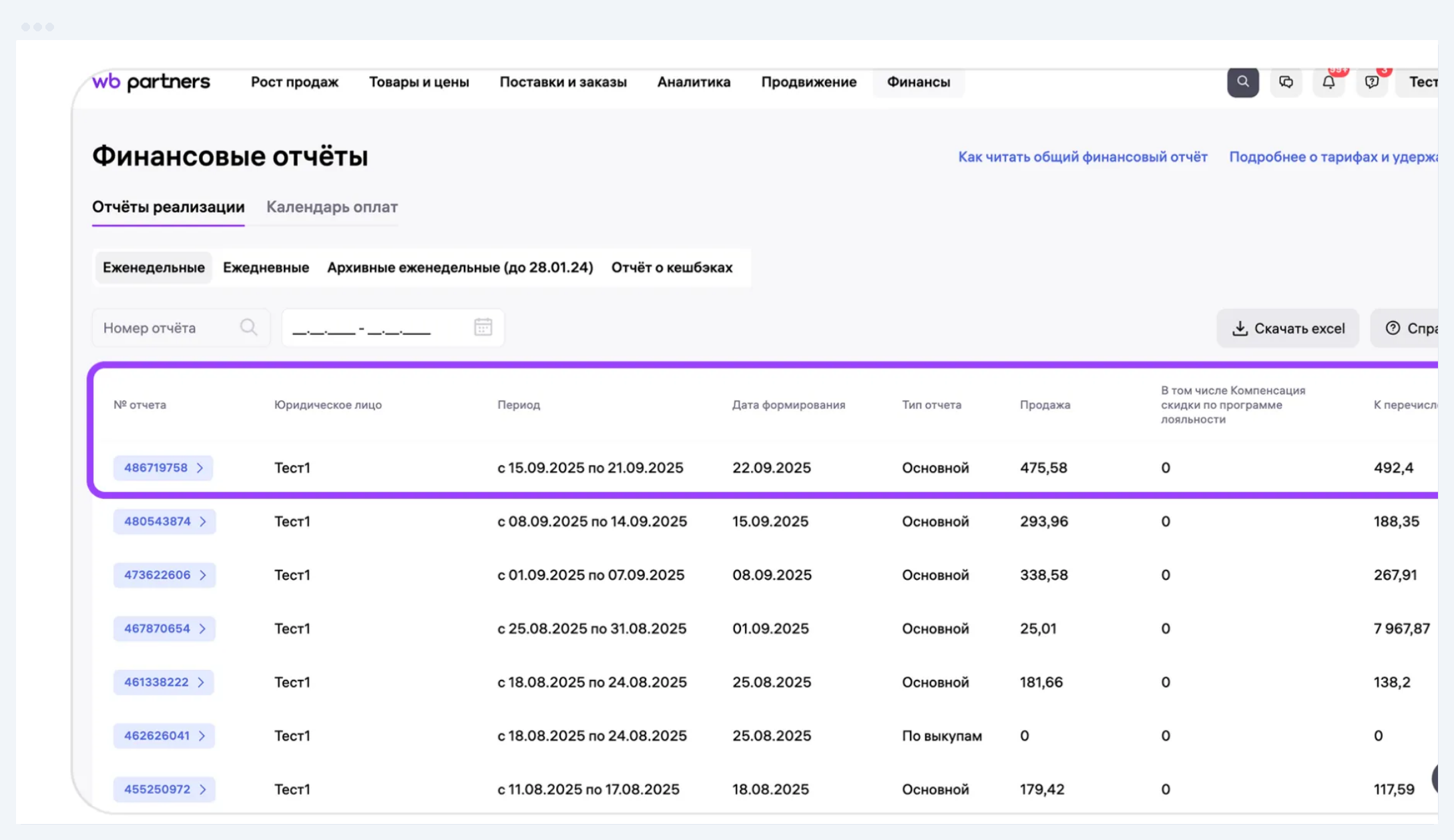
The XLSX from the portal is for you, and the tax office needs the printed form. WB sends it to the "Documents" section within 7 days after the week closes. The main report is called "Weekly settlement report" there, and the buyout report is called "Buyout notice". These are the final documents with the WB stamp, and your bookkeeping should be reconciled against them. We covered which other documents WB issues for the month and how to post them in 1C in our article on WB reports for accounting.
When to expect the report. For stores connected to us, the regular weekly report is generated on Monday, the day after the week closes. The week in the report runs Monday to Sunday, except for a week that spans two months.
Why the weekly report is split into two periods
Since the end of August 2026, WB issues a week that spans two months as two reports. This is set out in clause 5.5 of the offer agreement: if a calendar week falls across two months, the first report ends on the last day of the month and the second starts on the first day of the next. The clause is in the version of the offer agreement dated 1 September 2026 and remains in the current version No. 102.
Here is how it looks in the reports of our stores. The week of 27 July to 2 August still arrived as a single document. The next week that straddled a month, 31 August to 6 September, arrived as two.
| Week | Report periods | Generated |
|---|---|---|
| 27.07–02.08 | one report, 27.07–02.08 | Mon 03.08 |
| 31.08–06.09 | 31.08–31.08 and 01.09–06.09 | Tue 01.09 and Mon 07.09 |
| 28.09–04.10 | 28.09–30.09 and 01.10–04.10 | Thu 01.10 and Mon 05.10 |
Source: weekly reports of two stores via the WB finance-api, checked 24 October 2026
That is where the "one-day" report that scares sellers comes from: 31 August 2026 was a Monday, so the first piece of that week fit into a single day. There is no error here. The report for the tail of the month is generated the day after the month ends, even if that is a Tuesday or a Thursday, and the rest of the week arrives on the usual Monday. If you also get a buyout report, you will receive four documents for such a week. The next such week, 26 October to 1 November, will arrive as reports for 26–31 October and for 1 November.
For reconciling money this means one thing: join the reports by period dates, not by week number. The payout may arrive as a single payment for both pieces.
Next on this topic: WB deductions: what they are, where to look, how to dispute
Why one week brings two reports
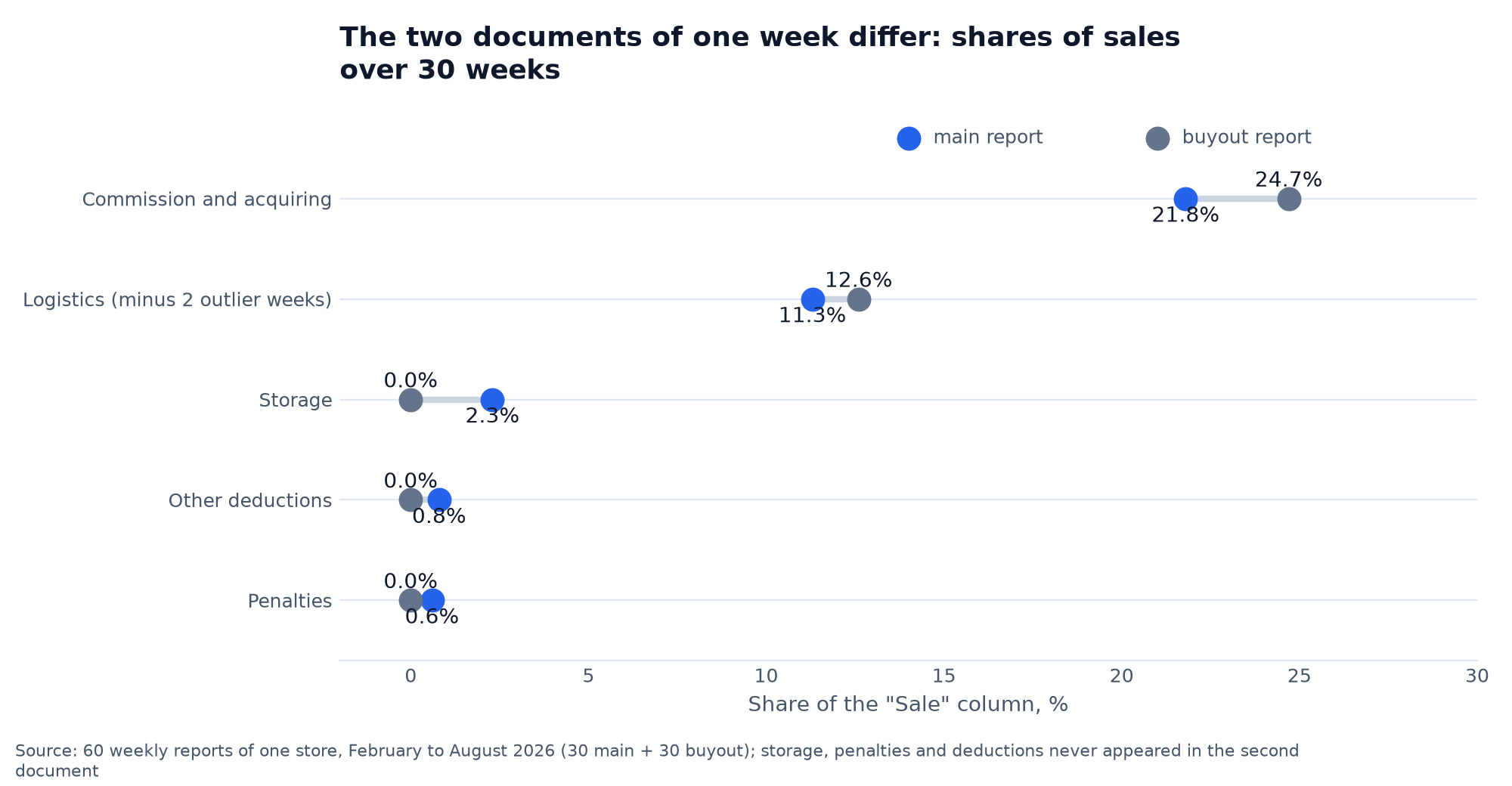
Besides splitting by month, WB also splits the week by sales type. The main report covers sales in Russia and outside the EAEU. The buyout report covers sales in other EAEU countries and the deals where Wildberries itself buys the goods. You can see the type in the "Report type" column, and in the API it is the reportType field: 1 is the main report, 2 is the buyout report.
The second document arrives only in weeks that had such sales. Our example store received both documents every week: 30 main reports and 30 buyout reports over six months. One of the connected stores stopped receiving buyout reports from the week of 28 September, because it no longer had such sales, and a single main report now closes its week.
The documents also differ in deductions. In the main report commission with the acquiring fee came to 21.8% of sales, in the buyout report 24.7%. Storage, penalties and other deductions landed only in the main report, and in the second one those columns stayed empty all 30 weeks. If you look at only one document, the picture of the week is incomplete.
How to read the Wildberries weekly settlement report column by column
Take a real main report for the week of 27 July to 2 August 2026 and walk down the columns.
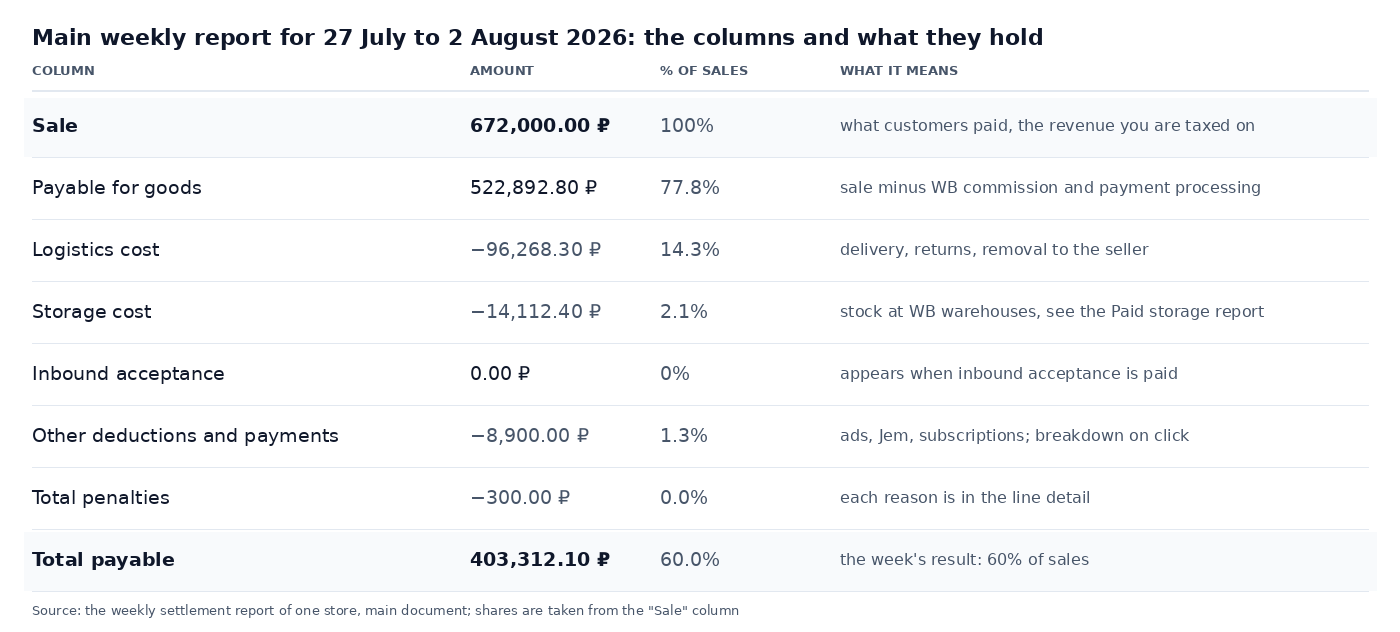
The eight columns in the table above read top to bottom as the path of the money: the customer paid 672,000 ₽, after commission and payment processing 522,893 ₽ was left, and logistics, storage, other deductions and penalties brought the week down to 403,312 ₽. Newcomers take the "Payable for goods" column for income, but logistics and storage have not been subtracted from it yet.
Next to them sit columns that are empty in an ordinary week and break manual reconciliation in an unusual one. "Wildberries commission adjustment" fixes errors in the commission calculation and collects deductions such as the minimum payment for the options in the rate builder. Three loyalty programme columns show the cost of participation, the points withheld and the discount compensation. "One-off change of payout date" is the charge for the "Withdraw now" button.
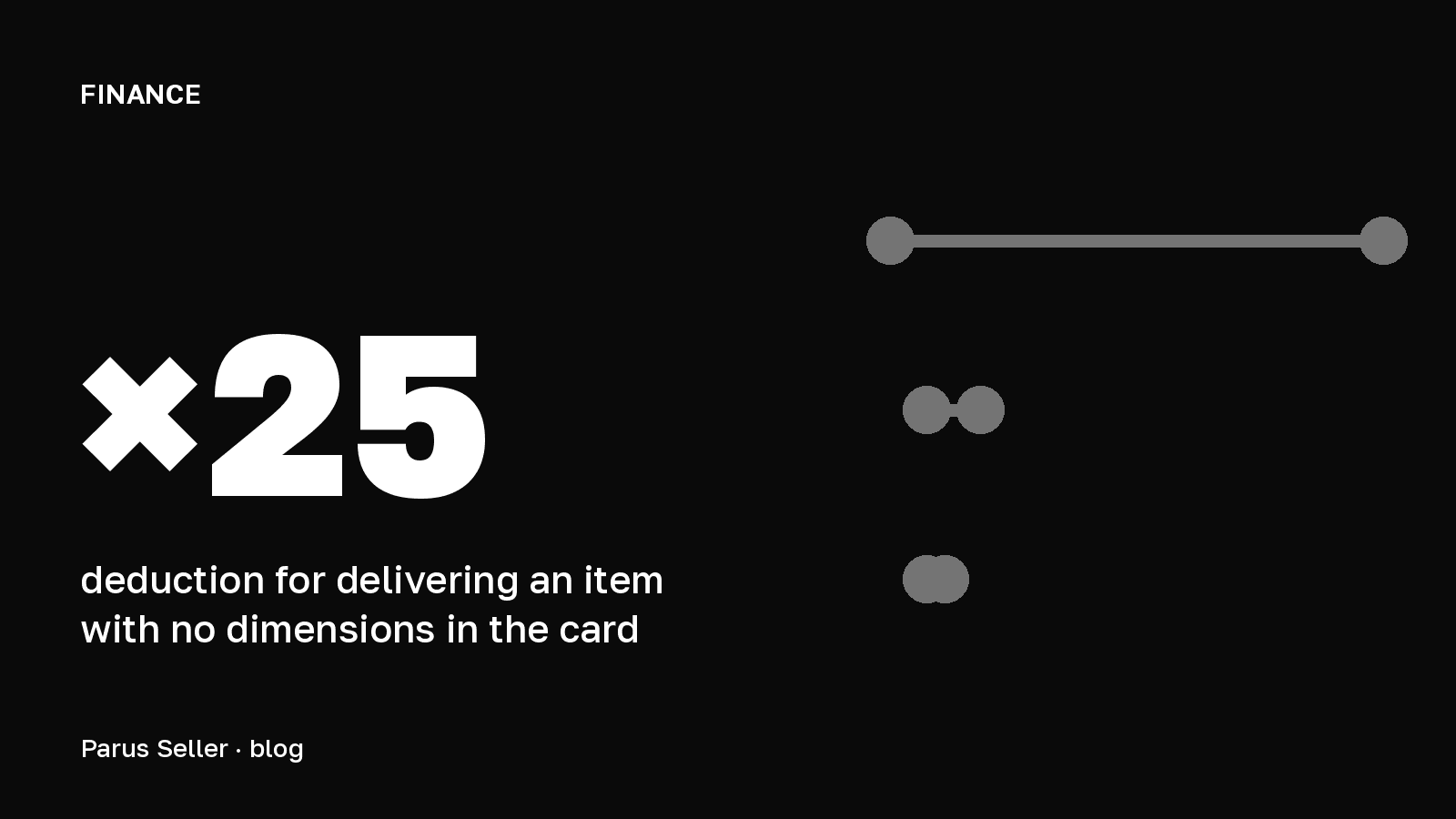
What you do with these columns next comes down to one habit: compare shares of sales week by week, not roubles. Logistics of 96,268 ₽ on sales of 672,000 ₽ is 14.3%. If sales are the same next week and logistics is 20%, go into the line-item detail and look at what changed: returns, the warehouse you ship from, or dimensions.
How "Total payable" adds up: the formula checked on 84 reports
The payout formula is longer than it is usually written, and the short version stops matching in exactly the week when you most need to understand the minus:
Total payable = payable for goods − logistics − storage − inbound acceptance − other deductions − penalties − WB fee adjustment − loyalty points withheld − loyalty programme participation cost
We checked it against all 84 weekly reports from two connected stores for February to October 2026. The calculation matched the bankPaymentSum field, the sum WB queues for transfer, to the kopeck in every report, including the 28 reports that closed in the red.
Two columns behave differently from what intuition suggests. The first is the WB fee adjustment. In the API it is called additionalPaymentSum, and from the name it is easy to take it for a top-up to the seller. In fact a positive number here is a deduction: in three of the 84 reports the adjustment was non-zero, and all three times it reduced the payout. A payout to the seller in this column and in "Other deductions" carries a minus sign, so subtracting a minus adds it to the total by itself.
The second is the compensation for the discount under the loyalty programme. The WB instruction advises adding it at the end of the calculation, but in the report summary it already sits inside "Payable for goods": WB itself writes that the compensation is part of "Sale". Add it a second time and the calculation will be off by exactly its amount. On our data, 12 of the 84 reports would have been off that way.
If your payment does not match the report, check three things first. Whether two reports are glued into one payment. Whether the week is split into two periods by month. Whether you are comparing the main report without the buyout report. We could not check the "Withdraw now" column: it is zero in all 84 reports.
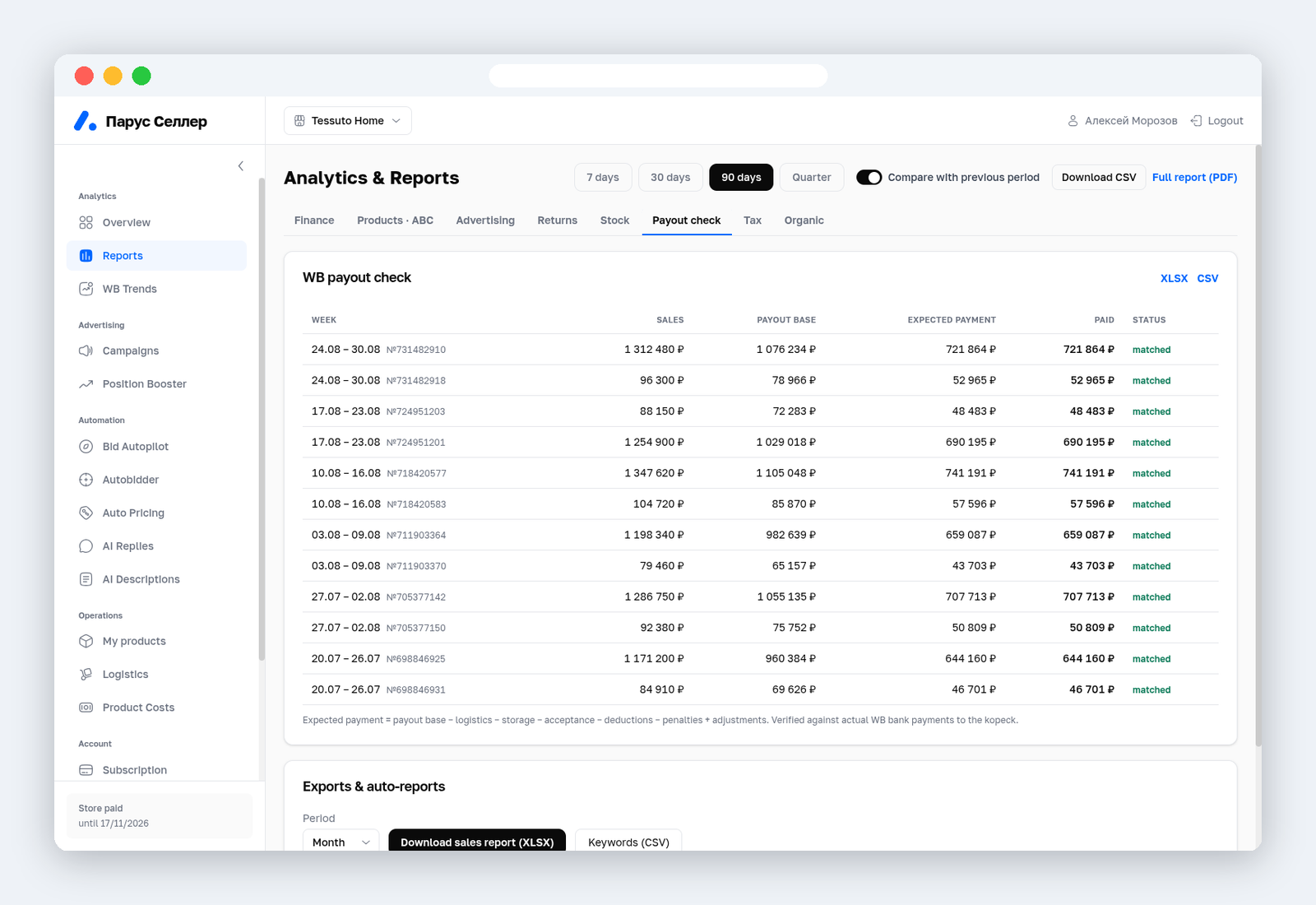
The "Payout check" tab in Parus Seller runs this check itself on every report: sales, payable for goods, the payment expected by the formula, the actual payout, and a "matched" or "discrepancy" status.
You can check by hand too, with one caveat: do not sum the line-item column as a whole. In the XLSX the rows for sales, returns, logistics and penalties lie mixed together, and the "Quantity" column holds 0 for logistics and storage. Filter by "Reason for payment" first, and only then add up.
Where the money goes over 30 weeks: the shares worth knowing
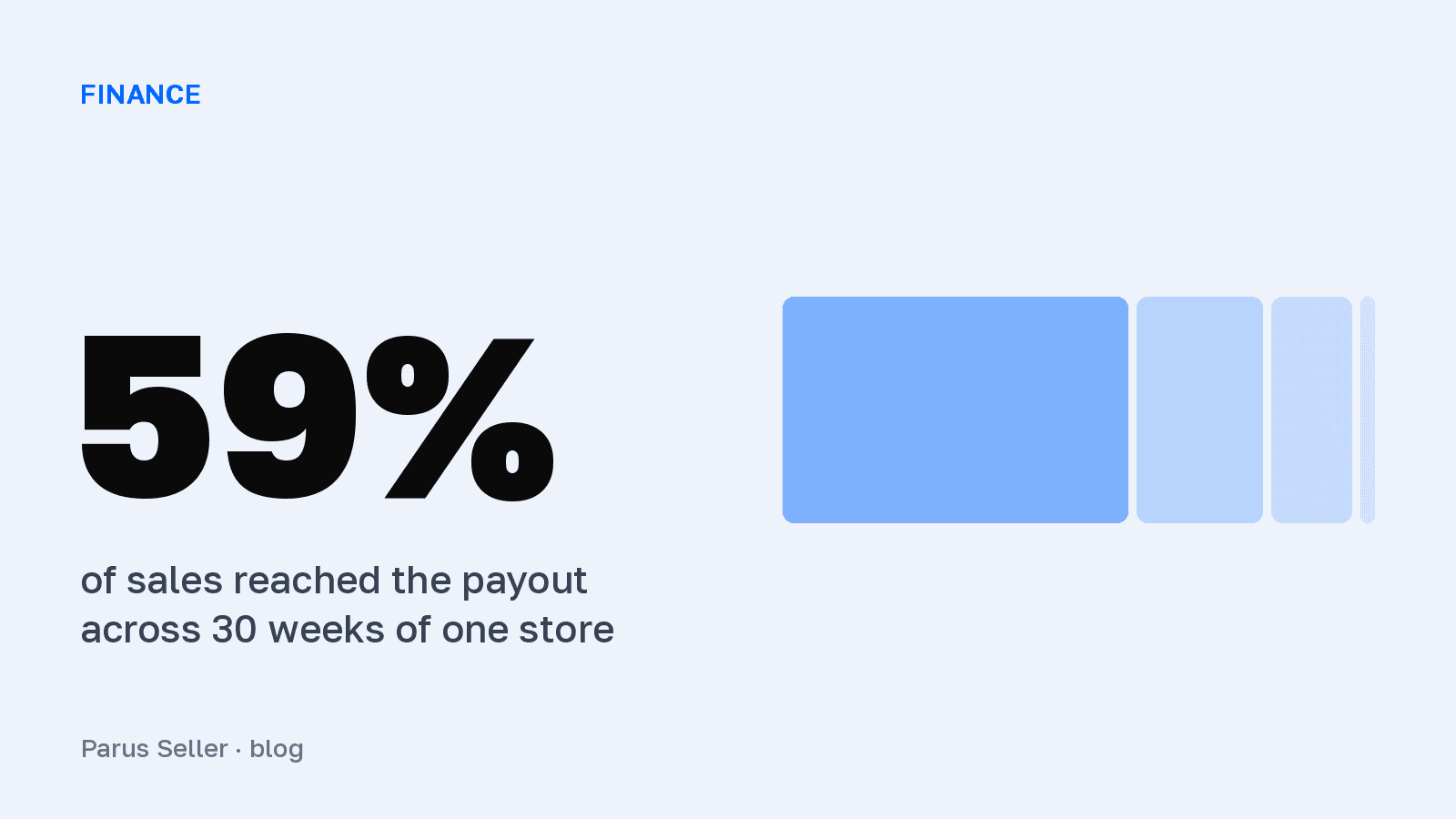
Add up all 60 reports from one store over six months. Of 36,417,366 ₽ in sales, 21,514,066 ₽ reached the account, which is 59.1%. The rest went like this: commission with the acquiring fee 22.4%, logistics 14.8%, storage 2.3%, other deductions 0.8%, penalties 0.6%.
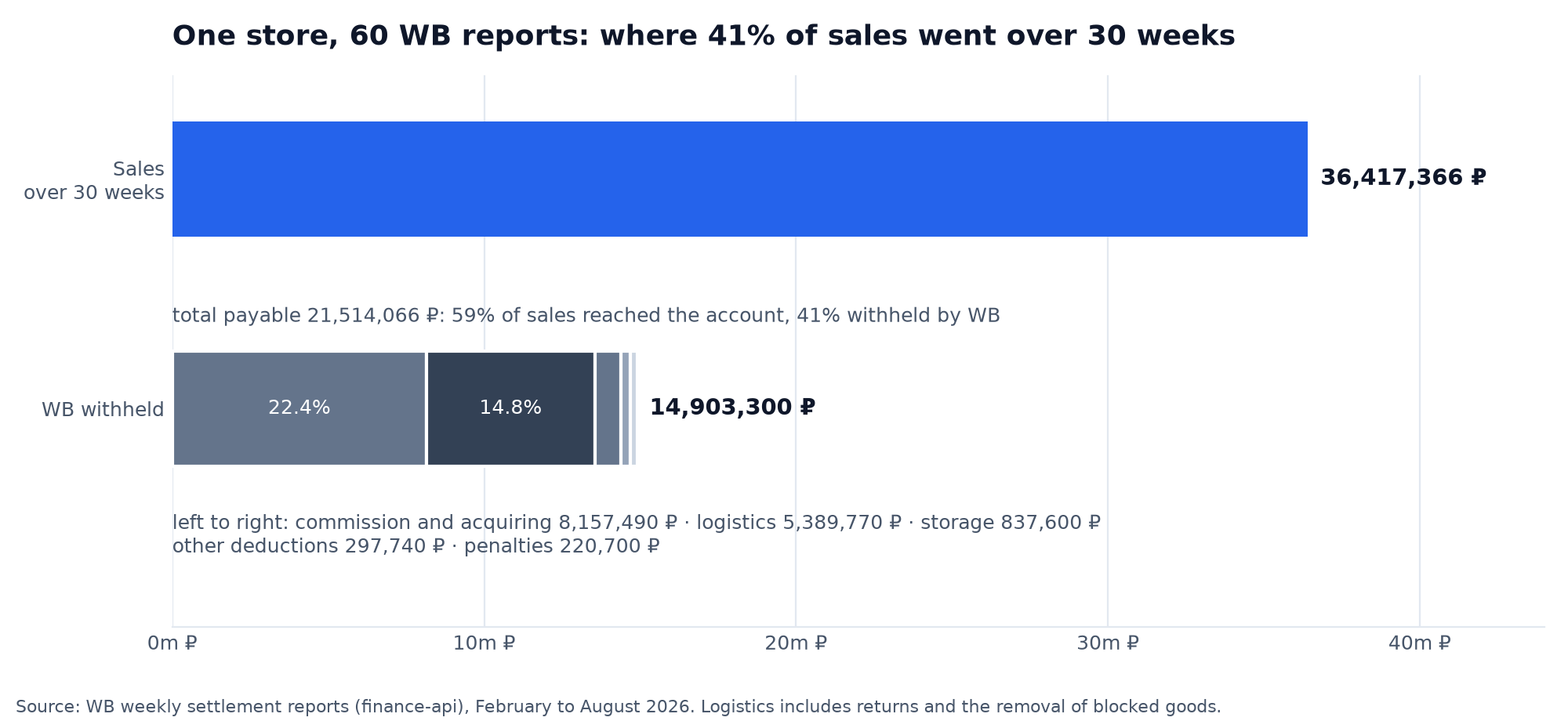
More useful than the total is how these shares behave from week to week. Commission barely moves, because it is the category rate plus the acquiring fee, and you know it in advance from the commission table. There is no need to check it every week: once a month against the rate is enough. Logistics at our store swung from 9% to 109% of sales. The low end is a week with a high buyout rate and short hauls, the high end is a week when WB sent a blocked batch back to the seller. So it is logistics, not commission, that deserves a look every week.
Two weeks of goods being removed cost the store three percentage points over six months. Without them logistics would have taken 11.3% of sales, and 62% of revenue would have reached the account instead of 59%. That is a working norm to compare against: if your logistics is steadily a third above its own average, look for the cause in returns and dimensions, not in WB rates. How returns multiply logistics we covered in our article on the buyout rate and what it costs in roubles.
Why logistics can be larger than sales: one week taken apart
In the report for 16–22 March 2026 the store sold 1,214,000 ₽ of goods, and the "Logistics cost" column showed 1,317,740 ₽. Total payable: −502,856 ₽. The summary table cannot explain that, so we downloaded the line-item detail, 10,330 rows, and grouped it by "Reason for payment".
- Delivery to the customer on a sale: 22,620 ₽ across 380 sales. That is all the "normal" logistics of the week.
- "Return of blocked goods (from the seller on cancellation)": 3,380 rows at 250 ₽, 845,000 ₽ in total.
- "Return of blocked goods (to the seller)": another 439,685 ₽.
- Penalties: 1,175 rows at 70 ₽ for "Paid storage of returns at a pickup point for more than 3 days", 82,250 ₽ in total. We went through this penalty in our article on penalties for Wildberries sellers.
- Storage: 44,930 ₽.
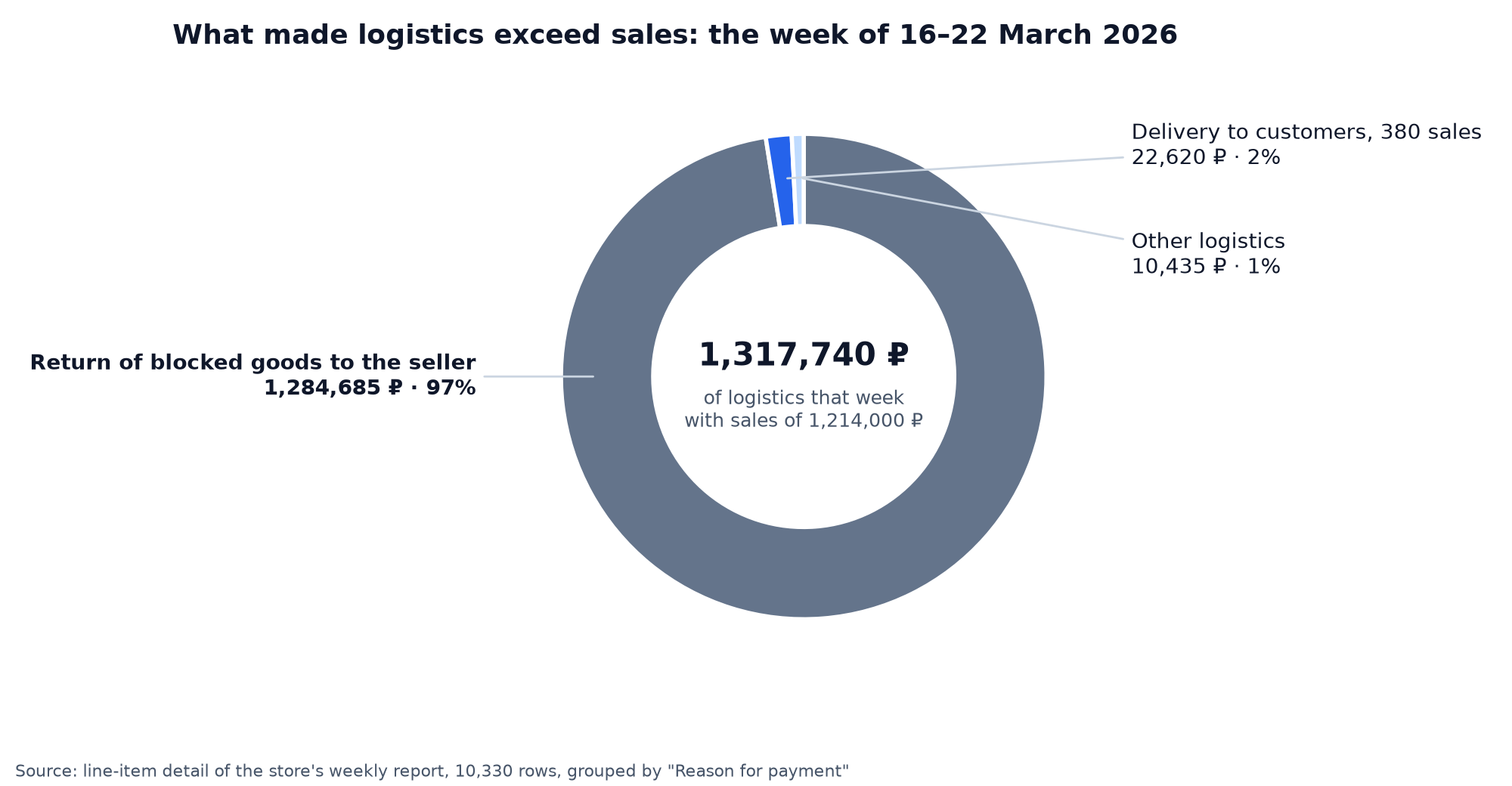
So 97% of the week's logistics has nothing to do with sales: WB blocked a batch and sent it back to the seller, charging 250 ₽ per unit for the trip and again for the actual removal. On top of that came penalties for returns sitting at the pickup point longer than three days. In a summary such operations look like "logistics went up", while in fact this is a one-off event worth checking row by row rather than dragging into the average logistics of a product.
How the daily report differs from the weekly one
The daily report sits on the neighbouring tab and is generated the day after the reporting day. It has the same columns, and its type is its own too: the main report and the buyout report arrive as separate rows.
The main question sellers ask is why the daily reports do not match the weekly one. We took three weeks of one store from 14 September to 4 October, including a week split across months, and added up the daily reports inside each weekly period. Sales, payable for goods, logistics, storage, adjustments and the total matched to the kopeck in all six weekly reports.
| Weekly report | Type | Daily reports inside | Matched |
|---|---|---|---|
| 14.09–20.09 | main | 7 | all six amounts |
| 14.09–20.09 | buyout report | 2 | all six amounts |
| 21.09–27.09 | main | 7 | all six amounts |
| 21.09–27.09 | buyout report | 1 | all six amounts |
| 28.09–30.09 | main | 3 | all six amounts |
| 01.10–04.10 | main | 4 | all six amounts |
Source: daily and weekly reports of one store via the WB finance-api, 24 October 2026
A discrepancy almost always means you added up the wrong things: the main report together with the buyout report, or days outside the period of a split week.
So why are there two kinds? The weekly report is the document under the offer agreement: the printed form arrives for it, the payout is calculated from it, and you have 14 days to raise objections to it. The daily report is there so you can see a problem before Monday. The removal of the blocked batch from the breakdown above would have appeared in the daily report the next day, while in the weekly one it was seen only on Monday.
What amount you pay tax on under the Wildberries report
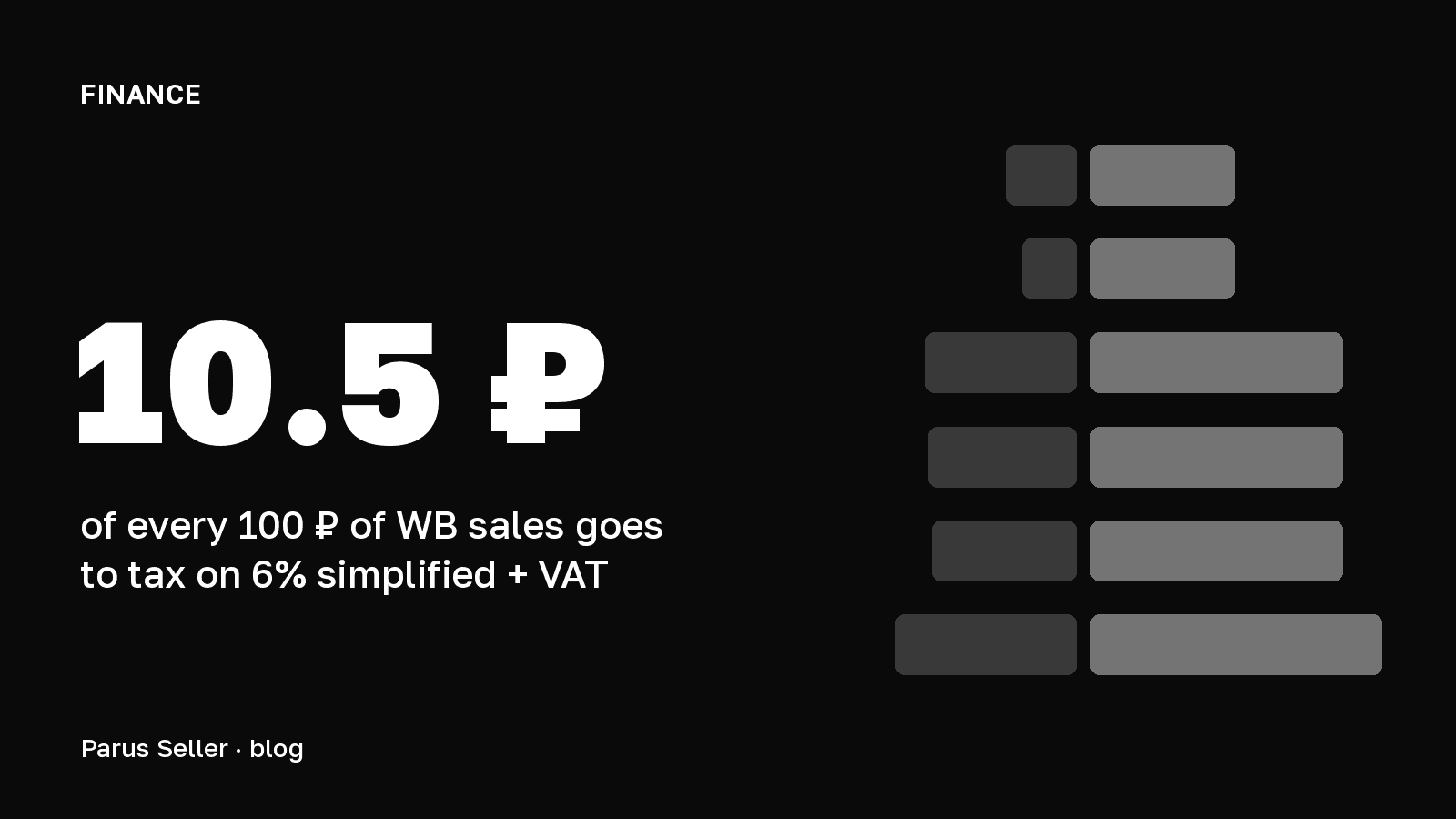
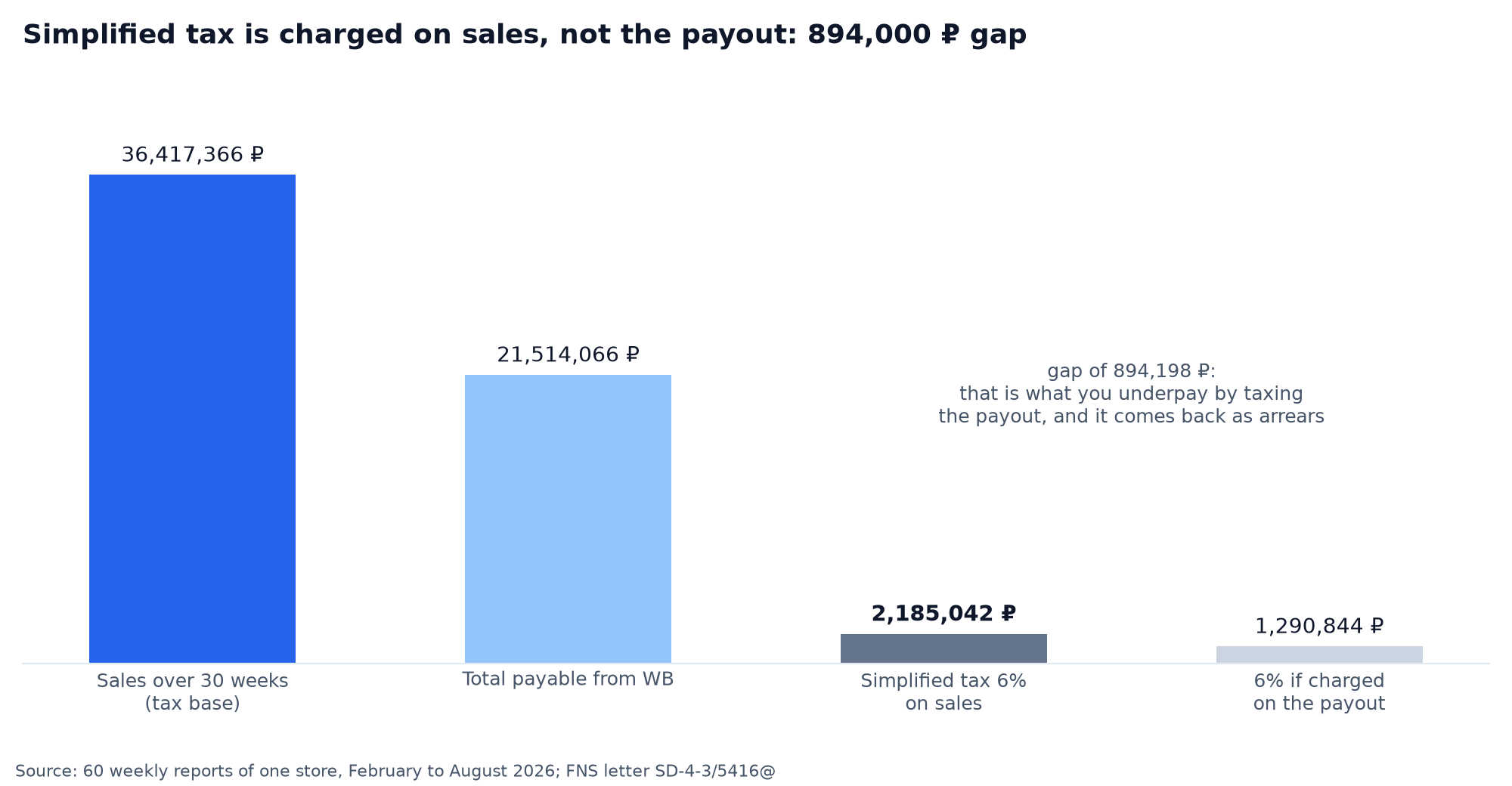
Income for the simplified tax equals the "Sale" column, not "Total payable". The Federal Tax Service explained this in letter SD-4-3/5416@ dated 8 May 2024: the seller's income is the whole sum received from customers for goods sold through the marketplace, and on the simplified tax on revenue the fee the marketplace withheld does not count as a cost. On revenue minus costs the fee can be written off, but revenue is still counted in full.
On our store it looks like this: sales over 30 weeks 36,417,366 ₽, payout 21,514,066 ₽, and the simplified tax on revenue at 6% is charged on 36,417,366 ₽ and comes to 2,185,042 ₽. Anyone who works out 6% of the payout pays 1,290,844 ₽ and gets a back-tax assessment of 894,198 ₽ plus interest. That is exactly why the "Sale" column has to be read separately from the payouts.
How to download Wildberries reports over the API
For 1C, Excel macros and your own spreadsheets the reports are pulled over the API rather than by hand. Per the WB documentation as of 24 October 2026 there are three methods for sales reports. The list of reports: POST /api/finance/v1/sales-reports/list, the period parameter takes weekly or daily. The line-item detail by report number: POST /api/finance/v1/sales-reports/detailed/{reportId}. The line-item detail for a period without a number: POST /api/finance/v1/sales-reports/detailed. The line-item detail returns up to 100,000 rows per call, and the data is available from 29 January 2024.
The list of reports and the line-item detail by number work only with a personal or service token, 1 request a minute. The line-item detail for a period can also be pulled with a basic token: with a secret it is again once a minute, without a secret twice a day. The number of a daily report is longer than an ordinary integer, and the documentation advises reading it with a library that supports BigInt, otherwise the last digits are lost.
| API field | Column in the portal | Note |
|---|---|---|
| reportId | Report number | key for the detailed method |
| dateFrom, dateTo | Period | a week or the part of it up to the end of the month |
| reportType | Report type | 1 main, 2 buyout report |
| retailAmountSum | Sale | revenue for tax |
| forPaySum | Payable for goods | after commission and processing |
| deliveryServiceSum | Delivery cost | logistics with returns |
| paidStorageSum | Storage cost | |
| paidAcceptanceSum | Inbound acceptance operations | |
| deductionSum | Other deductions and payments | a payment carries a minus sign |
| penaltySum | Total penalties | |
| additionalPaymentSum | WB fee adjustment | a plus is a deduction |
| cashbackAmountSum | Withheld for loyalty points | subtracted |
| cashbackCommissionChangeSum | Cost of participation in the loyalty programme | subtracted |
| cashbackDiscountSum | Discount compensation | already inside forPaySum |
| bankPaymentSum | Total payable | checked by the formula |
Source: dev.wildberries.ru, the "Financial reports and accounting" section, and a live request to sales-reports/list on 24 October 2026
The report list holds every summary column under a technical name with a Sum suffix; the line-item detail carries the same fields without the suffix. These are the fields we used for the reconciliation in the formula section above. The token needs access to the "Finance" category, the account owner creates it under "API integrations", and we went through it in detail in our piece on the Wildberries API token.
How to check the report every week in ten minutes
The routine we use ourselves, and it closes most of the surprises:
- On Monday open all the reports for the week: the main one, the buyout one and, if the week falls on a month boundary, both parts. Add up "Total payable".
- Work out the shares of sales: commission, logistics, storage. Compare them with last week.
- Any share grew by more than a third: download the XLSX, filter by "Reason for payment", find the rows to blame.
- Other deductions or a WB commission adjustment above zero: click the sum and check that it is advertising, subscriptions and rate options, not somebody else's.
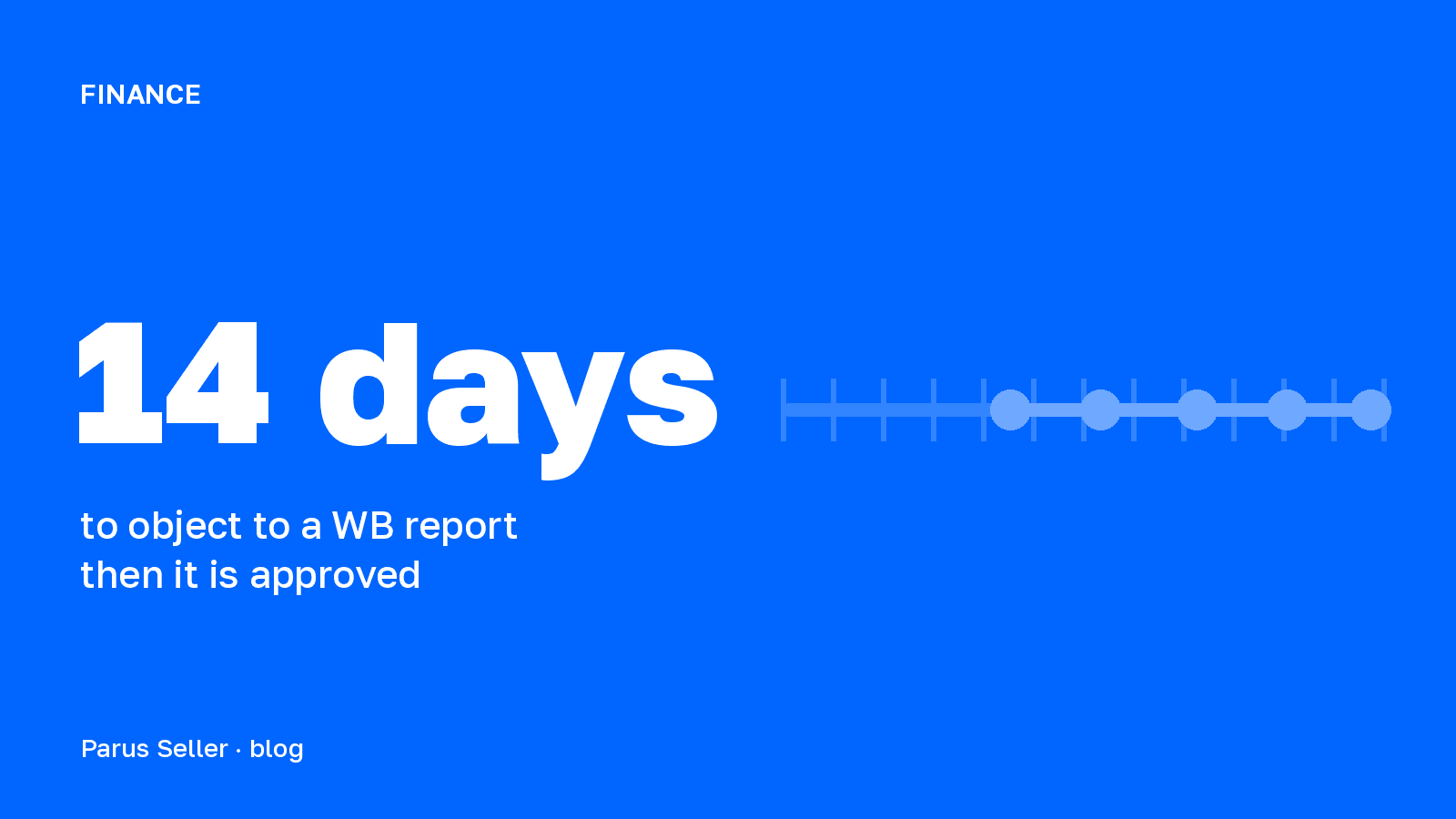
- Reconcile the actual payout against the formula. Send a discrepancy to support with the report number and the rows: under clause 5.6 of the offer agreement you have 14 days from the end of the reporting period to raise objections, after that the report is considered approved.
In Parus Seller steps 1, 2 and 5 run by themselves once the seller portal is connected by API key: reports are pulled once a day, the "Finance" tab shows the waterfall from sales to net profit with cost of goods and tax, and the "Payout check" tab compares every report with the payment. The account owner creates the token and revokes it in one click.
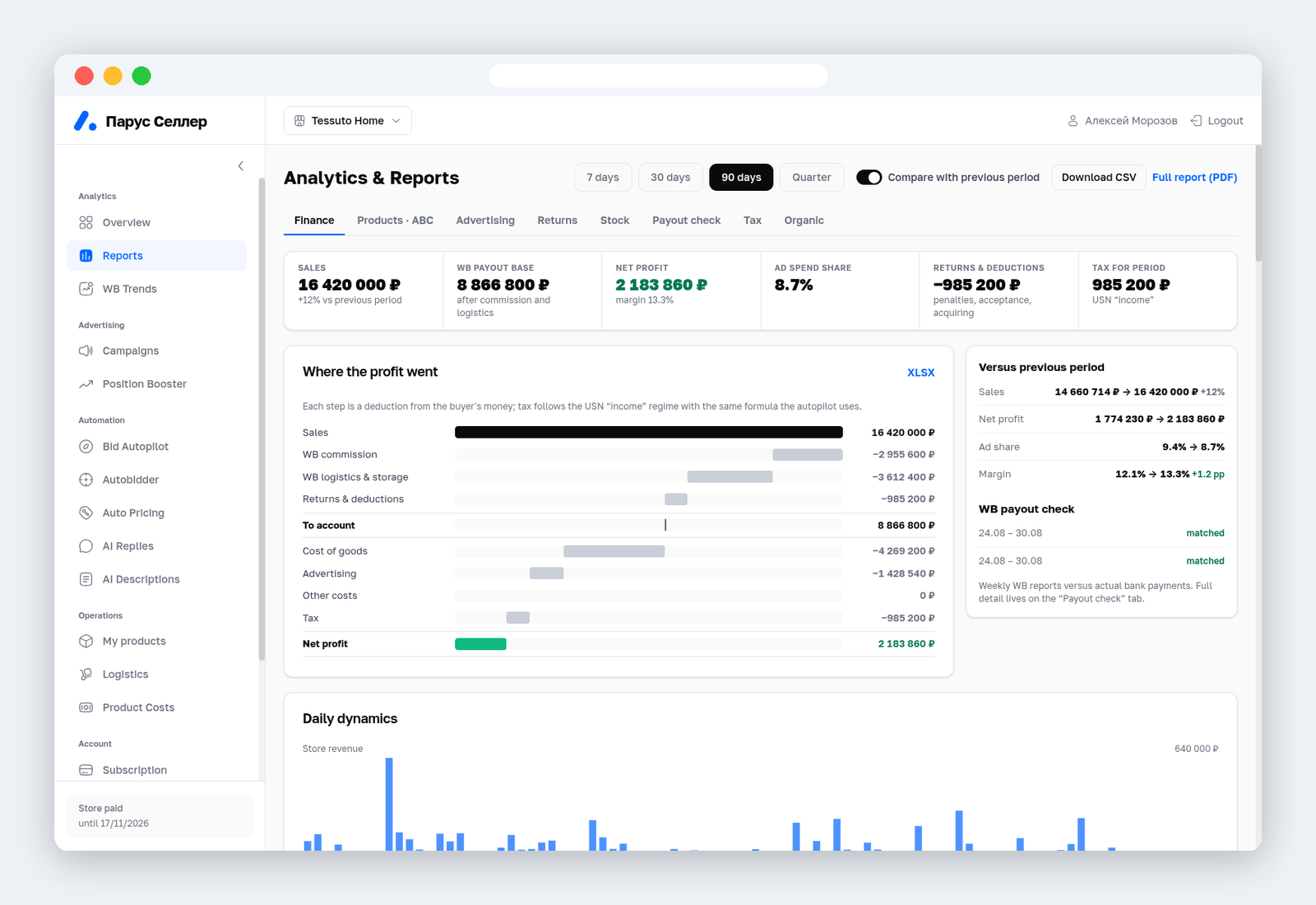
First two months free with promo code PARUS60, no card required: connect your seller portal and see your own reconciliation.
To see how much of a sale is left before the report even arrives, there is our unit economics sheet with the formula for every deduction. What the WB portal gives away free in analytics and what comes only with Jem is collected in a separate article.
FAQ
How do you read the Wildberries weekly report for accounting? An accountant needs three figures: "Sale" as revenue, WB's fee (the difference between "Sale" and "Payable for goods") as a cost on the simplified tax on revenue minus costs, and "Total payable" for the bank reconciliation. The document for the tax office is the printed form from the "Documents" section, not the XLSX. More in our article on WB reports for accounting.
Where do you find the Wildberries settlement report? WB Partners → "Financial reports" → the "Weekly" tab. The XLSX download button is there too. Reports in the format used before 28 January 2024 are in the "Archived weekly" tab.
Why did I get a report for a single day, for example 31 August? The week fell across two months, and under clause 5.5 of the offer agreement WB split it on the last day of the month. 31 August 2026 was a Monday, so the first report for that week covered one day, and 1–6 September came as a second report.
Does WB generate a report for a week without sales? Yes, if there were deductions during the week. In a store connected to us, the week of 5 to 11 October passed without a single sale, and WB still sent the main report: sale 0 ₽, storage and total payable. The buyout report does not arrive in such a week.
Why is my Wildberries report negative? The deductions for the week outgrew what the sales earned. Most often that is return logistics, storage, or a one-off event such as goods being removed. In our sample store 2 of the 30 main reports were negative, both of them weeks with a blocked batch coming back. In a sample of 84 real reports, 28 were negative, and the formula matched in all of them: the minus is real, not a WB error.
What amount do you pay tax on under the Wildberries report? On the "Sale" column, that is the whole sum customers paid. This is the Federal Tax Service position from letter SD-4-3/5416@ dated 8 May 2024. The payout from WB is not the tax base.