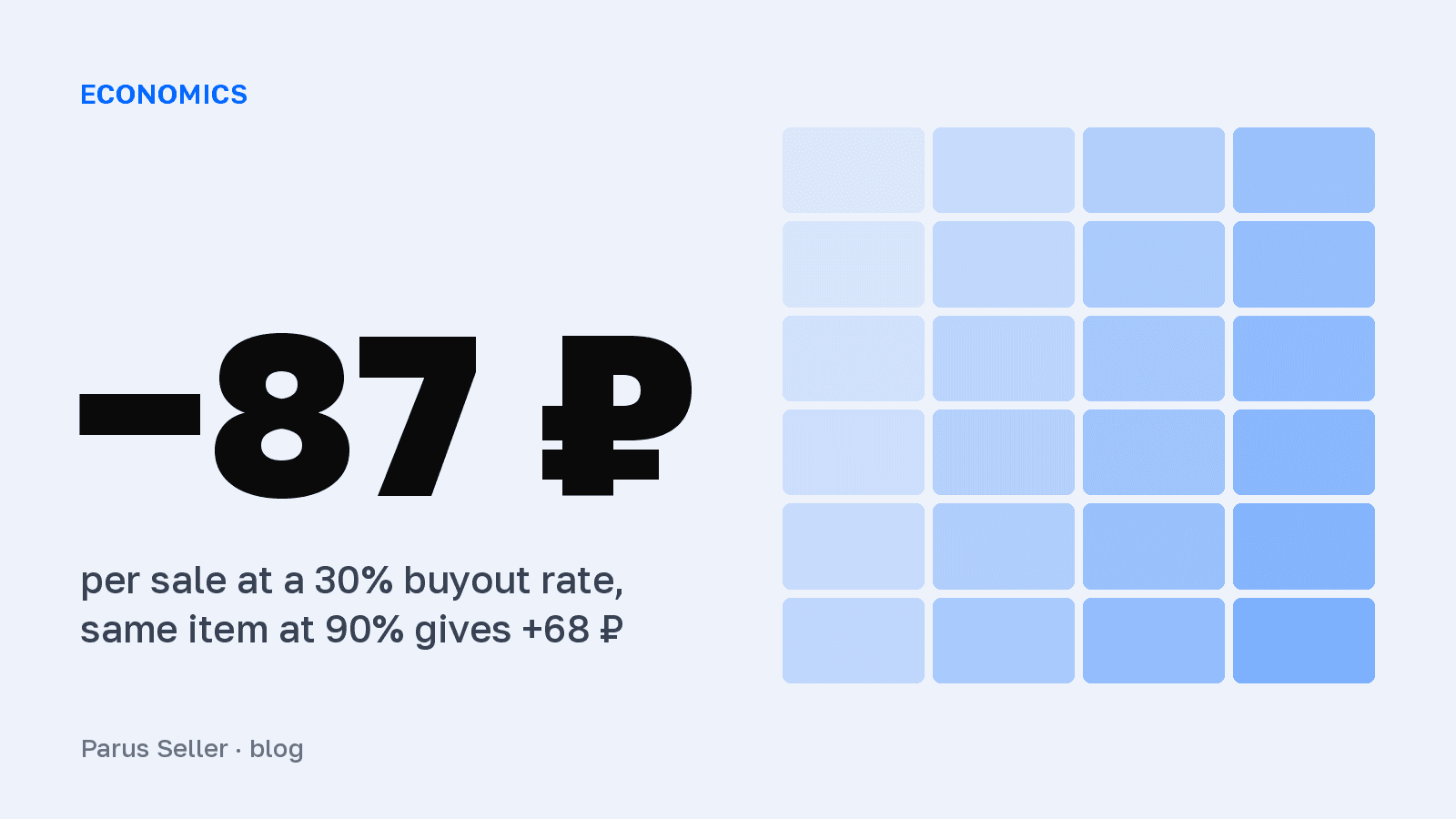
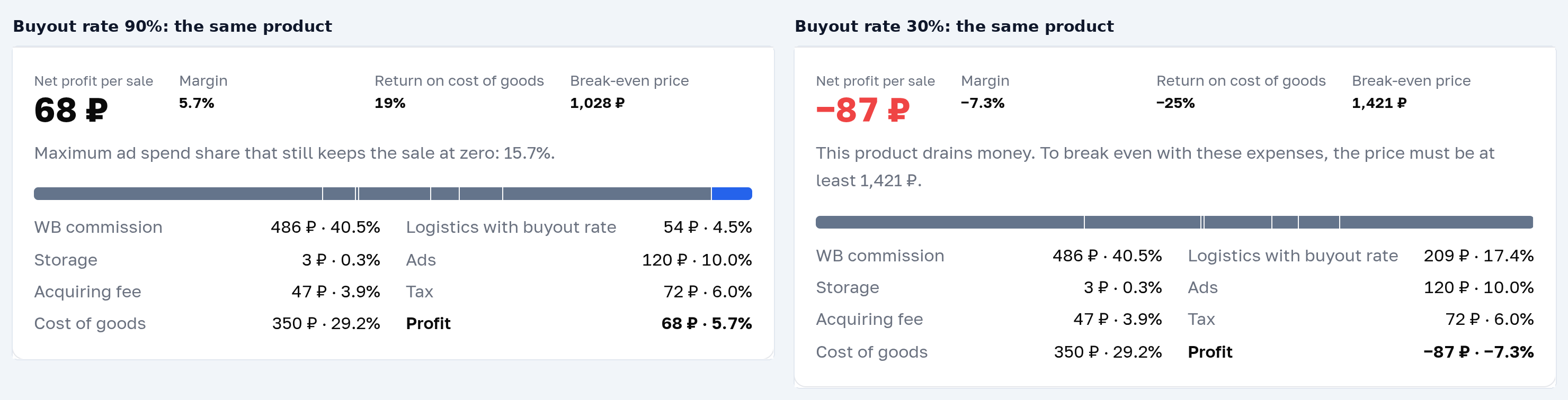
How to calculate net profit per sale on Wildberries: take the price and subtract the cost of goods, the WB commission for the category, logistics including non-buyouts, storage, ads, the acquiring fee and tax. An item at 1,200 ₽ with a cost of goods of 350 ₽ in the Beauty category brings 68 ₽ at a buyout rate of 90% and loses 87 ₽ at 30%. Put your own numbers into the calculator below.
Article 5 of 12 in the topic {hub}. All articles in the topic
A profit calculator is needed once: before you buy. After the purchase, the question of how much you make on a sale has already been answered for you, and all that is left is to read the answer off the report. Below is an online calculator of net profit from a single sale on Wildberries at September 2026 rates: the commission is pulled by category from the WB API, logistics are counted by litre, and refused orders, storage, advertising, the acquiring fee and tax each get their own line.
In short: profit per sale = price minus seven deductions. The commission comes from a WB API snapshot across 79 categories, logistics from the basic rate of 46 ₽ for the first litre, and the return and the acquiring fee from a real store report. An item at 1,200 ₽ with a cost of goods of 350 ₽ in the Beauty category brings 68 ₽ at a buyout rate of 90% and −87 ₽ at a buyout rate of 30%.
The same calculator also lives on its own page, handy to bookmark: Wildberries profit calculator.
Profit calculator for a single sale
Category commissions come from the WB API as of 05.09.2026, logistics use the basic WB rate. Every field is editable, the result updates instantly.
- Margin
- 2.5%
- Return on cost of goods
- 9%
- Break-even price
- 1,124 ₽
Maximum ad spend share that still keeps the sale at zero: 12.5%.
- WB commission486 ₽ · 40.5%
- Logistics with buyout rate92 ₽ · 7.7%
- Storage3 ₽ · 0.3%
- Ads120 ₽ · 10.0%
- Acquiring fee47 ₽ · 3.9%
- Tax72 ₽ · 6.0%
- Cost of goods350 ₽ · 29.2%
- Profit30 ₽ · 2.5%
How to use the calculator
- Pick the category and the sales model: the commission fills in by itself, and it is the median across the subjects of the category from the WB API as of 5 September 2026. Type the exact rate for your own subject in by hand, it sits in the seller portal under "Tariffs."
- Enter the price after all discounts, the cost of goods including packaging and delivery to the warehouse, your own buyout rate and the packed volume in litres. The warehouse coefficient is in Supplies → Tariffs: in our store's report for August it ran 1.0-2.2, most often 1.5. How many units to ship is answered by days of cover for each product, and the formula is in the article on stock at WB warehouses.
- Advertising, storage, the acquiring fee and tax already hold typical values. The result recalculates on every change: profit, margin, break-even price and the ad spend share ceiling at which the sale still does not go negative.
To check it, switch the buyout rate from 90 to 30: the same item slides from 68 ₽ of profit to −87 ₽, and the break-even price climbs from 1,028 to 1,421 ₽.
What moves profit the most
We ran the item from the example through the calculator, changing one input at a time. Advertising and price move profit harder than the commission does, and a second litre of volume costs as much as losing 20 points of buyout rate.
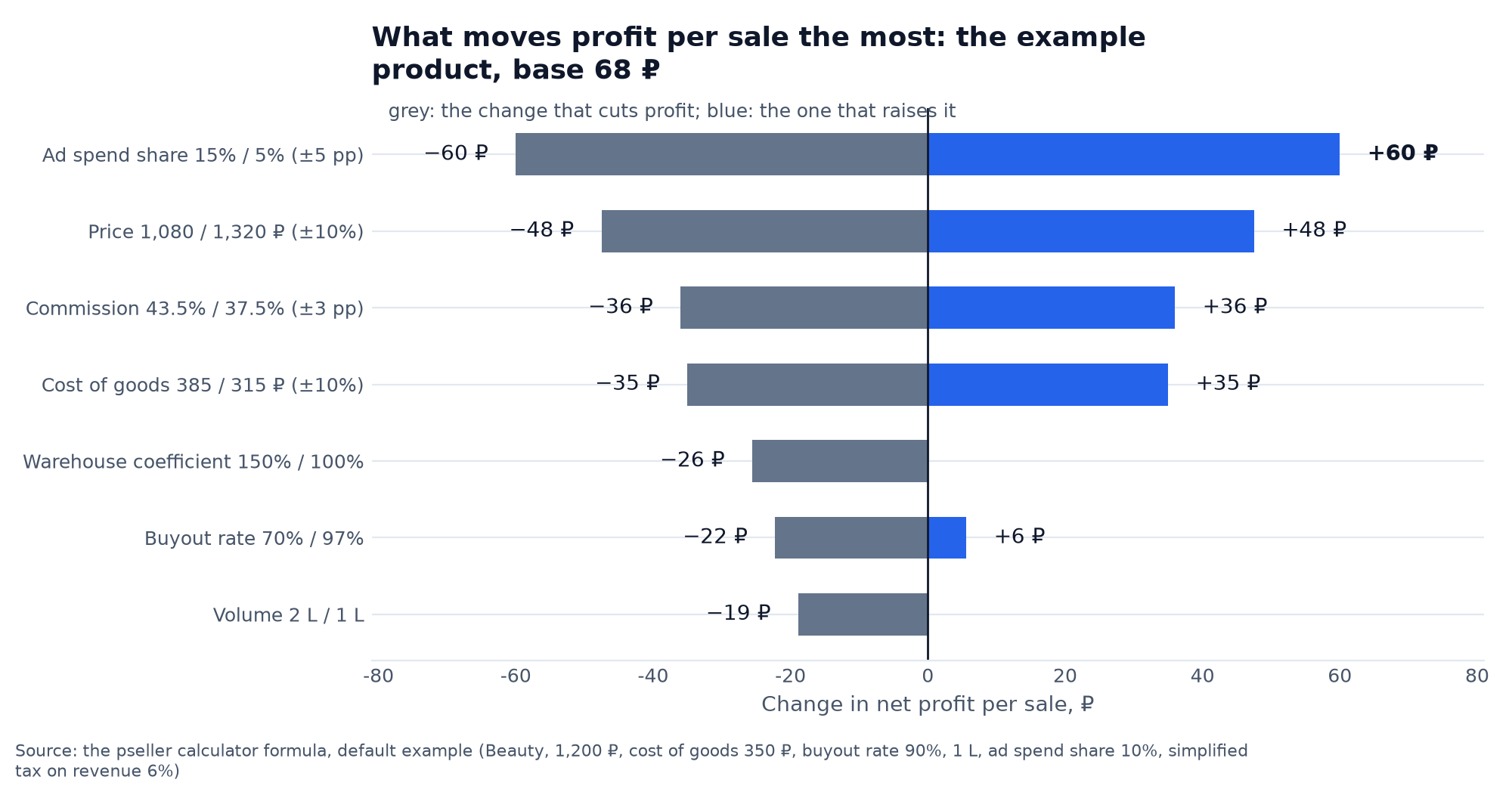
The practical takeaway: before you raise the price, look at advertising. Cutting the ad spend share from 15 to 5% gives you the same 60 ₽ as a 10% price rise, and it does not scare the customer off. A warehouse coefficient of 150% eats 26 ₽ out of every sale, so a warehouse at 100% wins whenever delivery to it costs the same.
Every line of the calculation is tied to a source, not to "roughly 20%".
- Commission. A WB API snapshot from 5 September 2026 across six thousand subjects that really sell; for each of the 79 categories, the median for FBO and FBS. The full table by subject is in the article on Wildberries commissions by category.
- Logistics and returns. The basic box rate from the WB API: 46 ₽ for the first litre and 14 ₽ for each next one, multiplied by the warehouse coefficient. In the line-item detail of our store's weekly report for 24-30 August, a trip to the customer cost 37-58 ₽ and the return of a refused order 23-26 ₽.
- Storage and the acquiring fee. 0.108 ₽ per litre per day at the Kotovsk warehouse, from the paid storage report as of 5 September; WB withholds the acquiring fee on a separate line, 3.7-4% of the price, and almost nobody budgets for it.
- Tax. The simplified tax on revenue at 6% is charged on the whole customer price, including the commission and the logistics you never saw. The confirmation from the Federal Tax Service and the full breakdown are in the article on the weekly Wildberries report.
Logistics per sale = delivery + (delivery + return) × (1 − buyout rate) / buyout rate
Next on this topic: Wildberries unit economics: free xlsx sheet download
Why cheap products die on the buyout rate
What share of the price is left to the seller for cost of goods, advertising and profit in the 12 largest WB categories: the price is the median across 3.2 million product cards from our crawler, the commission is the median across the subjects of the category, and logistics are 46 ₽ per litre.
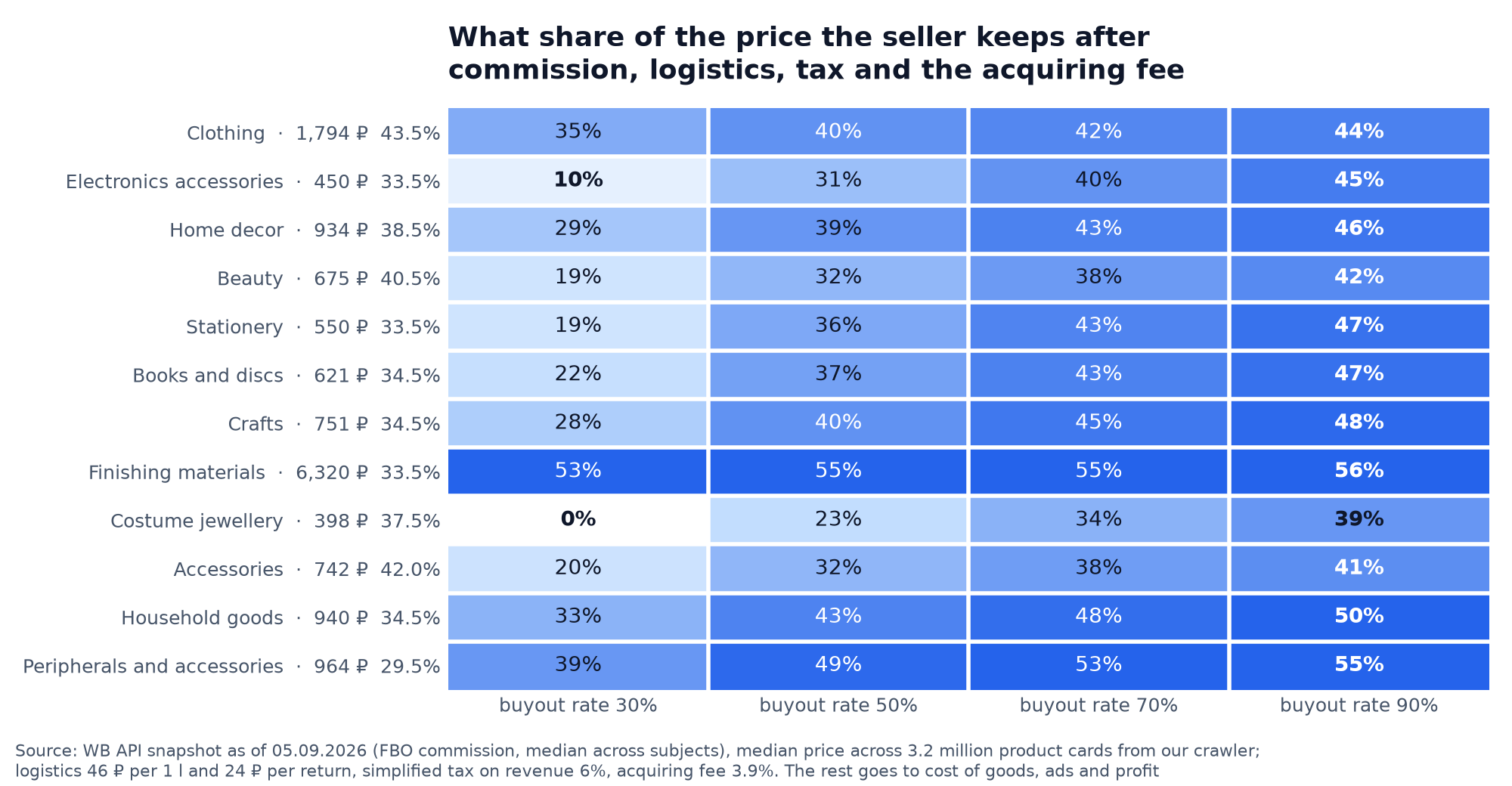
- The buyout rate hits cheap products, not expensive ones. Costume jewellery at 398 ₽ leaves the seller 0% of the price at a buyout rate of 30%, while finishing materials at 6,320 ₽ barely feel the buyout rate at all: 53% against 56%.
- Clothing with a commission of 43.5% leaves 35% at a buyout rate of 30%, and electronics accessories with a commission of 33.5% only 10%: a price of 1,794 ₽ against 450 ₽ outweighs ten points of commission.
- At a buyout rate of 90% every category sits in a band of 39-56%: with a good buyout rate the commission makes the difference, with a bad one the price of the item decides everything. Your own buyout rate and the norms by category are in the article on the buyout rate on Wildberries.
What the profit calculator inside the WB seller portal can do
Wildberries has a calculator of its own, "Analytics → Profit calculator", and the instruction for it was updated on 4 September 2026. Category, price, dimensions and warehouse are mandatory there, so logistics and storage are worked out at the rates of that specific warehouse; sell-through and the buyout share it fills in itself, using category averages; and you can compare FBW, FBS and DBS in one table and export it to Excel.
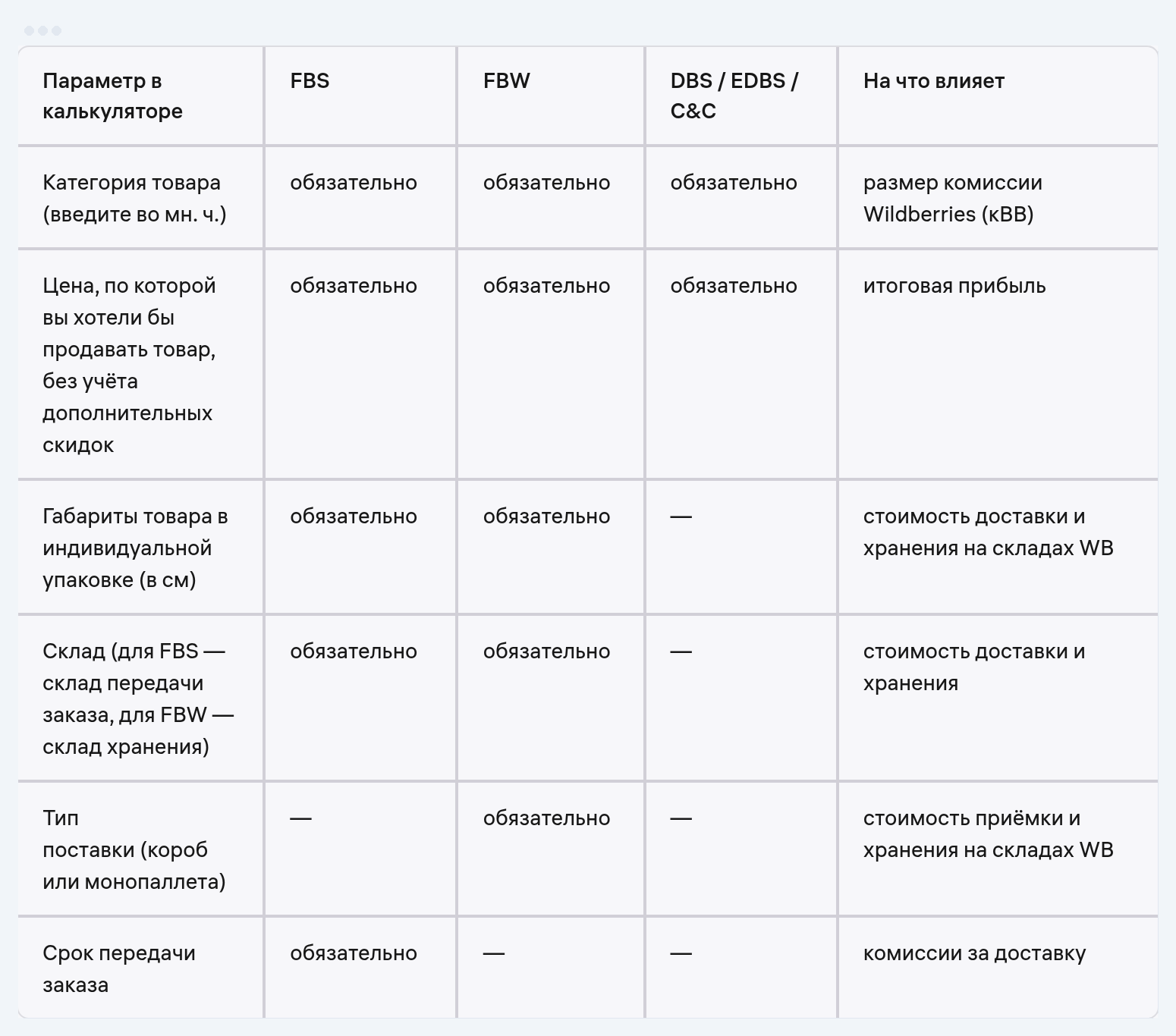
What it lacks: advertising sits in one line, "share of promotion costs", with no link to a real CPO, the acquiring fee is buried in "other costs", and the calculation, in the words of the instruction itself, is approximate: "for a final estimate, use the financial reports". It cannot check plan against fact. To size up a product before you buy, either calculator will do, and the point is to count with something at all.
| What it calculates | Calculator in the WB seller portal | Calculator in this article |
|---|---|---|
| Commission | Exact rate by category | Category median, type in your own rate by hand |
| Logistics and storage | Rates of the selected warehouse | Basic rate of 46 ₽ per litre × warehouse coefficient |
| Buyout rate and sell-through | Category averages, can be replaced with your own | You enter your own buyout rate |
| Advertising | Share of promotion costs, % | Ad spend share and the ad spend share ceiling at which the sale goes to zero |
| Acquiring fee | Inside "other costs" | A separate line, 3.7-4% |
| Several models at once | FBS, FBW, DBS in one table, export to Excel | Switch between FBO and FBS |
| Break-even price | Not mentioned in the instruction | Recalculated on every change |
Source: WB instruction "Profit calculator", updated 04.09.2026; the calculator above
For FBS, the WB calculator also asks for the order handover time: it affects the commission. Under clause 12.7 of the offer agreement, an order handed over within 13 hours costs 5 points less. If the packaging dimensions are not known yet, the "Fill in average dimensions" button will insert the category averages.
Three mistakes that make the calculation lie
The comments under other people's calculators read like a list of the same few questions.
- Tax on the payout instead of on the price. Income under the 6% simplified tax is everything the customer paid. At a price of 1,200 ₽ the tax is 72 ₽, even if only 700 reached your account.
- Logistics as "delivery × 2". Every refused order is two trips, and at a buyout rate of 50% each sale carries a whole refused order, at a buyout rate of 30% a good two.
- Profit in a calculator and a WB payout are different numbers. The calculator subtracts cost of goods, advertising and tax; WB does not. It transfers the payout amount less logistics, storage and deductions. How to read the payout itself is covered in the article on Wildberries payouts to sellers.
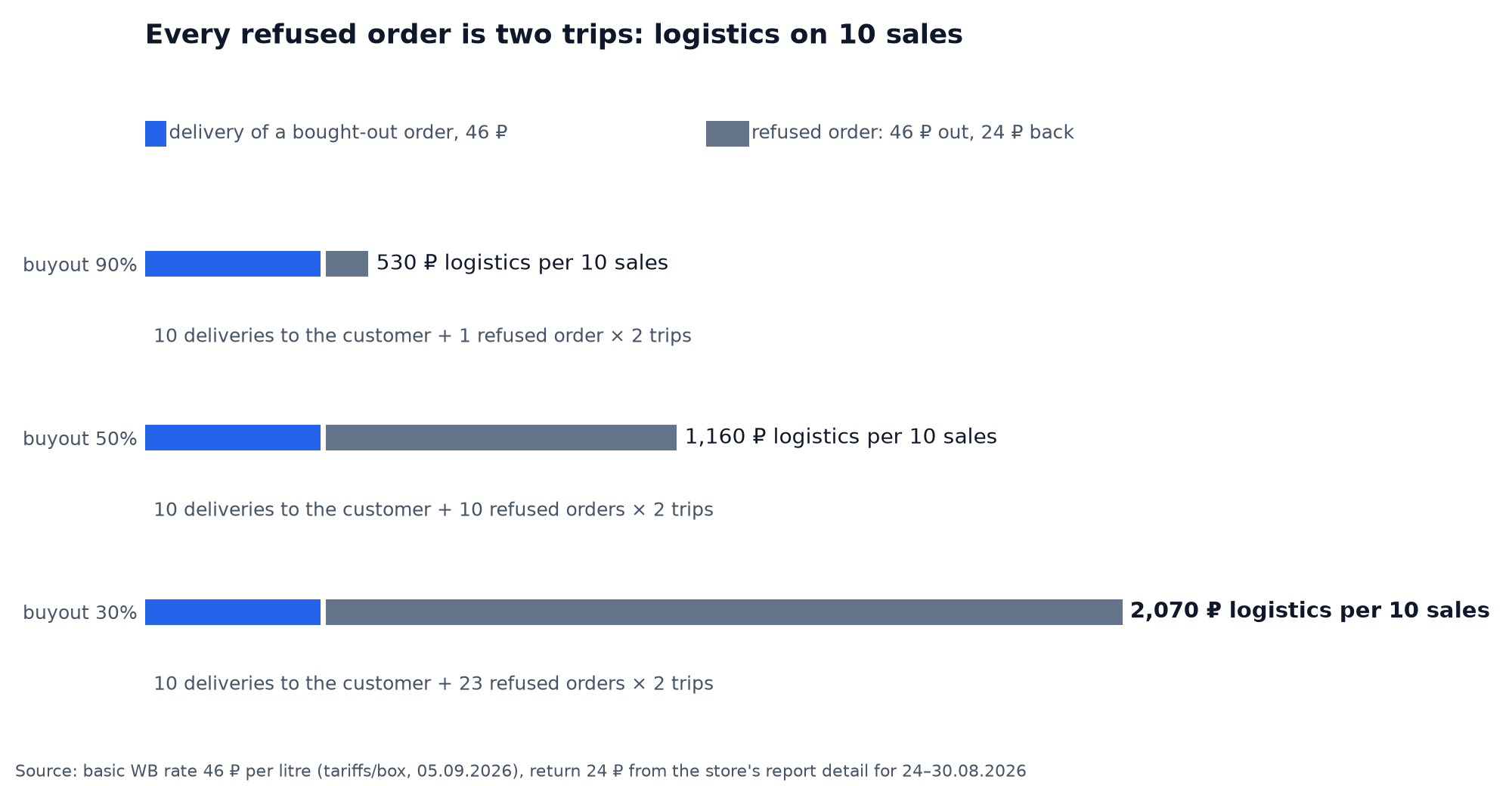
What the calculation lines mean: the WB discount, buyout, logistics per sale
Half the questions under calculators are about wording. Here are the lines that show up in the calculation and in WB reports, and what each one does to profit.
| Line | What it is | How it affects profit per sale |
|---|---|---|
| Discounted price | Your price after your own discount | Calculation base: commission, the acquiring fee and tax are all calculated from it |
| WB discount (formerly the loyalty discount) | A discount to the customer, funded by Wildberries | Doesn't affect it: the payout is calculated from your discounted price |
| Buyout rate | The share of orders that customers actually collect | Every refused order adds two trips to a sale |
| Logistics per sale | Delivery plus the trips for refused orders, spread across the units actually bought | The formula above: at a buyout rate of 30%, one sale carries 2.3 refused orders |
| Return of a refused order | Return logistics from the customer to the warehouse | 23–26 ₽ per trip in our store's report |
| Warehouse coefficient | Multiplier applied to the base logistics and storage rate | At 150%, each sale costs 26 ₽ more |
| Handling coefficient | Since 1 October 2026, this is the new name for what used to be paid inbound acceptance | Charged per inbound supply, and enters profit per sale as a per-unit share |
| Acquiring fee | The fee for accepting card payments | 3.7–4% of the price, on a separate line in the report |
Source: the WB "WB discount" instruction, updated 24 September 2026; the WB offer agreement, version No. 102, clause 13.2.2; our store's report for 24–30 August 2026
WB sets its own discount and changes it whenever it wants, so the customer sees a price lower than yours, and you get paid from your own price. Two details from the 24 September instruction. In some categories, advertising and promotion add up to 10% to the WB discount, based on spend over the last 14 days. And if a seller buys back their own products, the WB discount disappears across the whole assortment for 30 days.
The Excel sheet with the same formulas
Download the Wildberries profit calculator (xlsx, free, no sign-up)
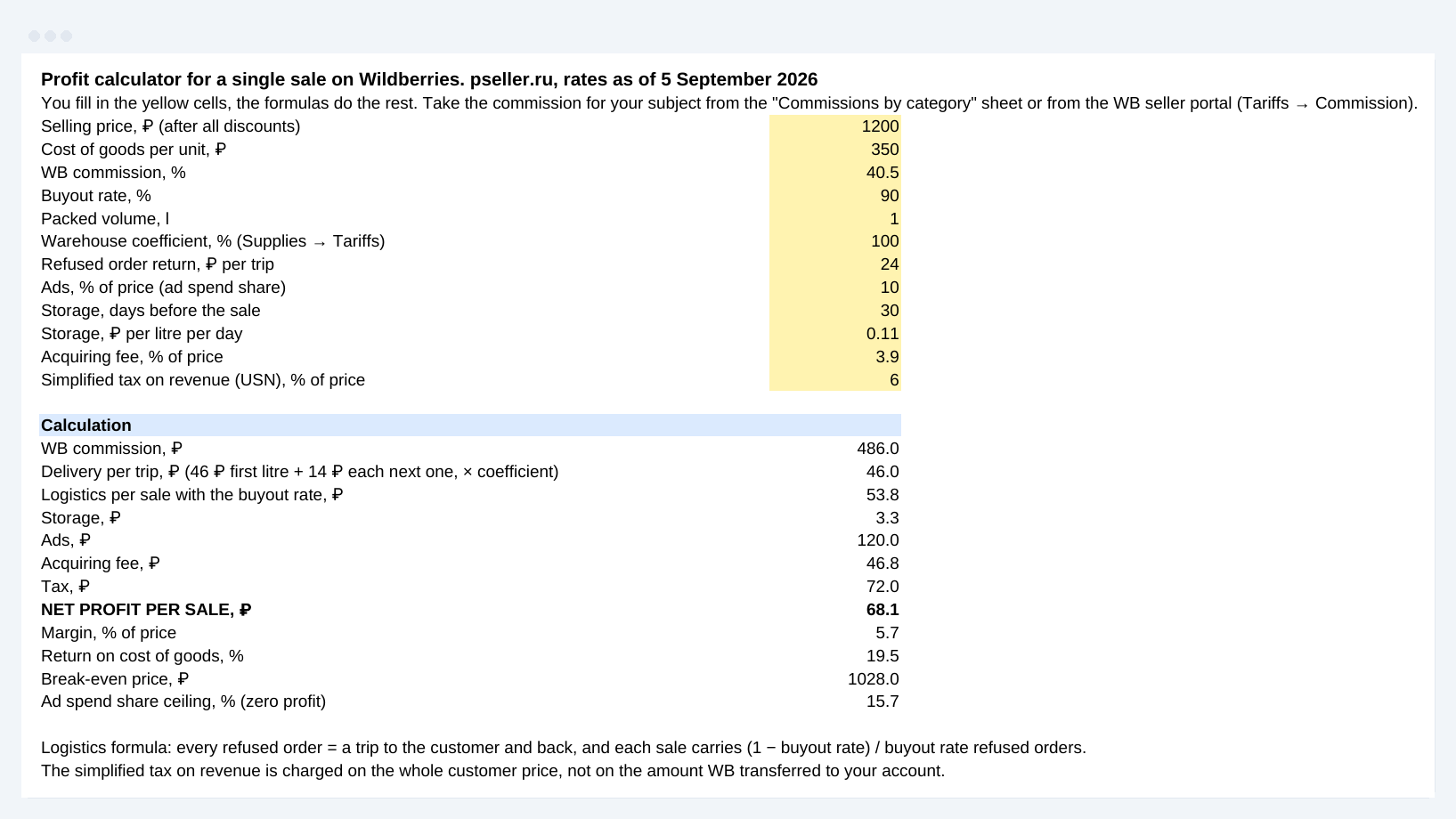
Three sheets: "Calculator" with twelve yellow input cells and open formulas, "Commissions by category" covering 88 categories with the median, minimum and maximum FBO rate, and "Rates and sources" with the date behind every figure. The recalculation in LibreOffice matched the control calculation to the kopeck. The full model with eight deductions and the ad spend share threshold is in the unit economics sheet.
When a calculator is no longer enough
A calculator answers the question of whether to go in. A month after the start the question turns into why the fact came out lower, and there a model is helpless: rates drift, the buyout rate floats, penalties arrive after the fact, advertising is smeared across campaigns. Parus Seller pulls the reports in by API key and lays actual profit out in the same steps as the calculator, only on real deductions.
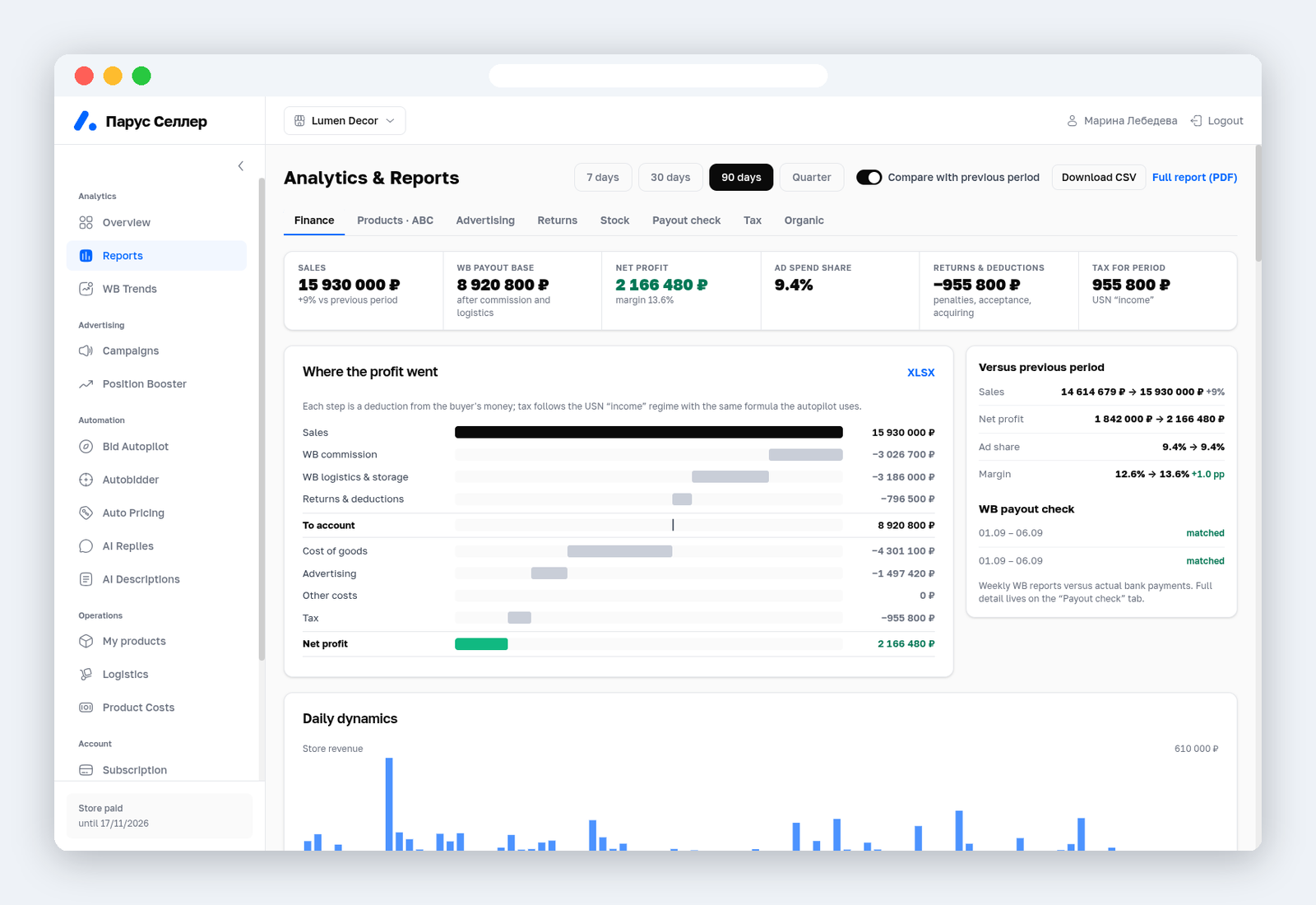
The screenshot shows a store with 15.9 million ₽ of sales over 90 days and 2.17 million ₽ of net profit: a margin of 13.6% against the plan, and the reconciliation with the WB payouts matched for both weeks. First two months free with promo code PARUS60, no card required: sign up and connect your seller portal. The key is created in the WB seller portal in a couple of minutes, and the instructions are in the article on the Wildberries API key.
FAQ
Is there a Wildberries calculator that works from the article number? Services that promise a calculation from the article number take the category, price and dimensions out of the product card, and you still type the rest in yourself. Those three fields you know without any article number.
How is the calculation different for FBS? The FBS commission is 4-5 points higher in every category, storage at a WB warehouse is not charged, but your own packaging and delivery to the sorting centre are added. Switch the model in the calculator and the commission changes by itself.
How do you count logistics by litre? Volume in litres is the length × width × height of the packaging in centimetres, divided by 1,000. The first litre is 46 ₽, each next one 14 ₽, and the result is multiplied by the warehouse coefficient. A box of 30 × 20 × 10 cm is 6 l and 116 ₽ at a coefficient of 100%.
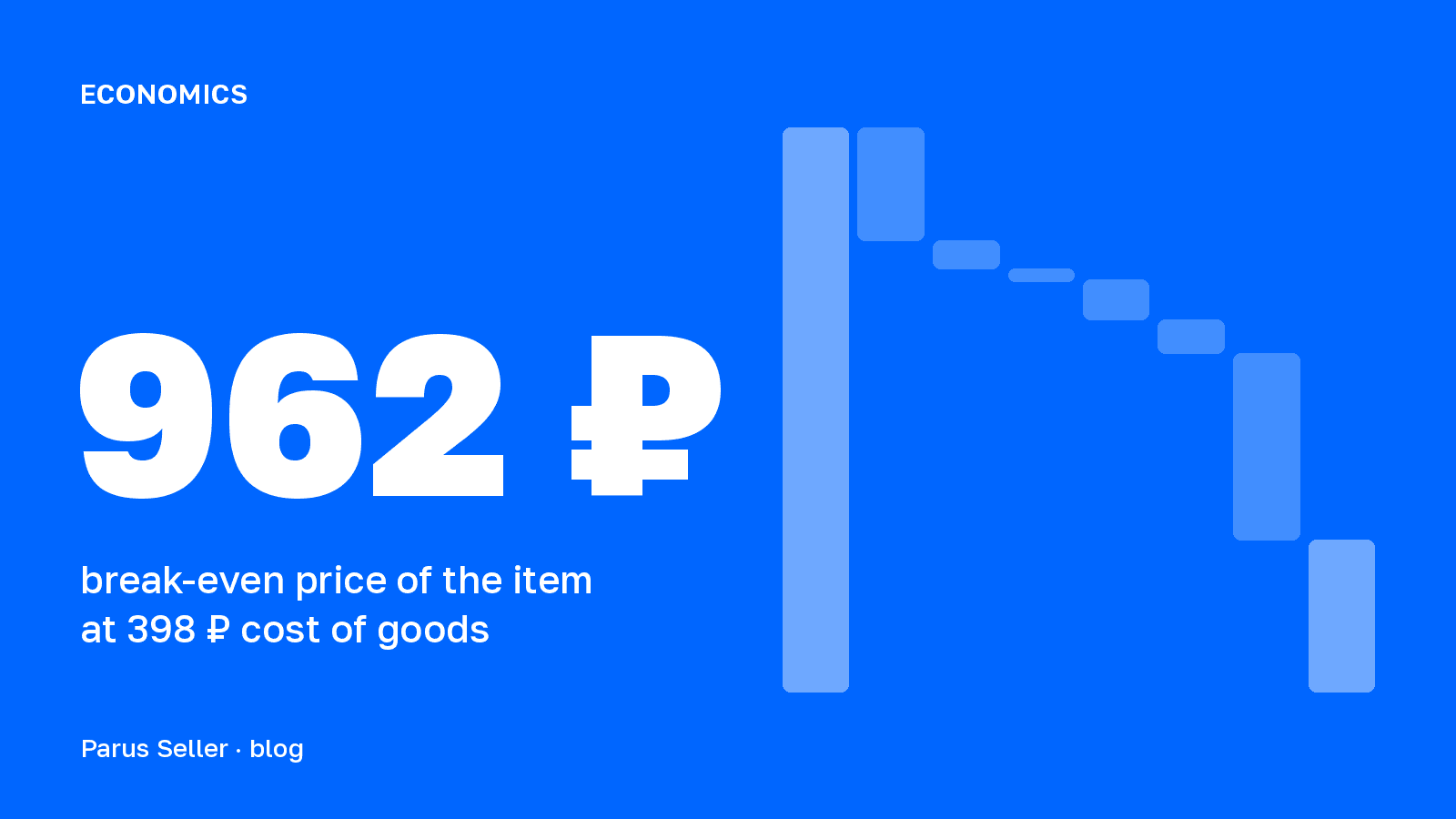
How do you calculate the break-even price on Wildberries? Break-even price = (cost of goods + logistics per sale + storage) / (1 − commission − ad spend share − acquiring fee − tax). The shares in the denominator are taken from the price, so you cannot get the price by simply adding up the costs. For the item in the example that is 1,028 ₽ at a buyout rate of 90% and 1,421 ₽ at a buyout rate of 30%, and the calculator above recalculates it on every change.
Does the WB discount factor into the profit calculation? No. The WB discount, previously called the WB loyalty discount (SPP), is paid by WB itself, while the payout to you is calculated from your price after your own discount. Enter your own price into the calculator, not the price the customer sees.
Is there an Excel version? Yes, the file above: the same formulas, open, no macros, and it works in Excel, Google Sheets and Numbers.