You don't need to upload a refusal letter to a product card on Wildberries. WB says directly in its «Разрешительные документы» instructions: refusal letters, negative certification decisions and voluntary certificates aren't entered into the card, doing so can cause verification errors. If a product doesn't require mandatory documents, you tick «Документы, подтверждающие безопасность, не требуются» in the «Документы» section. If it does, you enter the certificate, declaration or state registration certificate number into the card.
The topic has become urgent. On 1 October 2026, Federal Law No. 289-FZ on the platform economy takes effect: if permit documents are mandatory for a product, their details must be shown in the card. «отказное письмо вб» gets about 960 searches a month, «документы на товар вб» another 810. We went through the WB instructions and checked 6,794 live product cards to see how many already have documents entered and verified.
What a disclaimer letter is and why WB doesn't ask for it
A disclaimer letter is issued by a certification body. It states that the product isn't on the lists of goods for which a certificate or declaration is mandatory. Marketplaces used to often ask for such a letter for products without documents, and out of habit sellers still look for a place to upload it.
WB dropped this scheme. Instead of a letter, the product card has a checkbox, and by ticking it, the seller confirms on their own that the product doesn't need documents. You can keep the letter on file in case of a dispute or an inspection, but you don't need to add it to the card. In bulk editing, the checkbox is in the column «Документы, подтверждающие безопасность, не требуются», and it's only available in categories where WB allows a product without documents.
What documents you need to sell on Wildberries
WB names six types of permits and certificates:
- certificate of conformity;
- declaration of conformity;
- state registration certificate (SGR);
- registration certificate for medical devices;
- registration certificate for medicinal products;
- registration data for an agrochemical or pesticide.
Which one you need depends on the product, not on WB. WB itself advises checking Government Resolution No. 2425, the EAEU technical regulations, the list of products subject to state registration, and Decision No. 526 of the Customs Union Commission, and in disputed cases asking an accredited certification body. Sellers most often run into these combinations:
| Product | Regulation | Typical document |
|---|---|---|
| Clothing and underwear | TR TS 017/2011 | declaration, certificate for some products |
| Children's products and toys | TR TS 007/2011, 008/2011 | certificate or declaration |
| Cosmetics and perfumery | TR TS 009/2011 | declaration, SGR for some products |
| Food products | TR TS 021/2011, 022/2011 | declaration |
| Dietary supplements | TR TS 021/2011 | SGR |
| Electronics and appliances | TR TS 004/2011, 020/2011 | certificate or declaration |
The table shows the typical case, not a rule for every SKU: within a single regulation, different products are certified differently. An exact answer comes from a certification body based on the HS code.
How to upload a certificate or declaration to Wildberries
You enter the document by its details, not by uploading a file. There are three ways to do it.
For one card at a time. Go to "Товары и цены" («Товары и цены»), then "Карточка товара" («Карточка товара»), section "Документы" («Документы»), button "Добавить" («Добавить»). On the left you pick the document type, on the right you enter the number and validity dates. You can add up to 20 documents of each type.
In bulk. In the card list, select the ones you need, click "Редактировать" («Редактировать») and fill in the "Сертификаты и декларации" («Сертификаты и декларации») column.
Via an XLSX template. Download the table, fill it in on your end and upload it back.
There's a separate requirement for the product code. The card must have a TN VED or OKPD2 code, and it must match the code in the certificate or declaration. If there's no code, or it's a different one, the card will fail the check and get blocked.
You enter the number in full, in capital letters, with the EAEU, TS or ROSS prefix if it has one. Typical number formats from the Rosakkreditatsiya register:
| Document | Number format |
|---|---|
| Certificate under an EAEU technical regulation | EAEU RU C-XX.BB00.A.00000/ZZ |
| Declaration under an EAEU technical regulation | EAEU N RU D-XX.BB00.A.00000/ZZ |
| Certificate under Russian technical regulations | RU C-XX.BB00.A.00000/ZZ |
| Declaration for products from Russia's Unified List | ROSS RU D-XX.BB00.A.00000/ZZ |
Here XX are Latin letters, BB are Russian letters, ZZ are the last two digits of the registration year. Common mistakes WB lists: a mixed-up keyboard layout, lowercase letters instead of capitals, extra punctuation marks, a declaration number entered in the certificate field, and an SGR or refusal letter number entered instead of a certificate.
How WB checks documents
The number goes for verification to the agency where the document is registered. That usually takes about three working days. A checkmark appears next to the product in the card list: green if at least one document passed the check, grey if all are still being checked, red if at least one failed. You can see the reason for rejection by hovering over the red checkmark: the document doesn't exist (usually a typo) or it's invalid.
WB accepts documents only in certain statuses: certificates and declarations «действует», «архивный», «продлён», «возобновлён», GOSREG certificates «подписан и действует», registration certificates for medical devices «действует».
If a document passes the check, a «Документы проверены» badge appears on the card. The customer sees it in the «О товаре» block.
How many cards already carry the «Документы проверены» mark
We took the 40 WB subjects with the most reviews and randomly picked up to 300 cards in each, no more than two per seller. For each one we read the card data that WB sends to the site: whether it has the verified documents mark and whether a TN VED or OKPD2 code is listed. In total, 6,794 cards from 5,608 sellers.
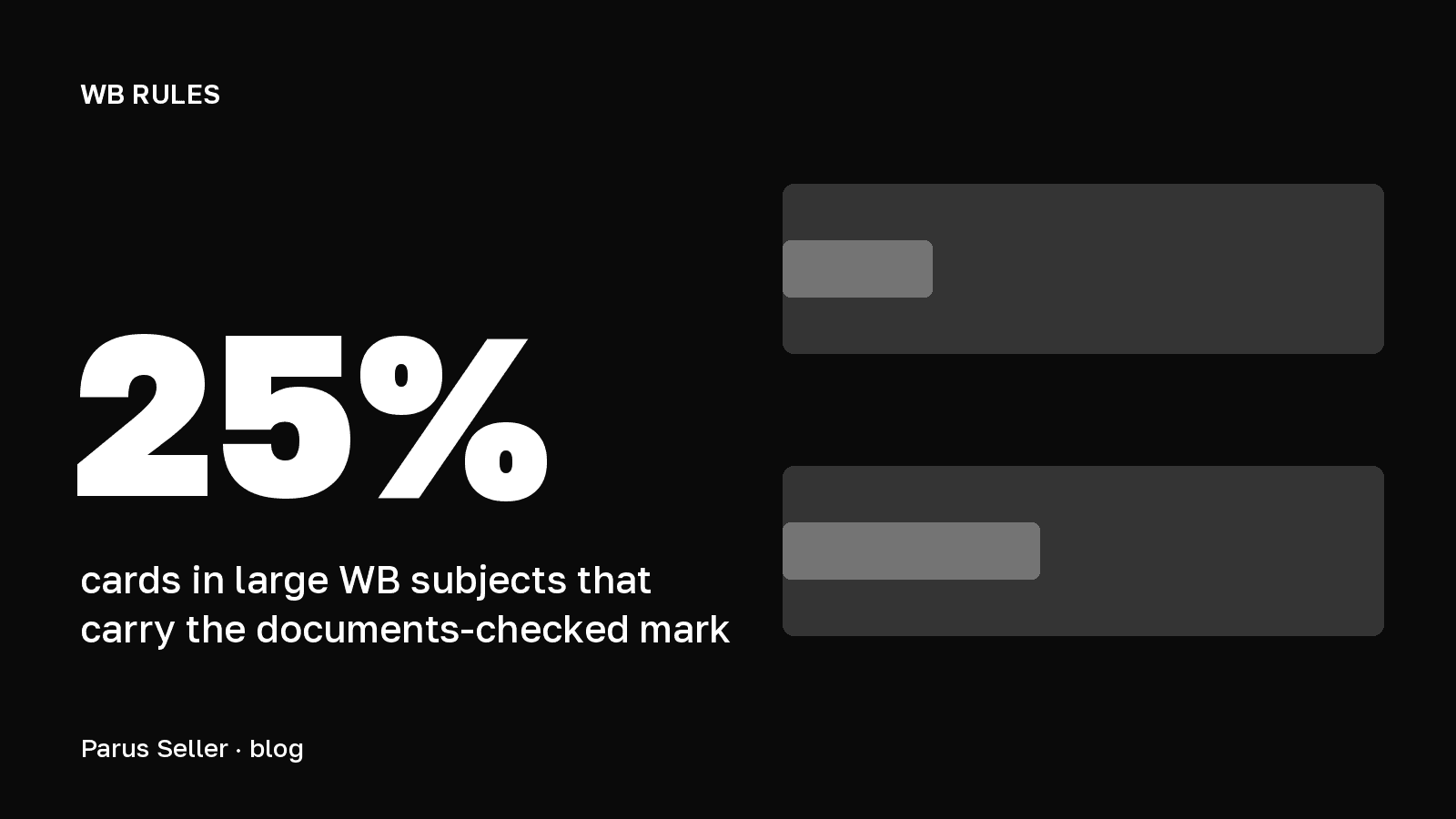
The mark appears on 24.8% of cards. A product code is listed for 42.7%.
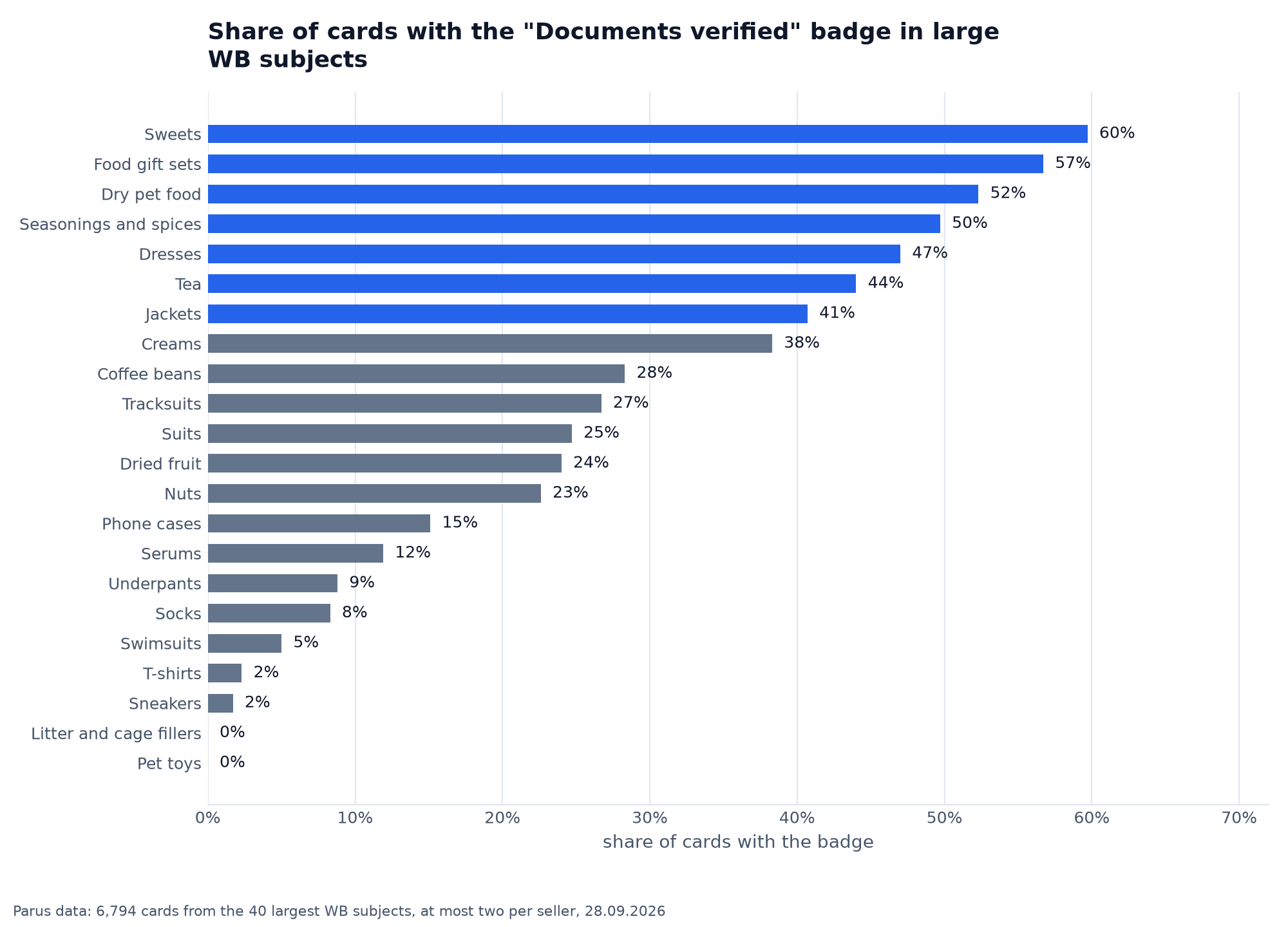
Food products lead: candy has the mark on 60% of cards, gift sets on 57%, seasonings on 50%. At the bottom are T-shirts and sneakers, at 2% each, even though clothing and footwear are also subject to conformity confirmation. Pet toys and litter fillers have the mark on none of the cards in the sample.
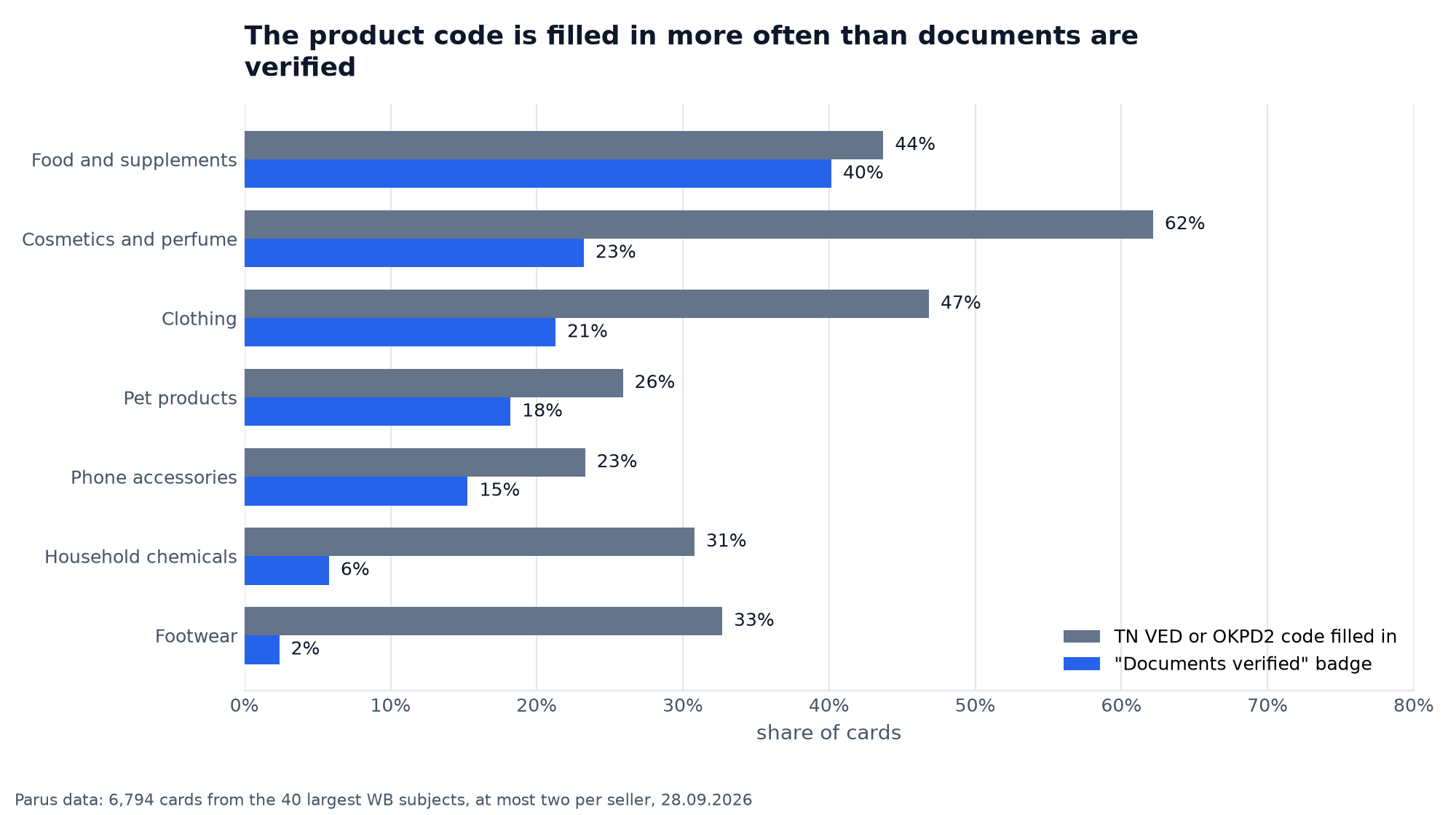
The gap between the code and the mark shows how much work is left. In cosmetics, a code is listed for 62% of cards, but verified documents for only 23%. In footwear it's 33% and 2%. A code without a document isn't a violation if the product doesn't require documents, but for clothing, footwear and cosmetics it more likely means the paperwork just hasn't been entered yet.
Where to arrange the documents: the WB Certification service
The WB Partners portal has a «WB Сертификация» service in the «Рост продаж» section. WB itself doesn't issue documents: the service connects sellers with accredited centres, and the contract is signed directly with the centre. Through it you can order certificates and declarations, SGRs, registration certificates, lab testing, a voluntary certificate and a letter of non-applicability. The service is still in testing and isn't open to all sellers yet.
What happens if you don't specify the documents
WB reminds sellers: if documents are mandatory for a product and they're missing, you can't sell it. Under Articles 14 and 16 of the Code of Administrative Offences, this carries fines, seizure of the goods and a sales ban. After 1 October, missing details in the product card will also become a violation of the platform economy law, so WB asks sellers to add them in advance.
For goods subject to marking, documents and Chestny Znak codes are checked separately, more on this in the article on marking on WB. We covered how to fill in the other fields in the article on the product card.
FAQ on refusal letters and certificates on Wildberries
Do you need a refusal letter for Wildberries? No. It's not uploaded to the product card. If documents aren't mandatory for the product, sellers check the box «Документы, подтверждающие безопасность, не требуются».
Where do you upload a certificate on Wildberries? In the product card, «Документы» section, «Добавить» button. You enter the number and validity dates, no file is needed.
Can you sell on Wildberries without a certificate? Yes, if the product isn't on the lists of mandatory certification and declaration. If it is, you can't sell without the document.
Why was the card blocked after adding a certificate? One reason WB cites: the TN VED or OKPD2 code in the card doesn't match the code in the document, or isn't specified at all.
What changes on 1 October 2026? Under Federal Law 289-FZ, the details of mandatory permitting documents must be specified in the product card.
Documents cover the legal side of the card, but sales depend on everything else. Parus Seller shows card positions in search, stock, reviews and profit for every vendor code. First two months free with promo code PARUS60, no card required: connect your store.