A Wildberries product card is created in the seller portal on a single screen: the "Products and prices" section, "Product card", the "Add" button. What starts after that decides whether WB shows the product at all. With no photo the card is not shown to customers, with empty attributes it stays out of the filters, and with a "sale" caption on the main photo it loses rating.
Article 13 of 26 in the topic {hub}. All articles in the topic
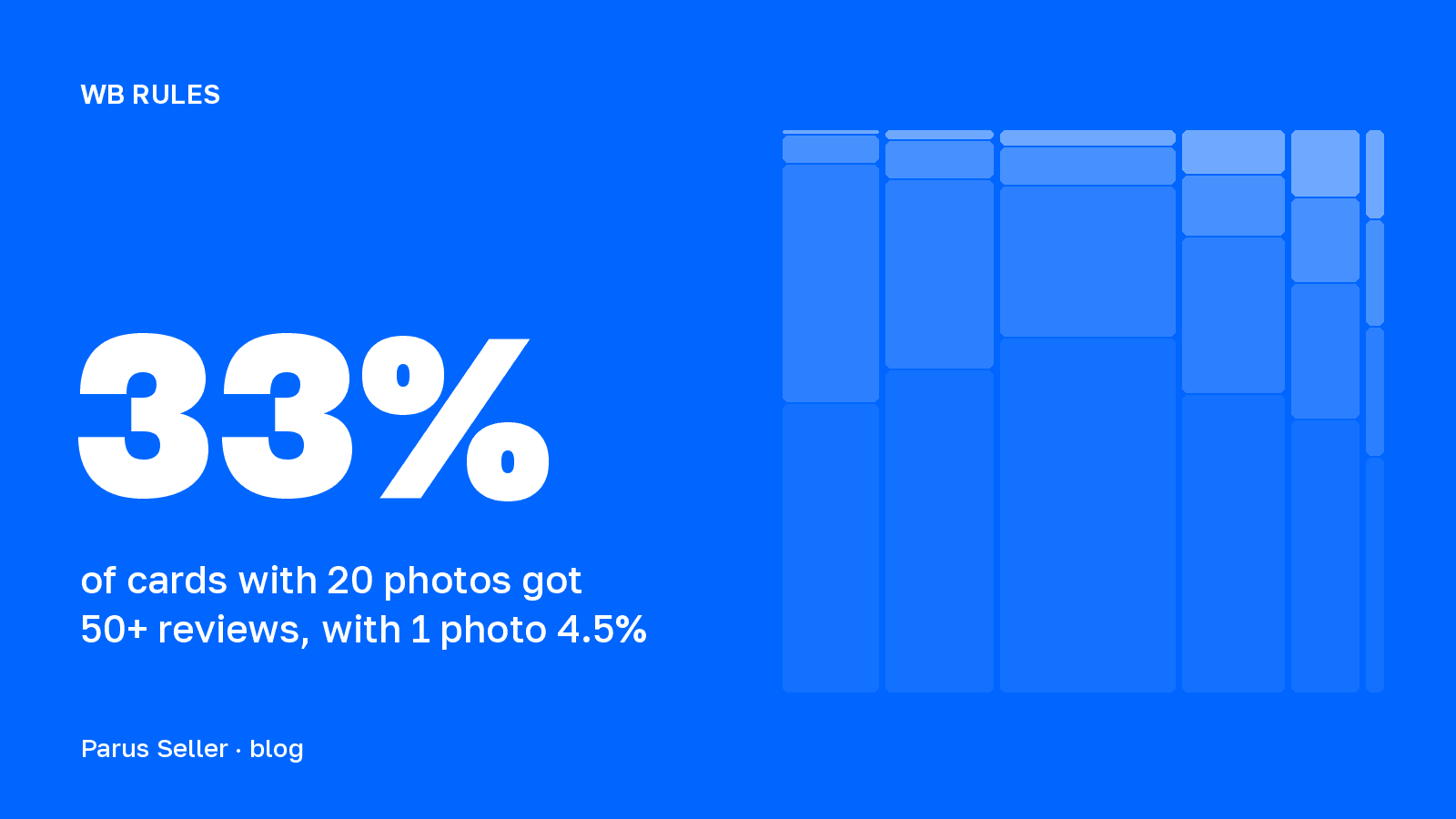
We read five WB instructions updated in July, August and September 2026, and counted across 1.2 million catalogue cards how many photos the cards that collect reviews have. The gap between one photo and twenty turned out to be sevenfold.
In short: the path is "Products and prices" → "Product card" → "Add". Name up to 60 characters, colour up to 5 values, price from 50 to 5,000,000 ₽, up to 30 photos and one video. The minimum photo size differs between two WB instructions, 700 × 900 and 700 × 933, so uploading 900 × 1200 at 3:4 is safe. Text about discounts on the main photo lowers the rating at any caption size. Of the cards with 20 photos, 33% got 50 or more reviews; of the cards with one photo, 4.5%.
How to create a Wildberries product card: the path in the portal and the fields
Creating a card starts with the "One product" item after the "Add" button in the "Products and prices" section. Bulk upload through an xlsx template lives next to it, but for your first cards it is better to walk the form by hand: it shows which fields WB treats as important for search. Per the instruction "How to create a product card" dated 3 September 2026, the form checks every field and highlights errors in the "What can be improved" block on the right. Once all the required fields are filled, the "Create and finish" button sends the card either to the "All products" tab or to "Drafts" if errors remain.
The name is capped at 60 characters and can be cut off in the catalogue, so the main word goes first. WB spells out what must not be in the name: synonyms and repeats, the brand, the season, gender and age, judgements like "best" and "hit", caps lock, words in Latin script only, special characters and emoji. The system suggests the category itself after you type the name or upload a photo. The vendor code is an internal identifier of up to 72 characters, and WB does not check it. The barcode, on the other hand, is scanned at the warehouse: up to 30 characters, no Cyrillic, and for goods subject to mandatory marking a 14-digit GTIN works instead of a barcode, which makes inbound acceptance faster.
| Field | Limit | What matters |
|---|---|---|
| Name | up to 60 characters | cut off in the catalogue, main word first; no brand, season, caps lock, special characters or emoji |
| Category | one, from the list | the system suggests it from the name or photo; categories have their own filling rules |
| Vendor code | up to 72 characters, any symbols | internal, WB does not check it; not the same as the barcode |
| Colour | up to 5 values | better one main colour: filters have "green", they have no "grassy" |
| Description | limit depends on the category, shown above the field | no tags, other brands, vendor codes or lists of colours and sizes |
| Attributes | set by category, "Used in filters" icon | every value entered on its own; empty fields = worse ranking |
| Price | whole number, 50 to 5,000,000 ₽ | managed after that in "Prices and discounts" |
| Barcode | up to 30 characters, no Cyrillic | scanned at the warehouse; a 14-digit GTIN works for marked goods |
| Packaging size | whole cm, up to 700 per side | logistics and storage are charged on them; understating = penalty under offer clause 13.3 |
| Documents | certificate or declaration from the register | checked for up to 3 days, "Documents verified" mark |
| Photos and video | up to 30 photos and 1 video | with no photo the card is not shown to customers |
Source: the seller.wildberries.ru instruction "How to create a product card", 3 September 2026
Packaging dimensions deserve separate attention. Logistics and storage are charged on them, so WB advises rounding up, and charges a penalty under clause 13.3 of the offer agreement for dimensions smaller than the real ones. How that penalty and other deductions look in the report we took apart in the article on Wildberries penalties for sellers. The price can be set at creation, as a whole number from 50 to 5,000,000 ₽, and after that it is managed in the "Prices and discounts" section. A certificate or declaration of conformity is checked for up to three days, after which the card gets the "Documents verified" mark.
How many cards you can create on Wildberries: the turnover limit and the promotion until 29 September
The card limit is the number of products a seller can add to the portal at all. WB recalculates it every day from turnover over the year and over the last 30 days, and splits sellers into five grades. Cards already created can be edited without restrictions, the limit applies only to new ones.
| Grade | Turnover per year | Turnover per 30 days | Card limit |
|---|---|---|---|
| 0 | up to 1 million ₽ | up to 100,000 ₽ | 600 |
| 1 | 1–50 million ₽ | 100,000 ₽ to 4 million ₽ | 8,000 |
| 2 | 50–100 million ₽ | 4–10 million ₽ | 30,000 |
| 3 | 100 million ₽ to 1 billion ₽ | 10–85 million ₽ | 45,000 |
| 4 | from 1 billion ₽ | from 85 million ₽ | 200,000 |
Source: the WB instruction "Card statuses, limits and settings" (18 May 2026); WB news on extending the promotion with the expanded limit (20 May 2026)
Since February 2026 a promotion has applied on top of this table: a limit of 2 million cards for all sellers, regardless of grade. In exchange, WB capped the number of cards per day: up to 1,000 on grade 0, up to 5,000 on grade 1, and up to 10,000 on grades 2 to 4. In May the promotion was extended through 29 September inclusive, and WB promised to warn of any changes at least 7 days in advance.
After the promotion ends, the grade table applies again. For cards above the regular limit WB promised extra tools, and without them such cards will be blocked, and stock from them at the warehouses will be sent for return 7 days after the block. So it is worth comparing the number of your cards with your grade's limit in advance and moving the extra ones to the bin. You cannot remove a card with an active supply, stock at a warehouse, or sales in the last 28 days.
Next on this topic: Wildberries product description: length, rules, rich content
How to fill in a product card: attributes, description and the completeness score
Attributes affect impressions more than the description does. The WB instruction says it plainly: if the fields are empty, the card ranks worse and shows up in search less often, and a customer with the "red dress" filter will only see cards where the colour is filled in. Fields that matter for filters carry a separate "Used in filters" icon. Every value is entered on its own: the system will not recognise "cotton paper wood" in one field, and the product will not make it into the filter. You can list up to five colours, but WB advises one main colour: the customer's filters have "green", they do not have "grassy".
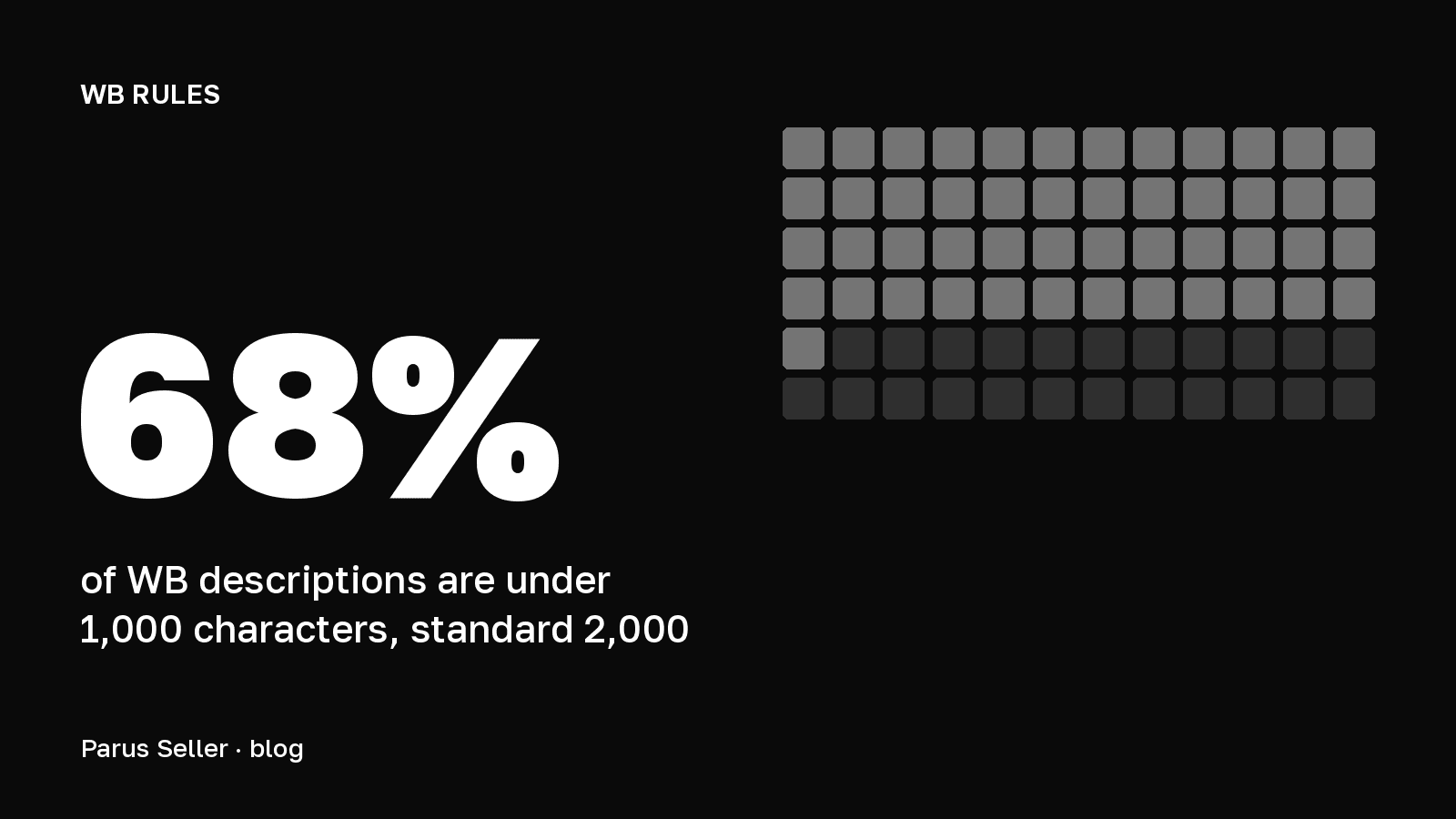
The description is written for a human, not for search. The character limit depends on the parent category and appears above the field once the category is chosen. WB indexes the text itself, so tags, lists of colours and sizes, other brands and vendor codes are banned in the description. An example from the completeness score instruction: a description made of repeats like "hat snood winter" gets penalty points, while a coherent text about suede boots with two straps lifts the score. Without the Jem subscription the portal generates 20 short descriptions a month; with the subscription or a plan-builder option there is no limit.
The card's completeness score is counted on a 10-point scale and is visible only to the seller. It rises with every filled field and falls on poor content, and the penalty can be larger than what you have accumulated. The instruction dated 27 July 2026 gives an example: a card with no photos scored 6 points, then took 4 penalty points for a bad photo and dropped to 2. Delete the photo, back to 6. In other words, WB rates an empty spot in the card higher than bad content. The score affects the position in search, and WB can recalculate it without any edits from you, when it reworks its algorithms.
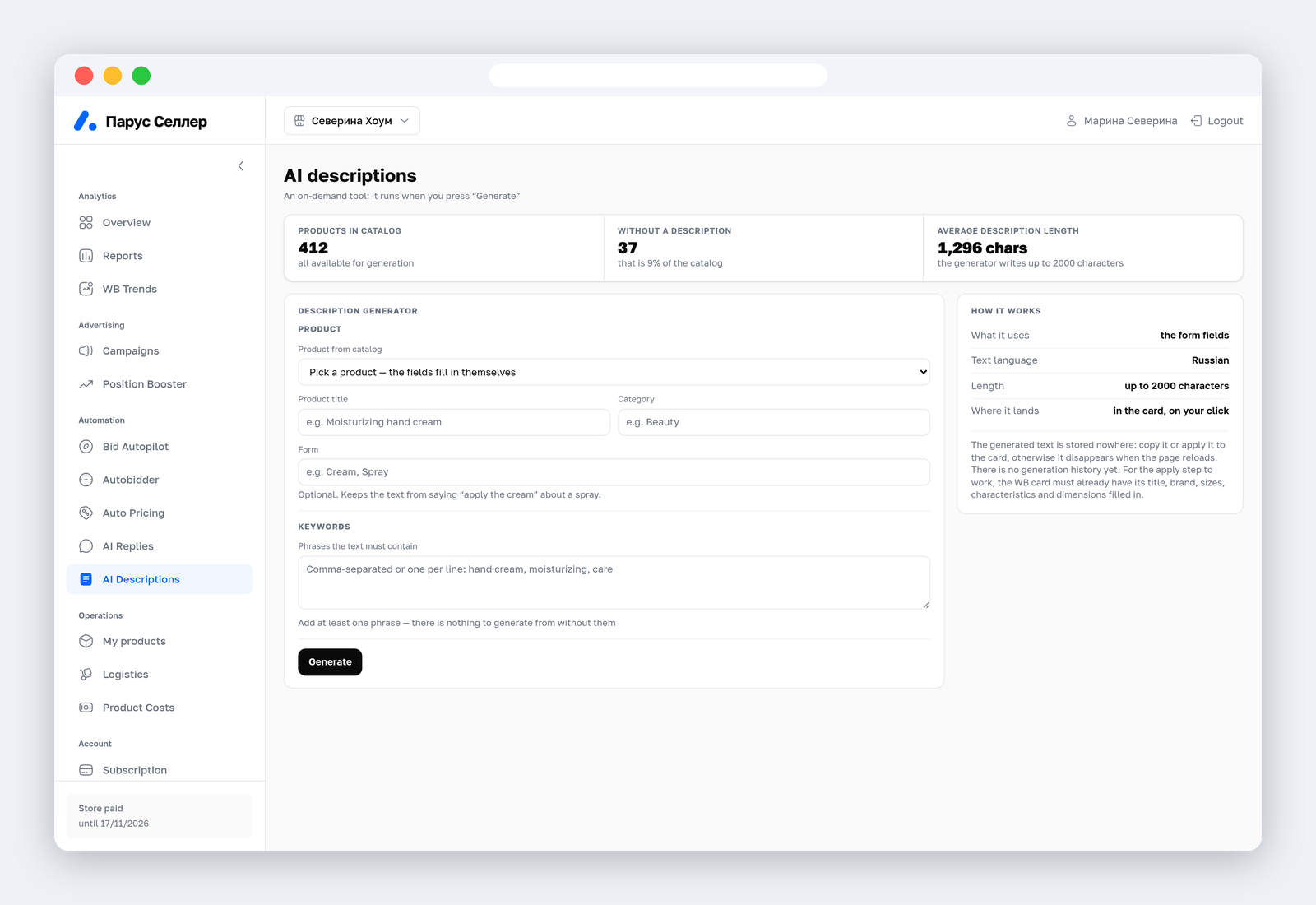
In Parus Seller the description is assembled on the "AI Descriptions" tab from the name, the category, the product form and the list of phrases that have to appear in the text. The finished text is applied to the card with a button, and to apply it on WB the card must already have the name, brand, sizes, attributes and dimensions filled in.
Photos for a Wildberries product card: sizes and 2026 requirements
WB now has two minimum photo sizes. The instruction "Product photos: rules, recommendations and common mistakes" dated 28 August 2026 asks for 700 × 900 pixels, the instruction "How to create a product card" dated 3 September asks for 700 × 933. The second figure is exactly 3:4, the vertical proportion the catalogue shows every card in. The rest of the requirements match: JPG, PNG or WEBP, compression quality no lower than 65%, a file up to 10 MB, up to 30 photos in a card. Rather than guess which of the two instructions your moderator read, it is safe to upload 900 × 1200 at 3:4: it clears both minimums and does not go soft on a phone.
| Parameter | Photo | Video |
|---|---|---|
| Format | JPG, PNG, WEBP | MOV or MP4, codec H.264 or MPEG-4 |
| Minimum resolution | 700 × 900 px in "Product photos" (28 August 2026); 700 × 933 px in "How to create a card" (3 September 2026) | frame from 720 to 1920 px in width and height |
| Proportions | 3:4, vertical (700 × 933 = exactly 3:4) | for autoplay 3:4, 810 × 1080 |
| Compression and size | quality no lower than 65%, up to 10 MB | file up to 50 MB, 25–30 frames per second |
| How many in a card | up to 30, with no photo the card is not shown | one, up to 3 minutes long |
| How to upload | file, link, built-in photo editor | file or direct link, YouTube will not do |
| Moderation | 72 hours to fix it after the notice, then the card is blocked | the same rules as for photos |
Source: seller.wildberries.ru instructions "Product photos" (28 August 2026), "How to create a product card" (3 September 2026), "Video autoplay" (27 July 2026)
One video goes into a card: MOV or MP4, a frame from 720 to 1920 pixels on each side, up to 3 minutes, up to 50 MB, 25–30 frames per second, codec H.264 or MPEG-4. A YouTube link will not do, only the file or a direct link to it. Autoplay of the video in the catalogue and in search is a separate service. It comes with the Jem subscription, with a card limit set by the plan, or it is switched on as a plan-builder option. A clip for autoplay has to be 810 × 1080 at 3:4. The instruction dated 3 September 2026 also brought in the "Video covers" service, which assembles a clip out of the card's photos.
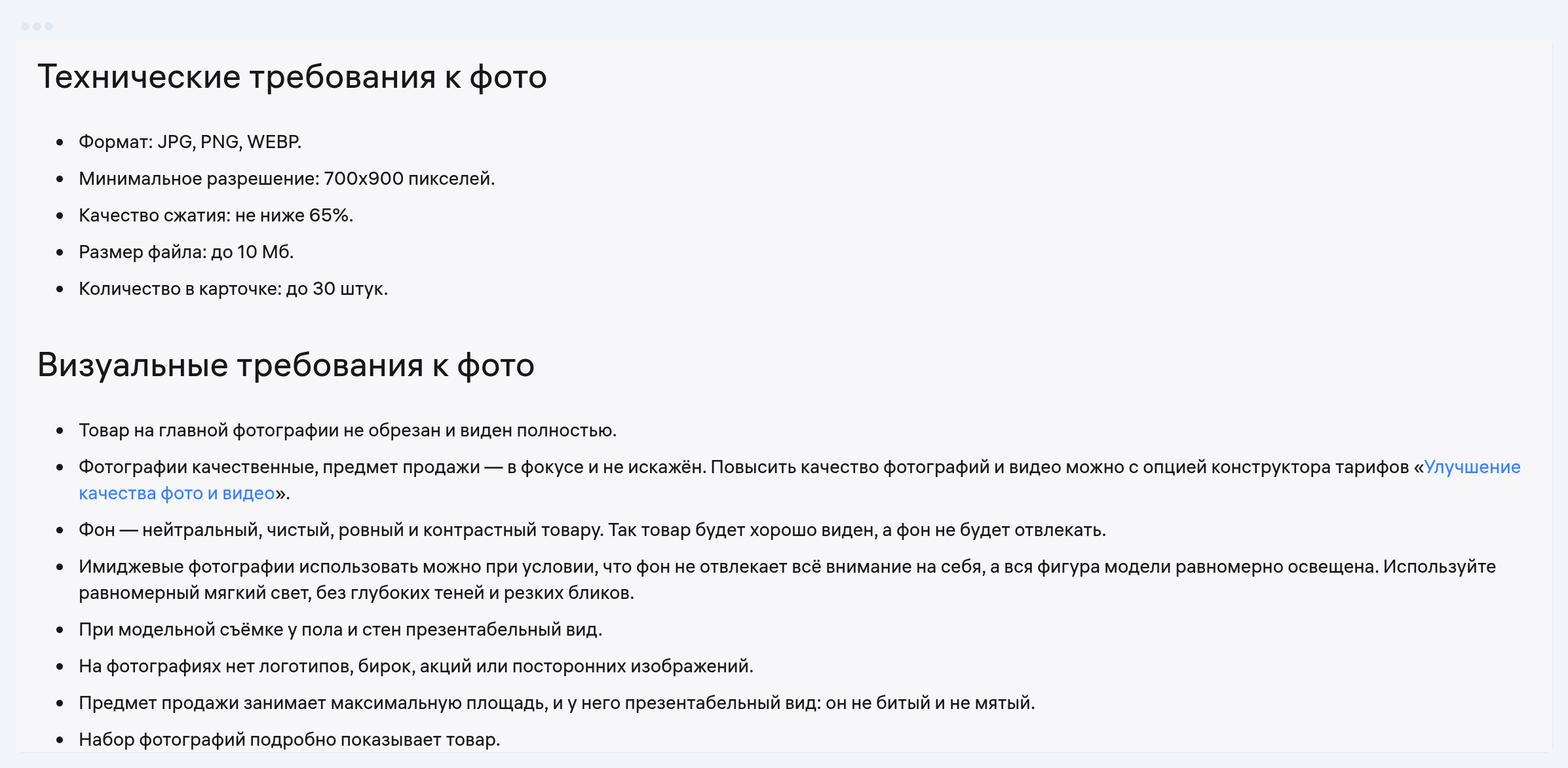
Every photo goes through moderation. If a photo does not pass, the notice arrives in the bell, you get 72 hours to fix it, and after that the card is blocked. A photo worth improving is outlined in orange in the card editor. WB leaves the final call to the moderator, who judges the set of photos as a whole, so formal compliance with the pixel rules does not settle the argument.
The main photo and infographics: what lowers a card's rating
The main photo affects the card's rating, and through it the position in search and in the catalogue, and WB lists exactly what drags it down. Marketing text is the worst of it. Captions about the season ("summer price"), urgency ("today only"), emotion ("tasty price"), discounts, guarantees, stock levels ("clearance") and the source of the price ("straight from the factory") lower the rating at any font size. Any other text lowers it the more, the larger it is. Hence the rule for infographics: keep it to a minimum on the main photo, use neutral-coloured blocks, and move the attributes to the second and third photo.
| What is on the main photo | What WB does | What to do |
|---|---|---|
| Text about the season, urgency, a discount, a guarantee, stock or "straight from the factory" | lowers the card rating at any caption size | remove the caption, move the facts to attributes |
| Any other text | lowers the rating the larger the caption is | minimum infographics, neutral-coloured blocks |
| Resolution below 700 × 900 px | lowers the rating, upload will reject it | reshoot or send 900 × 1200 |
| The product is cropped, at an angle, boxed or too small in frame | lowers the rating | whole product, straight, large, no box |
| Several products, a collage, stray objects, the model covering the product | lowers the rating | one product in frame, model facing the camera |
| A bright or uneven background, watermarks, acid infographics | lowers the rating | neutral even background, text contrast from 4.5:1 |
| A botched neural network image, broken translation, a product from another category | lowers the rating | realistic photo, text without distortions |
| Blood, wounds, mould, dirt, body deformities | lowers the rating as sensitive content | show the result, not the problem |
Source: the seller.wildberries.ru instruction "Product photos: rules, recommendations and common mistakes", 28 August 2026
For infographics WB sets the text contrast: no lower than 4.5:1 for small text and 3:1 for large or bold, the same threshold as in the WCAG accessibility standard. The instruction advises keeping the palette narrow and lists the combinations to avoid: green with red, green with brown, blue with purple, light green with yellow. Gradient backgrounds are banned, and the outline of the product has to read. Acid colours, multicoloured blocks and captions covering the product are named among the common mistakes. The size of an infographic is not regulated separately: it follows the same requirements as a photo.
You can make infographics without a designer. The card has the built-in WB photo editor: collage, background replacement, captions and decorative elements. For Jem subscribers and through plan-builder options there are "Photo studio" with neural network models, "Rich content" and photo "A/B tests". A separate "Content protection" option shows whether other sellers are using your main photo. WB does not ban neural network images, but it counts an unnatural picture and distorted characters in text among the mistakes that lower the rating.
How many photos the cards that sell have: data from 1.2 million cards
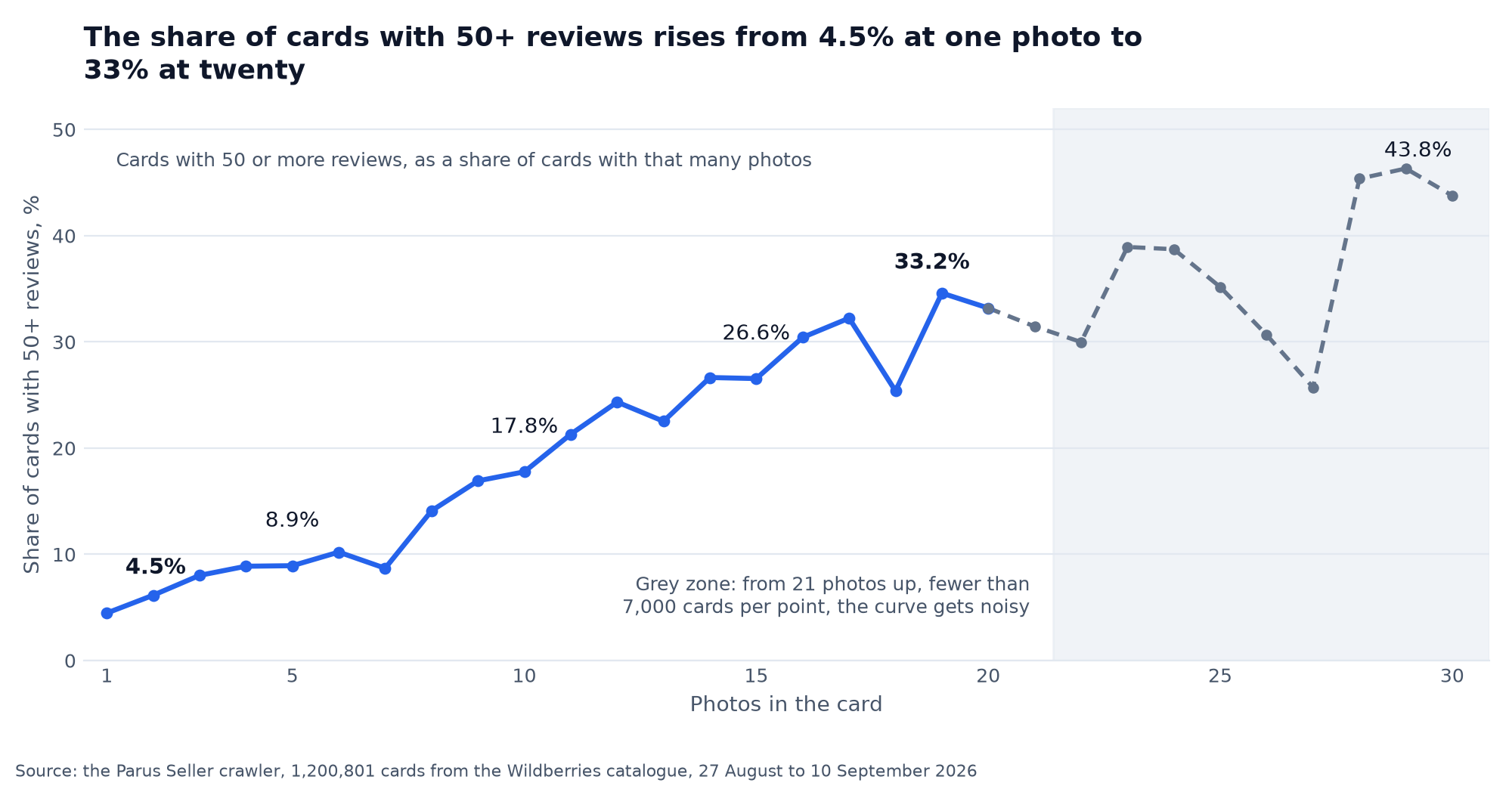
Of the cards with one photo, 4.5% got 50 or more reviews; of the cards with twenty photos, 33%. That is the result across 1,200,801 cards our crawler saw in the Wildberries catalogue from 27 August to 10 September 2026. The crawler walks category pages sorted by "popular", so the sample is skewed towards the cards the catalogue shows rather than the whole WB assortment. The number of photos comes from the public catalogue response, the number of reviews from the same place. The median across all cards is 7 photos. Every sixth card stops at three photos, and 30 photos, the WB ceiling, were uploaded by 2,725 cards, 0.2% of them.
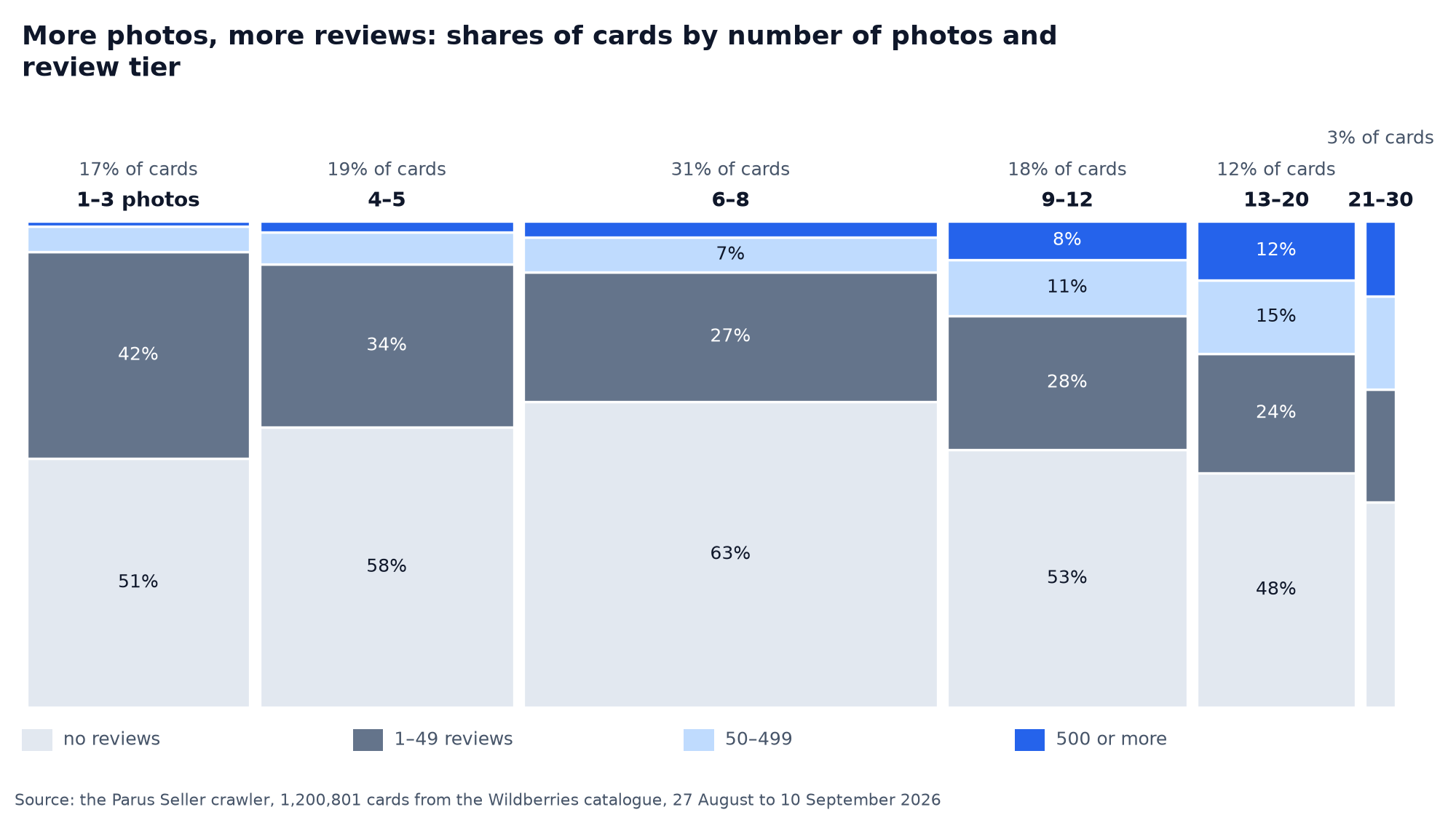
The relationship is monotonic. Among cards with 1–3 photos, 1% got 500 or more reviews; among cards with 13–20 photos, 12%; among cards with 21–30 photos, 16%. The curve by exact photo count rises from 4.5% at one photo to 8.9% at five, 17.8% at ten, 26.6% at fifteen and 33.2% at twenty. Beyond that there are few points: from 21 photos up, every value holds fewer than 7,000 cards and the curve gets noisy, but it never drops below 25%.
Causation does not follow from these numbers. A seller who uploaded twenty photos has usually filled in the attributes and the description too, and puts money into advertising, and reviews come from sales, not from photos. But the figure gives you a bearing: a card with three photos looks like an exception in the catalogue rather than the norm, and among the review leaders such cards make up 3%.
How many photos the review leaders have and how it differs by subject
The median for cards with 1,000 or more reviews is 11 photos, with a typical range from 8 to 15. For cards with no reviews the median is 7, for cards with 1–9 reviews it is 6. The lower bound differs too. For cards with 1,000 or more reviews the bottom tenth starts at five photos, in the 200–999 tier at four, and in the 1–9 review tier every tenth card gets by with two.
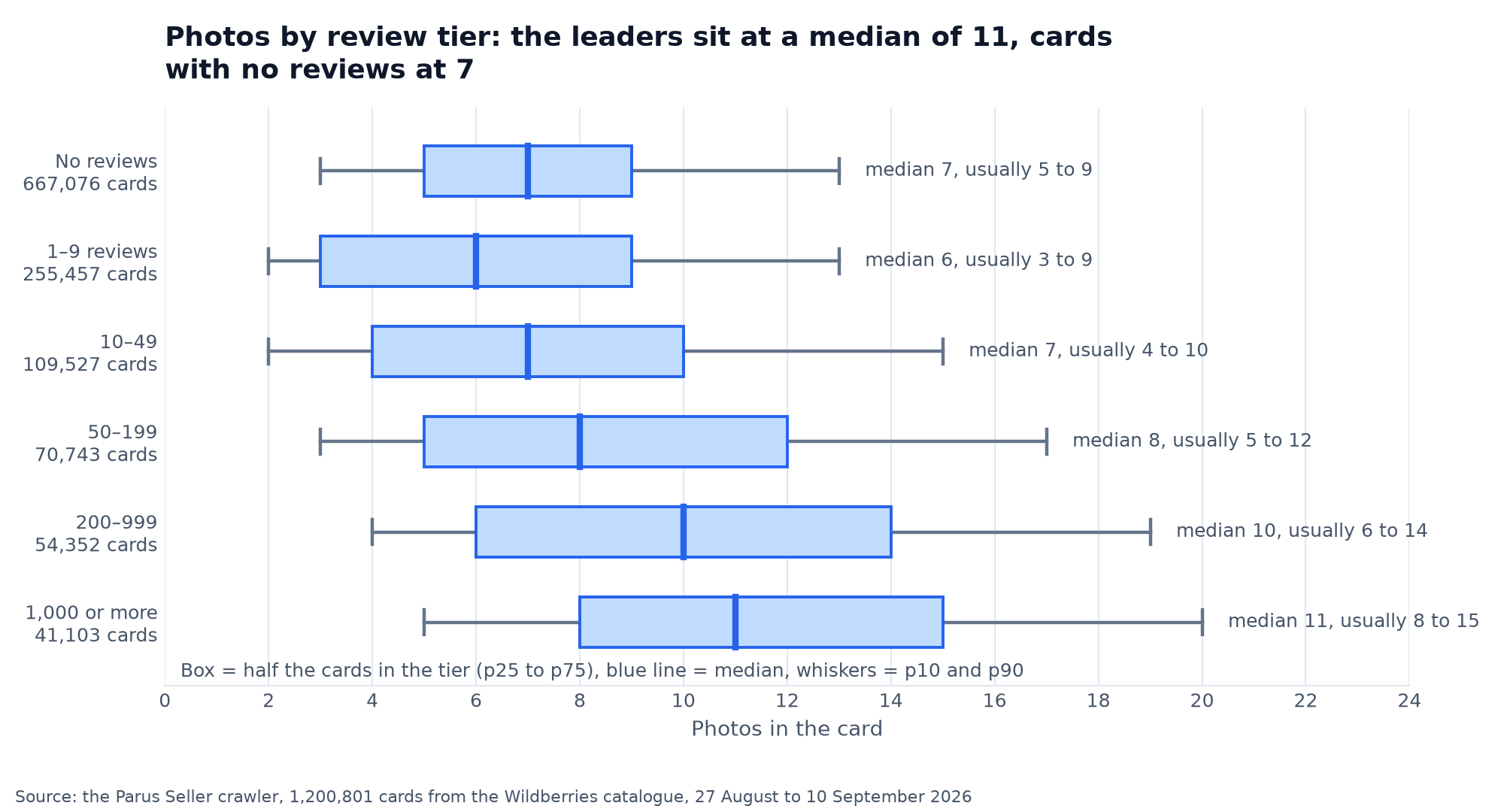
The gap differs by subject. Books have a median of 7 photos, and books with 200 or more reviews have 16: publishers show the spreads. Notebooks 4 against 10, textbooks 5 against 11, T-shirts 8 against 12, supplements and creams 7 against 11. There are subjects where the leaders add no photos. Photo backdrops and insect repellents hold 7 photos in both tiers, and for book stands the leaders get by with 8 photos against 12 for everyone else. Look at your own subject rather than the catalogue average, and treat the leaders' median as your floor.
| Subject | Cards in the crawl | Median photos, all | Median photos, 200+ reviews | Difference |
|---|---|---|---|---|
| Books | 17,408 | 7 | 16 (1,268 cards) | +9 |
| T-shirts | 8,552 | 8 | 12 (1,020 cards) | +4 |
| Notebooks | 11,086 | 4 | 10 (218 cards) | +6 |
| Textbooks | 13,898 | 5 | 11 (950 cards) | +6 |
| Supplements | 20,680 | 7 | 11 (6,292 cards) | +4 |
| Creams | 10,920 | 7 | 11 (1,918 cards) | +4 |
| School diaries | 10,837 | 5 | 9 (312 cards) | +4 |
| Mouse pads | 10,258 | 6 | 9 (242 cards) | +3 |
| Badges | 9,591 | 4 | 8 (336 cards) | +4 |
| Pencil cases | 9,826 | 5 | 8 (914 cards) | +3 |
| Phone cases | 55,976 | 6 | 8 (548 cards) | +2 |
| Photo backdrops | 37,020 | 7 | 7 (211 cards) | 0 |
| Insect repellents | 33,806 | 7 | 7 (1,886 cards) | 0 |
| Book stands | 6,821 | 12 | 8 (222 cards) | -4 |
Source: the Parus Seller crawler, 1,200,801 cards from the Wildberries catalogue, 27 August to 10 September 2026; the subjects with the most cards in the crawl
How to merge product cards into one with variants
You can merge products of the same category with the same shared attributes: one dress cut in three colours, lemonade in 1 and 2 litre bottles, a smartphone with 16 and 32 GB of storage. Different mixer tap models or shampoos for different hair types cannot be merged. When you create a card, a variant is added with the "Add variant" button, and cards that already exist are merged through the "Variants" block in card editing, the "From your own card" item, by vendor code. One card holds up to 30 variants, and a variant is taken out with the "Make a separate product" button.
| Product | Can be merged | Cannot be merged | Mandatory varying attributes |
|---|---|---|---|
| Shampoos | bottles of different volumes | for different hair types | none |
| Mixer taps | in different colours | of different models | none |
| Smartphones | with 16 and 32 GB of storage | of different brands | none |
| Mattresses | of different sizes | of different brands | none |
| Cosmetic oils | of different volume or scent | with the same volume and scent | volume, scent |
| Washing powders | of different volume or weight | with the same volume and weight | volume, weight |
| Hairsprays | of different volume or hold | with the same volume and hold | volume, degree of hold |
| Any subject | up to 30 variants in one card | variants with the same set of attributes: then only a carousel, no blocks | text blocks: from 2 varying attributes |
Source: the seller.wildberries.ru instruction "Merging product cards", 27 July 2026
Two things about a merged card often surprise sellers. First: the rating of the variants is not added up, each vendor code counts on its own, and an overall rating for the card comes with a paid plan-builder option. Second: variants are shown to the customer as a carousel with photos. Text blocks with attributes appear only for subjects with two or more varying attributes, colour and storage size for instance, and only if no two variants share the same set. WB tested both formats and writes that with the blocks customers find their variant faster and buy more often. For cosmetics and household chemicals the varying attributes are mandatory: oils without volume and scent, powders without volume and weight will not merge.
A finished card then has to be fed with stock, price and replies to reviews. In Parus Seller every card shows stock by warehouse and how fast orders come in, AI replies to reviews go out within WB's moderation rules, and the description is generated around your phrases. Promo code PARUS60 gives two months of full access with no card, registration with the promo code already in the link. Connecting through an API token takes a couple of minutes, the token is created by the store owner and revoked in one click.
FAQ
How many photos can you upload to a Wildberries card? Up to 30 photos and one video. With no photo the card is not shown to customers, and WB advises uploading at least two. Across 1.2 million catalogue cards the median is 7 photos, and for cards with 1,000 or more reviews it is 11.
What photo size do you need for a Wildberries product card? The minimum in the "Product photos" instruction is 700 × 900 pixels, in the "How to create a product card" instruction 700 × 933. The proportion is 3:4, vertical. The safe size is 900 × 1200: it fits both minimums and does not go soft in the app.
Why is my card not showing on Wildberries? Three common reasons: the card has no photos, it sits in "Drafts" because of an error in a required field, or moderation blocked it after 72 hours without a fix. The list of blocked cards and the reason are visible in the portal.
Can cards in different colours be merged into one? Yes, if the category and the shared attributes match. Each colour is a separate vendor code with its own barcode, up to 30 variants in a card. Ratings across variants are not added up without a paid option.
What is the card completeness score and where do I see it? An internal 10-point score for the card at the top of the editing page. It rises as you fill the fields, falls for bad photos and a spammed description, and the penalty can be larger than the points you have. Only the seller sees it, and it affects the position in search.