What the Wildberries infographic requirements are in 2026: Wildberries has no separate standard for infographics, a slide with text is checked like an ordinary product photo. The file is JPG, PNG or WEBP, from 700 × 933 pixels, up to 10 MB, with up to 30 images per card. A slide may not carry prices, discounts, contacts, "hit" or "top", sales counts or calls to buy. On the main photo any text lowers the card rating, and the larger the text, the stronger the effect.
These are limits, not a reason to give up infographics. We checked by hand the main photos of 111 random cards with 100 or more reviews: 75 of them carry text over the product. Below are the rules from WB instructions with their dates, the bans, the slide order and a calculation of text size for the preview.
In short: infographics on Wildberries go through moderation like an ordinary photo: 900 × 1200 at 3:4, up to 10 MB, no prices, discounts, contacts or "hits". On the main photos of cards with 100+ reviews, text appears in 68% of cases, less often in clothing, more often in beauty. Make the headline from 60 px, in a 246 × 328 preview it becomes 16 px. Video is on 47% of cards with 1,000+ reviews.
What WB requires from infographics in 2026
Infographics on Wildberries follow the photo rules from several instructions. The most recent one, "How to create a product card" of 2 October 2026, requires 700 × 933 pixels. The "Product photos" instruction of 28 August names a minimum of 700 × 900, and the API documentation allows files up to 32 MB instead of 10 MB in the seller portal.
| Rule | Where it is written | Updated |
|---|---|---|
| JPG, PNG or WEBP, compression quality from 65%, file up to 10 MB | "How to create a product card" | 02.10.2026 |
| Resolution from 700 × 933 px | "How to create a product card" | 02.10.2026 |
| Resolution from 700 × 900 px | "Product photos: rules, recommendations and common mistakes" | 28.08.2026 |
| Up to 30 photos and one video, a card without photos is not shown | "How to create a product card" | 02.10.2026 |
| No logos, tags, promotions or unrelated images on photos | "Product photos: rules, recommendations and common mistakes" | 28.08.2026 |
| In a set the full contents are visible on the first photo, an accessory comes right after the main one | "Product photos: rules, recommendations and common mistakes" | 28.08.2026 |
| Via the API: up to 32 MB, BMP and static GIF besides JPG, PNG and WebP | WB API documentation, media file upload | 01.10.2026 |
Source: seller.wildberries.ru instructions and the WB API documentation for sellers, update dates are in the table
In practice this means one thing: make slides 900 × 1200 pixels at 3:4 and save them under 10 MB. Such a file passes both minimums and stays within the portal limit. WB stores all 111 main photos from our sample below at exactly 900 × 1200, even when the seller uploaded a different ratio: the missing space is filled with margins.
We covered text contrast and the palette in the article on the Wildberries product card.
What you may not write on Wildberries infographics
The bans are listed in the card creation instruction updated on 2 October 2026. There are eight of them, and almost all concern text: prices and discounts, contacts, judgements such as "hit" and "top", a reward for a review, sales counts and calls to buy. The good news is that each such caption is easy to replace with a fact about the product that sells just as well.
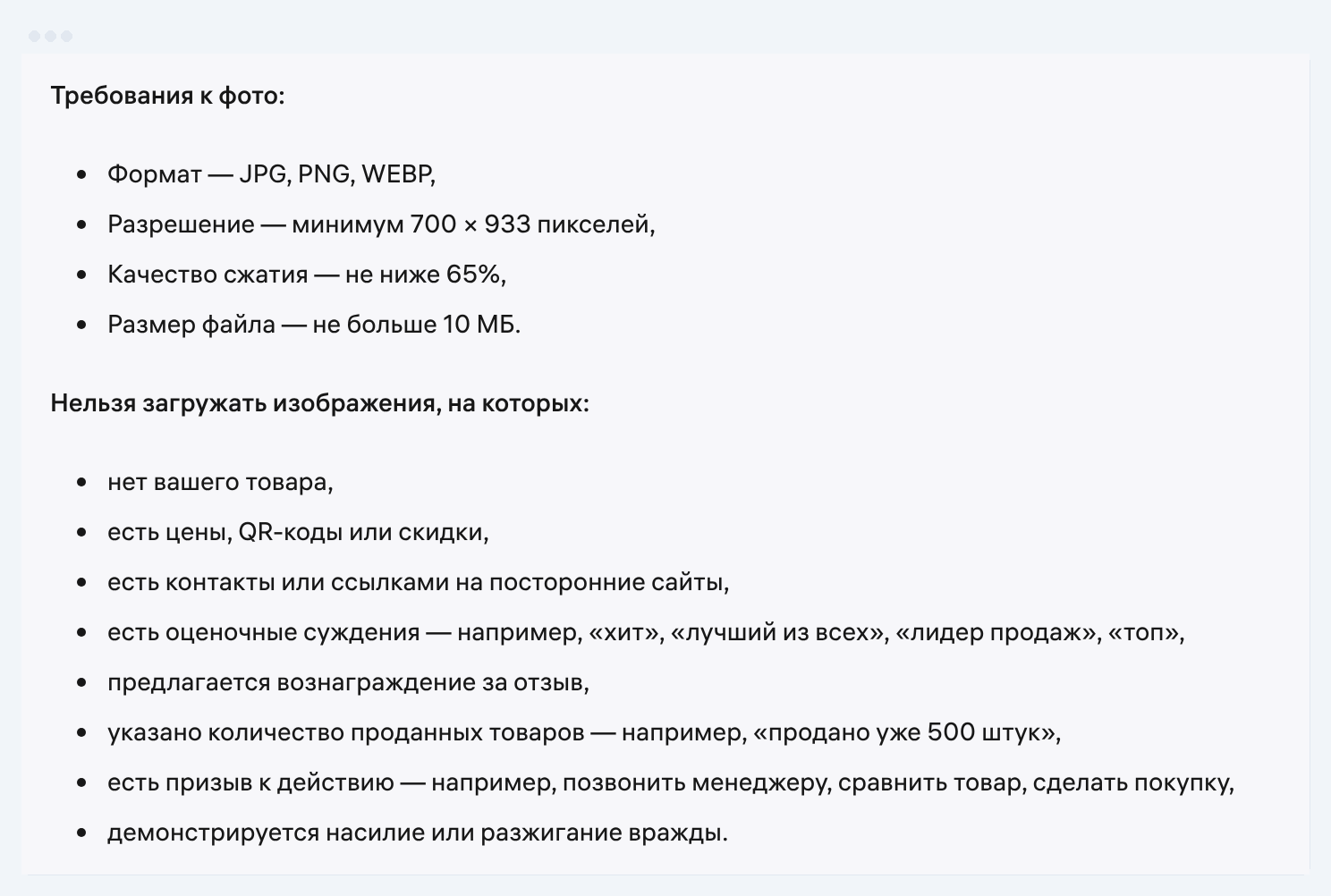
| What the slide says | What WB says | What to put instead |
|---|---|---|
| "990 ₽", "−30%", "sale" | prices and discounts on photos are banned | a product property instead of the price |
| QR code, phone, website, social media handle | contacts and links to outside sites are banned | remove completely |
| "Hit", "top", "best", "bestseller" | judgements are banned | a measurable property: volume, material, number of modes |
| "500 already sold" | the number of items sold is banned | remove, WB shows reviews and the rating itself |
| "Gift for a review", "cashback for 5 stars" | a reward for a review is banned | remove |
| "Call the manager", "compare", "buy" | a call to action is banned | a use case: "for the kitchen", "for travel" |
| Someone else's logo, a stock photo watermark | logos and watermarks lower the rating, third-party rights may not be violated | your own photo without marks |
Source: seller.wildberries.ru instructions "How to create a product card" (02.10.2026) and "Product photos: rules, recommendations and common mistakes" (28.08.2026)
On the main photo the rating is also lowered by marketing phrases about the season, urgency, discounts and guarantees, by translation errors in captions and by a product that does not match its category.
How WB checks infographics and why it blocks a card
All photos go through moderation, and infographics are no exception. If an image breaks the rules, a notification arrives in the "bell", and you get 72 hours to fix the card. After that the card is blocked, and the reason is visible in the seller portal. The moderator assesses the image parameters as a whole.
| Where you upload | What is checked | What to know |
|---|---|---|
| Card photos in the seller portal | technical requirements and the bans from the instructions | 72 hours to fix, then a block; an orange frame means "the photo should be improved" |
| Photos via the API | 700 × 900 px, up to 32 MB, up to 30 items | if even one file fails, none is uploaded, although the method returns code 200 |
| A variant for the main photo A/B test | the same technical requirements, preferably without marketing text | moderation usually takes up to 3 hours, the test runs from a week to two months |
| A second main photo for an audience | 700 × 933 px, up to 10 MB, the same product | the image must not mislead, the service shows the reason for a rejection |
Source: seller.wildberries.ru instructions "Product photos" (28.08.2026), "Main photo A/B testing" (27.08.2026), "Photos for a target audience" (16.09.2026), WB API documentation
The API trap is simple: on a batch upload WB reports success even if one slide out of ten is over the limit, and the old photos stay in the card. After a bulk upload, open the card and check that the slides have changed.
Do you need infographics on the main photo: what 111 cards showed
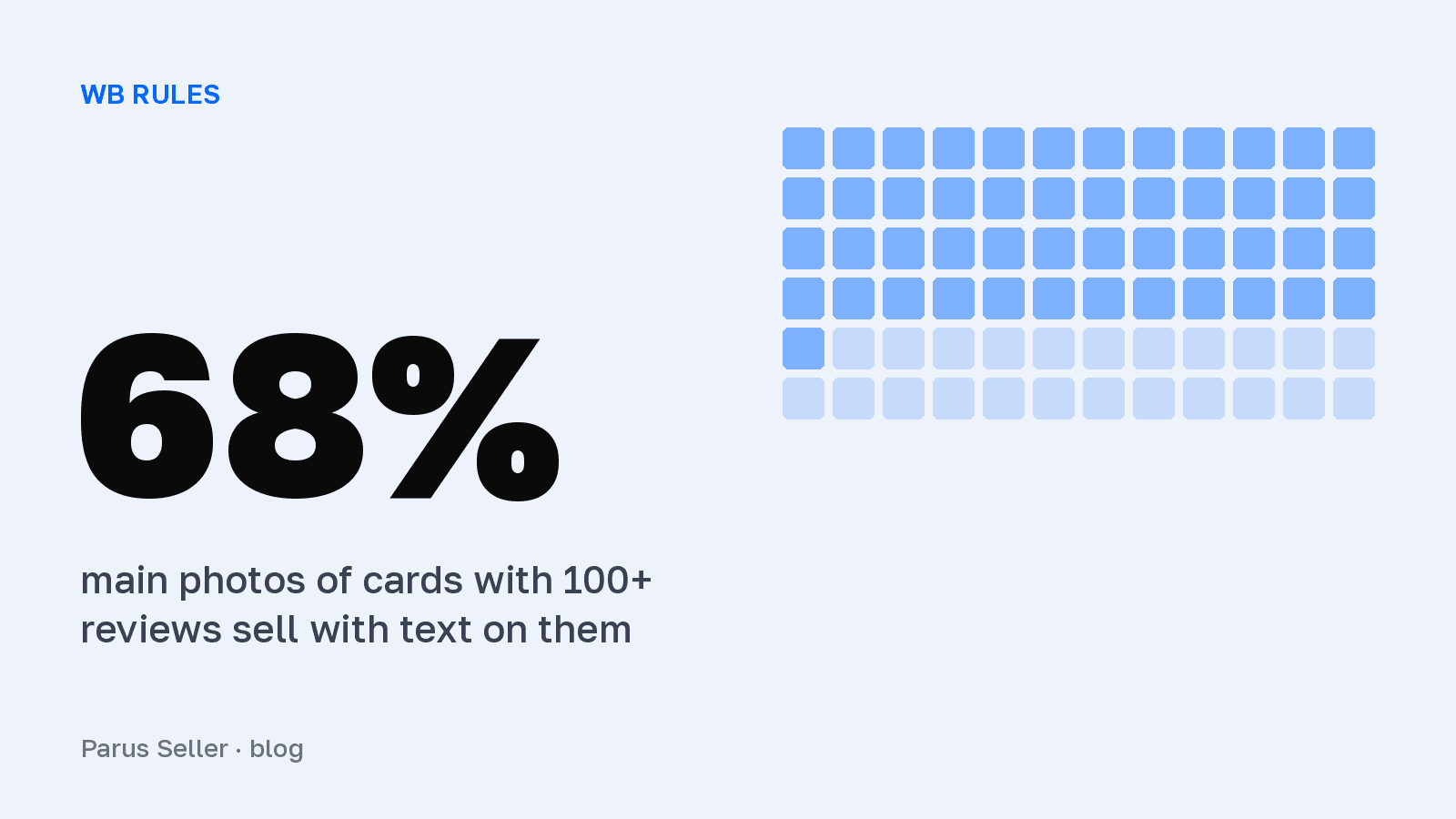
In most categories sellers with reviews use them. We checked by hand the main photos of 111 random WB cards with 100 or more reviews: 75 of them carry text over the product, which is 68%. On 62 photos it is a full infographic with three or more captions. Clothing is the exception: 12 cards out of 16 do without text, a model shows the product.
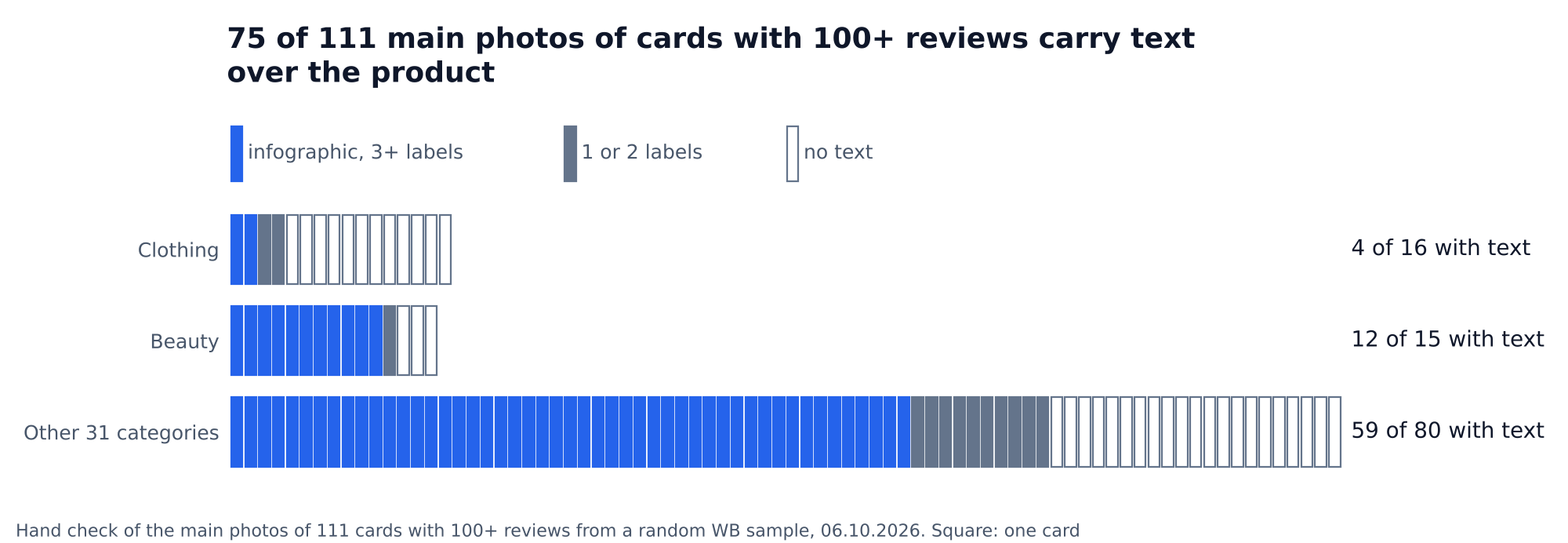
How we counted. On 6 October 2026 we picked random WB article numbers and read 7,115 public cards with their review counts. WB counts reviews per merged card. In the sample, 111 cards had 100 or more reviews, with a median of 306. We labelled each main photo by hand and counted as a caption only text placed over the photo, not text on the packaging or a print. The sample is small, with 15 to 16 cards each in clothing and beauty, so the category figures are a guide, not a norm.
What follows from this. WB openly warns that text on the main photo lowers the card rating, yet two thirds of sellers with reviews keep captions: it matters more to them that the buyer understands the product from the preview. Clear mistakes are rare: a promo code discount, "more items, lower price", a gift with the order, a guarantee or an invitation to the seller's own store turned up on 8 photos out of 111. A main photo A/B test helps check what works for you: WB shows two variants to two halves of the audience and compares the results.
How often the review leaders add video
The more reviews a card has, the more often it has a video. In the same sample of 7,115 cards, a video is uploaded on 8% of cards without reviews, on 21% of cards with 100 to 999 reviews and on 9 of 19 cards with 1,000 or more reviews. The last group is small, its 95% confidence interval runs from 27% to 68%.
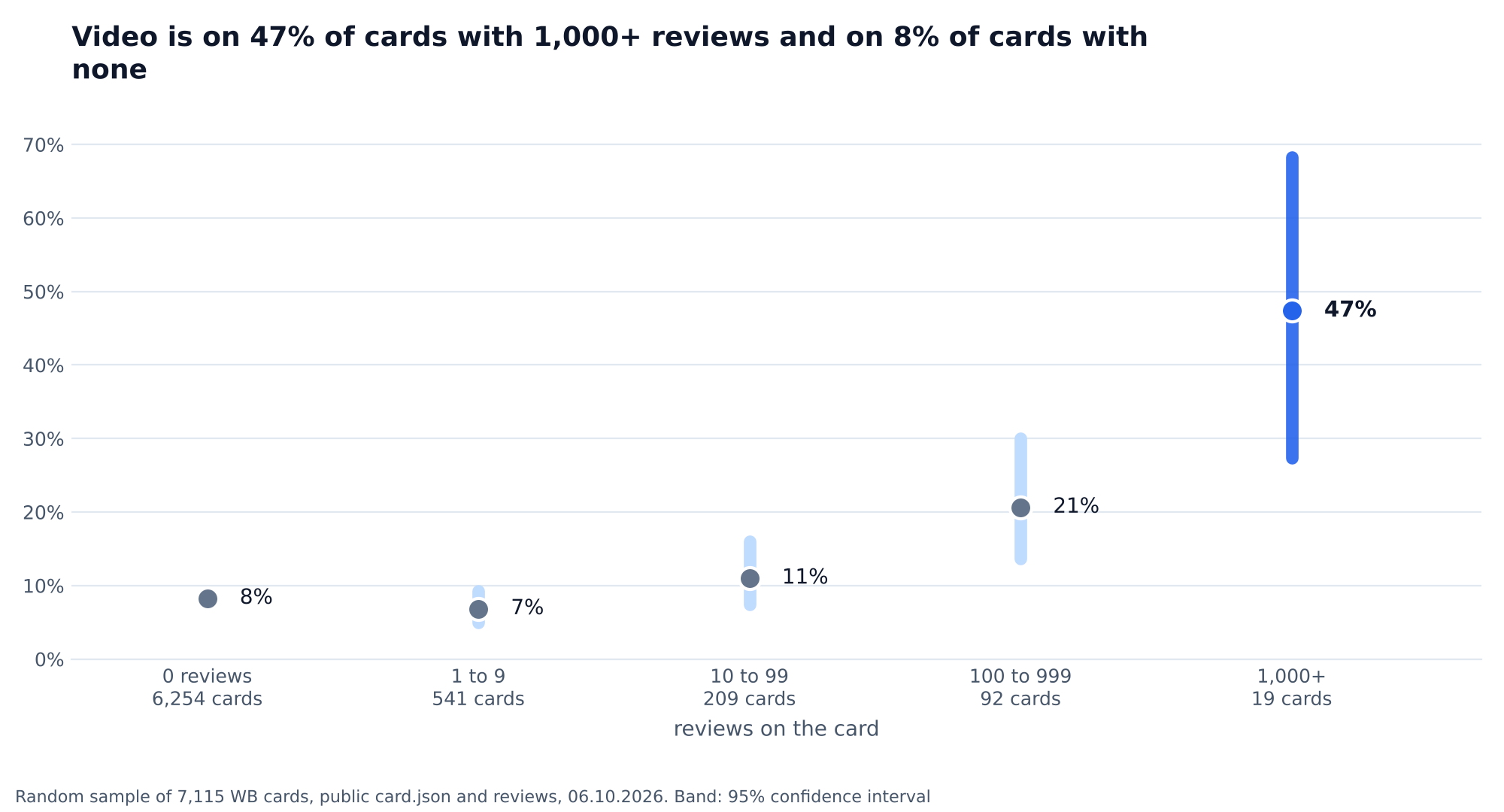
The video flag comes from the public card file. The chart does not show causation: a popular product is more often sold by a seller who invests in the whole card at once. But a video remains one of the cheapest ways to catch up with the leaders. The WB "Video covers" service builds a video from the card photos for free, its effects include infographic animation, and if the card has at least two photos, the cover is generated automatically and you only need to check and add it. We collected the technical requirements for the video in the article on the product card.
Which slides a card needs and in what order
WB sets no strict slide order, but the "Product photos" instruction has three rules about the sequence. The main photo shows the whole product, large and without packaging. If a set is sold, its full contents are visible on the first frame. An accessory such as a gift box or a case comes right after the main photo. We offer the rest of the order as a working scheme, not as a WB requirement.
| Slide | What is on it | Where the rule comes from |
|---|---|---|
| 1, main photo | the whole product on a neutral background, minimum text, neutral coloured badges | WB instruction "Product photos" |
| 2, contents | accessories and packaging, if there are any | WB instruction "Product photos" |
| 3, key property | one benefit as a number: volume, capacity, running time | our recommendation |
| 4, dimensions | dimensions on the product itself, a size chart for clothing | our recommendation |
| 5, material and details | a close-up of the texture; for bed linen a frame with the fabric is mandatory | WB instruction "Product photography recommendations" |
| 6, use | the product in an interior, in a hand or on a model | our recommendation |
| 7, variants | colours and sizes of the same model, no other brands | our recommendation |
Source: seller.wildberries.ru instructions "Product photos" (28.08.2026) and "Product photography recommendations" (18.05.2026); rows marked "our recommendation" are not a WB rule
One slide should answer one buyer question. If the third slide holds dimensions, composition and a guarantee at once, none of the three will be readable in the preview. WB asks for the slides of one article to be shot in one style, so it is convenient to fix the font and badges with "Templates" in the built-in WB photo editor.
How to make infographics readable on a phone
The buyer first sees the main photo in the catalogue, in a small preview. In WB storage every photo has a 900 × 1200 copy and a reduced 246 × 328 preview. The preview is 3.7 times narrower than the slide, so letters 60 pixels high turn into 16, and a 24-pixel caption shrinks to 7 and blurs into a grey stripe.
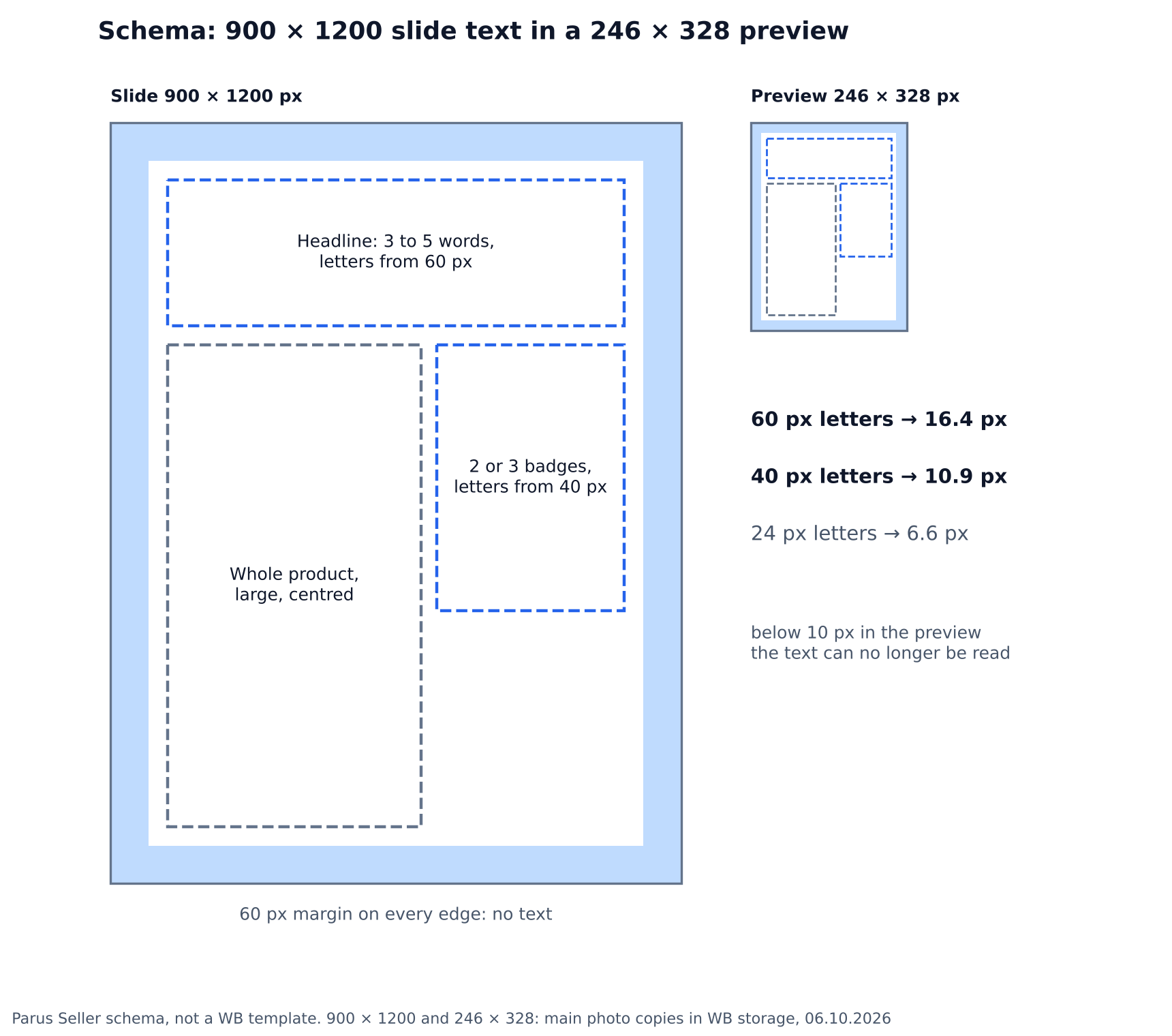
Hence three rules for slides. The headline is short, three to five words, with letters from 60 pixels on a 900 × 1200 canvas. Badge captions are from 40 pixels, and there are no more than three of them. Leave a margin of about 60 pixels without text along the edges, so the caption does not stick to the edge of the preview. We derived these figures from the preview scale, WB publishes no such thresholds. The check takes a minute: shrink the slide to 246 pixels wide and read it on a phone at arm's length.
Frequently asked questions about Wildberries infographics
Can you put the price on a Wildberries infographic? No. The WB instruction of 2 October 2026 bans images with prices, discounts and QR codes.
What size should a Wildberries infographic be? At least 700 × 933 pixels under the card creation instruction, a convenient working size is 900 × 1200 at 3:4. Up to 10 MB in the seller portal, up to 32 MB via the API.
How many slides should a card have? WB accepts up to 30 photos and asks for at least two, otherwise the product will not get into search.
Can you make infographics with a neural network? Yes, WB does not ban generated images. But an unnatural picture and distorted letters lower the card rating.
Why did WB block a card because of its infographics? The photo failed moderation, for example because of a price, contacts or a "hit". You get 72 hours to fix it after the notification, and the reason is visible in the seller portal.