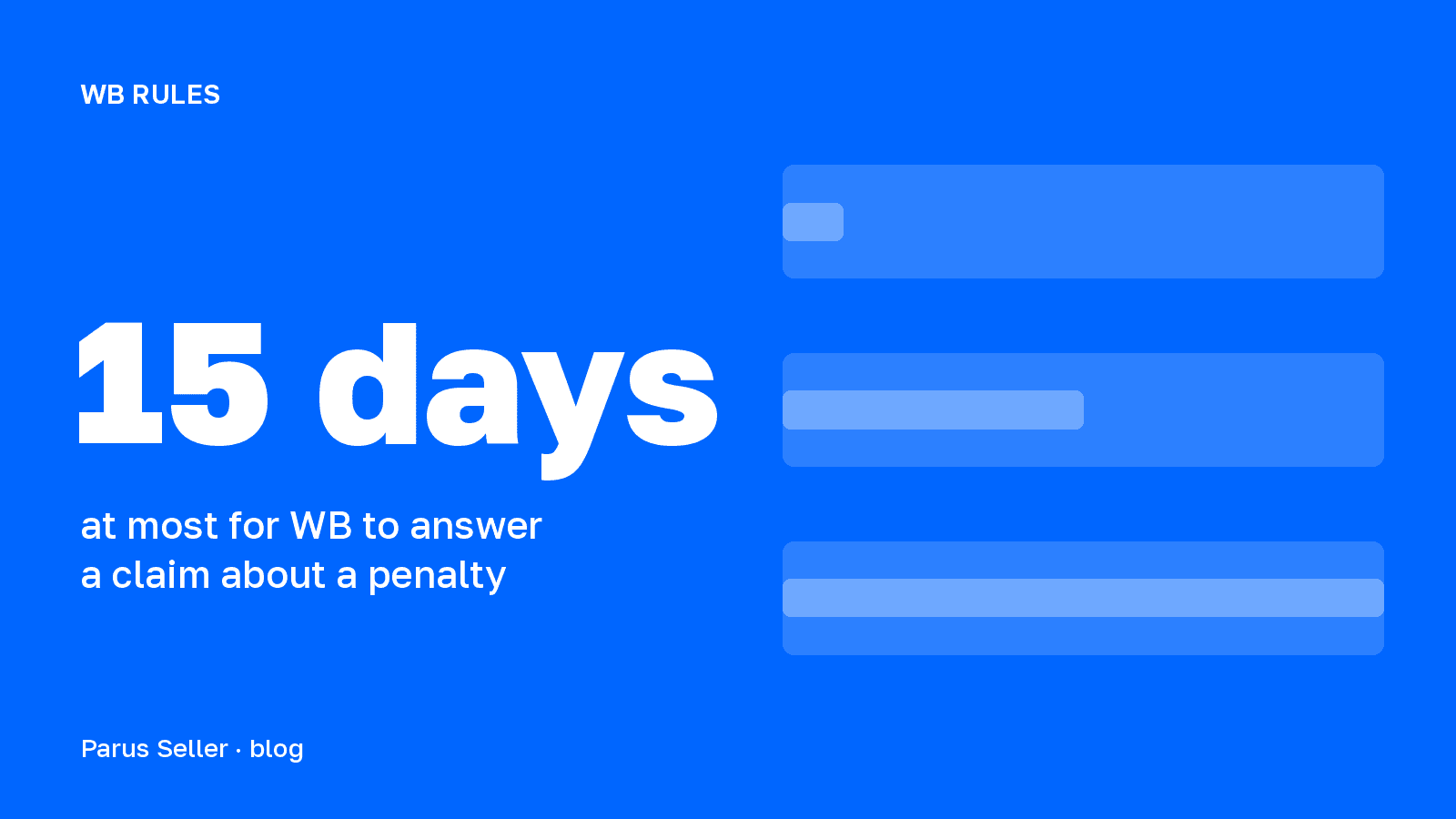
How to contact WB seller support: through the «Поддержка» (Support) section of your WB Partners account. Click «Новый диалог» (New dialog), choose a category and a topic, describe the situation and attach files of up to 10 MB each. Under the offer agreement in force since 1 October 2026, an answer to a question arrives within 30 days at most. WB reviews a pre-trial claim about a penalty or a block within 15 calendar days, and other claims within 30.
A seller has no other channel for disputes. Clause 8.1 of the offer agreement treats only correspondence through the portal as legally significant, and in its instruction on fraud WB writes that support communicates only in requests on seller.wildberries.ru. Below is the procedure from the WB instructions «Поддержка продавцов» (Seller support) of 27 July 2026 and «Досудебное урегулирование» (Pre-trial settlement) of 2 October 2026, plus the deadlines from offer agreement No. 102. All deadlines here are the maximums set in the documents: we have no data on how fast support answers in practice. The disputes themselves about penalties, deductions, acceptance and payouts are covered in separate articles, linked along the way.
In short: write to «Поддержка» from your account, one problem per dialog, with report numbers, WB article numbers and files. WB answers a question within 30 days, a claim about a penalty or a block within 15, other claims within 30. If every deadline is used in full, a weekly report dispute reaches the right to go to court in 74 days.
Where is seller support in the WB account
WB seller support sits in the top right corner of the WB Partners portal: hover over the icon and choose «Поддержка» in the drop-down menu. On the section page click «Новый диалог», choose a category, then a topic. Categories are listed alphabetically, and you can search them by keyword.
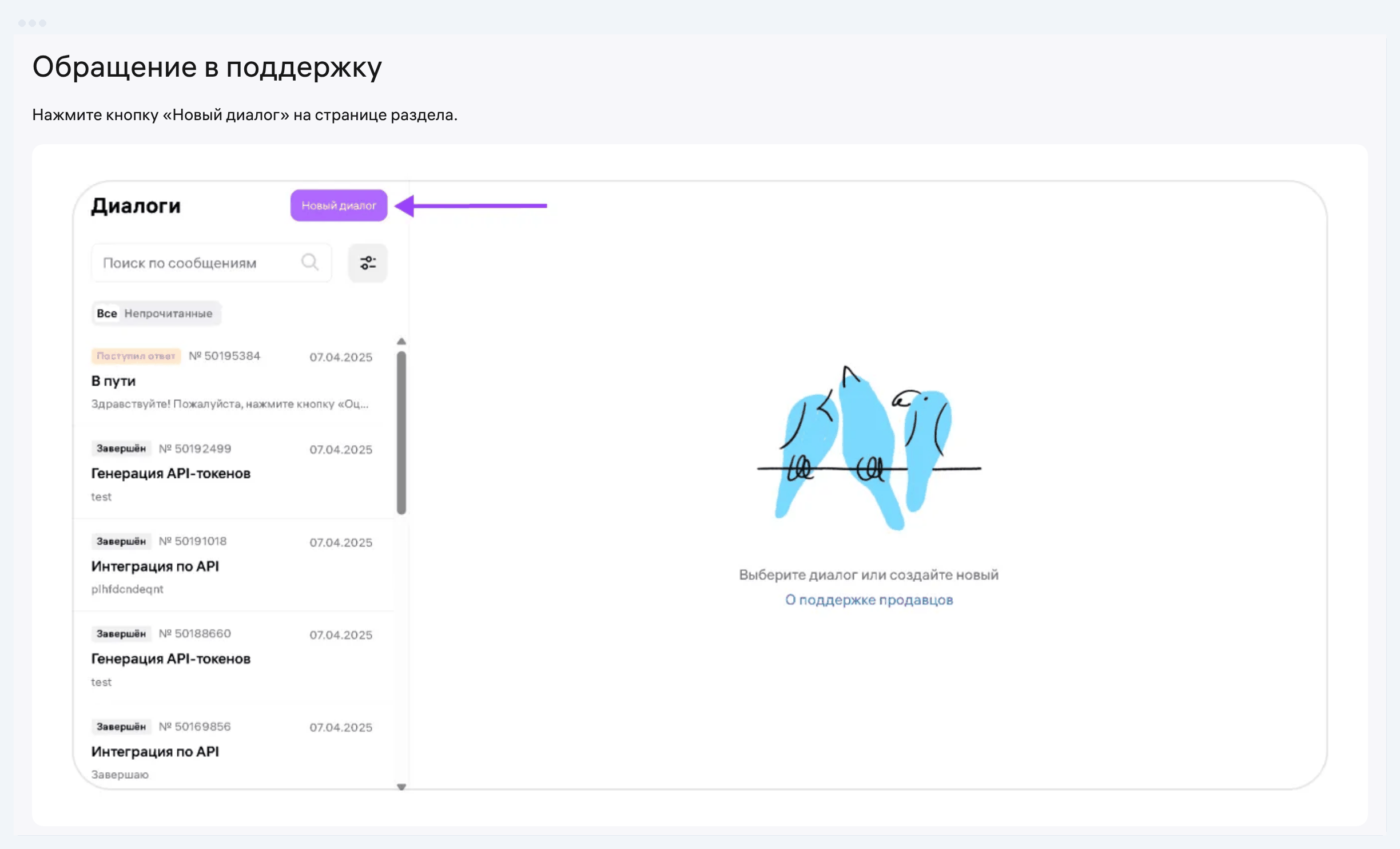
After you pick a topic, WB shows the frequent questions on it. If there is no ready answer, describe the situation in the comment field and attach files with «Загрузить файлы» (Upload files). The limits: one file up to 10 MB, all attachments up to 50 MB, and a new request on the same topic can be created once every 15 minutes. Once created, the dialog gets its own number. Save it: you can refer to this number in the next request and in a claim.
| Dialog status | What it means | What to do |
|---|---|---|
| «Создан» (Created) | the request is accepted, no answer yet | wait, add details to the same dialog if needed |
| «Ждём ваш ответ» (Waiting for your reply) | the specialist lacks information | send what was requested in a comment and click «Отправить» (Send) |
| «Поступил ответ» (Answer received) | support has answered | rate it from 1 to 5 stars or continue the dialog |
| «Завершён» (Completed) | you rated the answer or did not reply for a long time | for the same problem start a new dialog citing the old number |
Source: WB instruction «Поддержка продавцов», updated 27.07.2026
An important detail from the same instruction: if you neither continue nor rate a dialog within several days, it closes automatically. So do not give five stars to an answer that did not solve the problem: the rating closes the dialog. There is also a paid option. A tariff builder option gives priority personal support, and such requests are handled by a separate team.
How to write to WB support to get a useful answer
A useful answer goes to a request with one problem, the exact category and all identifiers. The instruction says plainly that the specialist works out the situation from the comment text. «Верните деньги за штраф» (Refund the penalty) without a report number and an article number risks coming back with the status «Ждём ваш ответ». Clause 9.3.7 of the offer agreement explicitly allows a longer answer time if the seller has not given all the necessary information.
A request needs five things: what happened, when, with which item (WB article number, supply or assembly task number), for what amount and what you are asking for. Below is a summary for frequent problems: where to write, what to attach and how long WB has to answer.
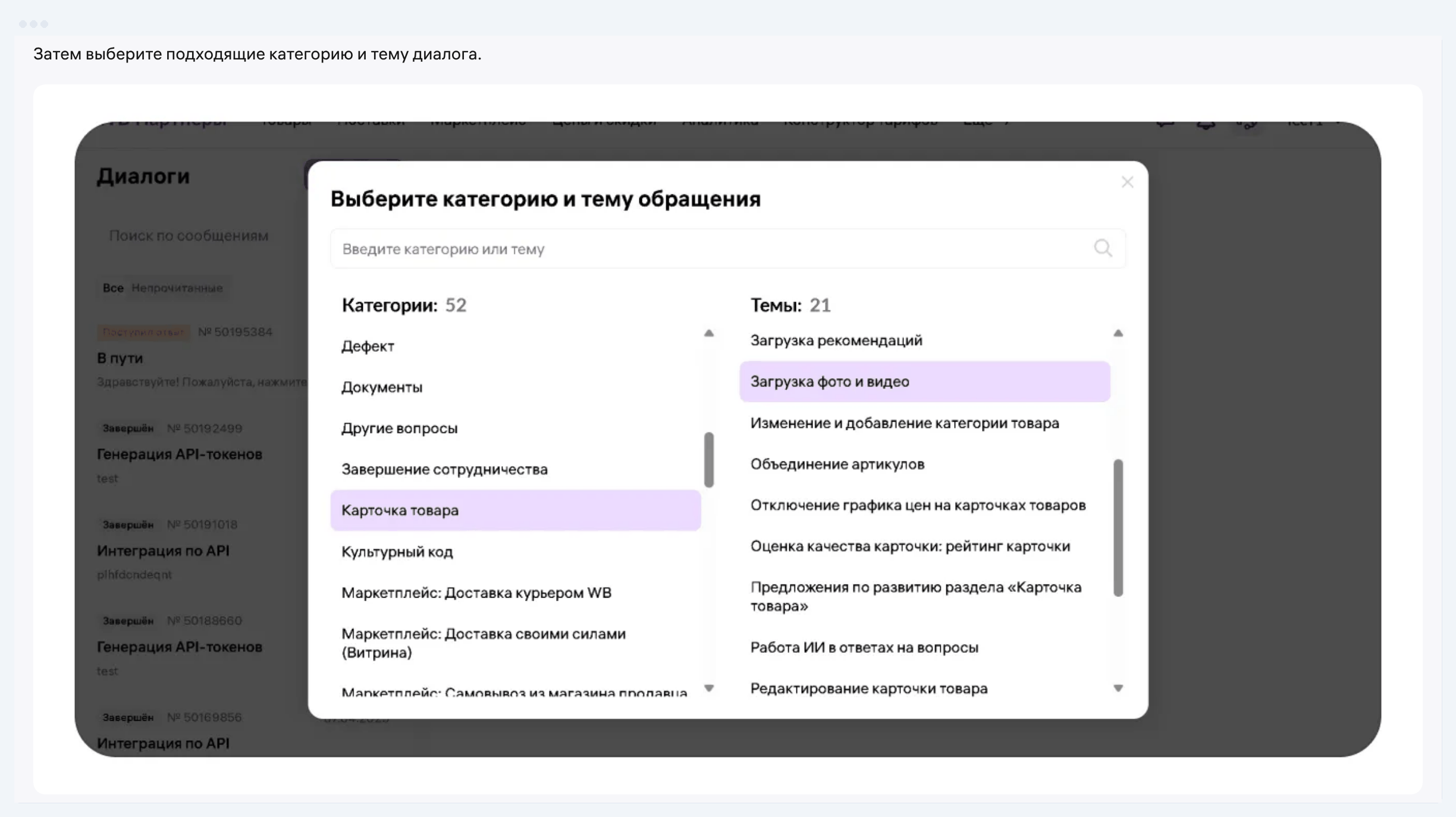
Choose the category by what the question is about. In the WB example, a question about product recommendations goes to «Карточка товара», because recommendations are shown in the card. The screenshot from the instruction shows the scale of the choice: 52 categories and 21 topics in «Карточка товара» alone.
| Problem | Where to write | What to attach | Answer deadline | Offer clause or instruction |
|---|---|---|---|---|
| Penalty | «Поддержка», then «Досудебные претензии» (Pre-trial claims) | report number, the penalty line, for dimensions photos on scales and with a tape measure | up to 30 days, claim 15 | 9.3.7, 8.9 |
| Deduction | «Поддержка» | the deduction breakdown window, UPD number, the report line | up to 30 days, claim 30 | 9.3.7, 8.9 |
| Item lost at a warehouse | «Поддержка» | the date of the return request, contracts, waybills, payment orders proving cost | documents within 10 days, payout within 30 business days | 11.3.1, 11.3.7, 11.3.8 |
| Disagree with an acceptance report | objections on the portal | supply number, screenshot of the report, shipping documents and photos | 7 days for your objections | 11.1.5 |
| Disagree with a return report | objections on the portal | report number, screenshot, photos of the received item | 3 business days for your objections | 11.2.1 |
| Error in a report or payout | «Поддержка» | report number, withdrawal request date, amount | 14 days for your remarks | 5.6, 5.7 |
| Product card blocked | request to restore it | proof that the violation is fixed | up to 30 days plus 15 | 9.2.5, 9.11.14 |
| Rights holder complaint | «Цифровой арбитраж» (Digital arbitration) | documents proving the right to sell the item | 10 days for your reply, review up to 30 | instruction «Цифровой арбитраж» |
| No access to the account | «Восстановить доступ» (Restore access) on the login page | INN, phone numbers, a 7.77 ₽ payment order when changing the number | 3 business days, answer by email | instruction on access recovery |
Sources: WB offer agreement No. 102 from 01.10.2026; WB instructions «Цифровой арбитраж» (27.08.2026) and «Восстановление доступа к личному кабинету» (11.06.2026)
What exactly to prove in each dispute we covered in detail: WB penalties, deductions, a burnt or lost item, inbound acceptance at the warehouse and payouts to the seller. Something else matters more here. If you forgot to attach something, add it to the same dialog instead of opening a new one: the instruction allows a new dialog only for a new question or after the status «Завершён».
How long does Wildberries support take to answer
Under the offer agreement, Wildberries support answers a seller's question within 30 days at most (clause 9.3.7). WB reviews a claim about a penalty, a block, a rating or a search position within 15 calendar days, and other claims within 30 (clause 8.9). The fastest answer, within 3 business days, comes for the account access recovery form.
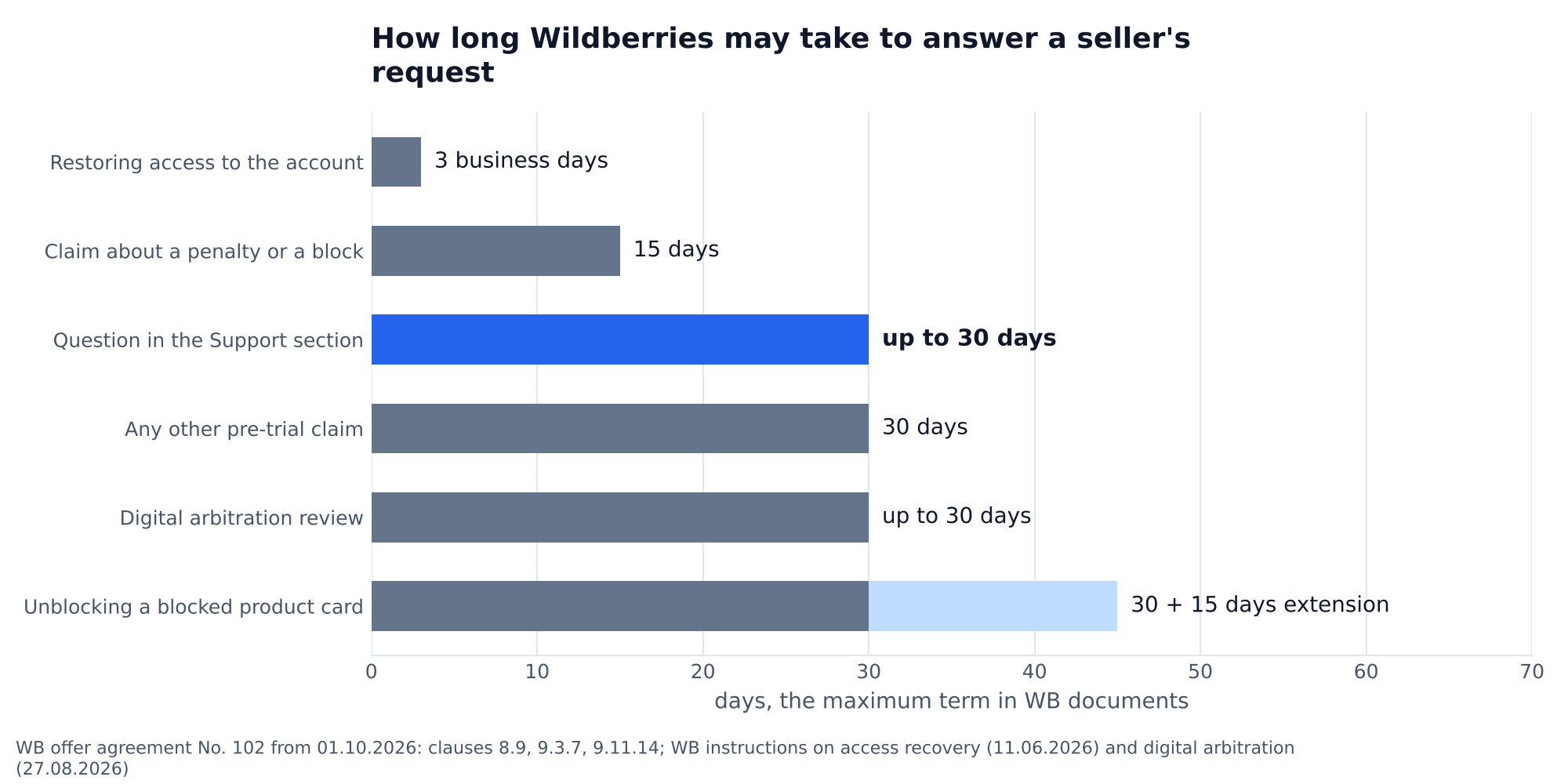
Unblocking a product card has the longest term. Under clause 9.11.14, a request to restore it is reviewed within 30 days, and WB may extend the term by another 15 if it needs more information. The time the seller spends gathering that information does not count. Accounts work differently: the offer agreement names no review term, but after deciding to unblock, WB lifts the suspension within 48 hours.
These numbers lead to a simple rule: the term runs from a complete request, not from the first one. While a dialog sits in «Ждём ваш ответ», nothing moves. Answer clarifying questions the same day and avoid rudeness: clause 9.3.6 lets WB withhold an answer until the question is asked in a proper form.
What to do if WB support did not help
If the support answer did not satisfy you, the next step is a pre-trial claim. It is filed in the same «Поддержка» section, in the «Досудебные претензии» category, and there is no other way: clauses 8.1 and 8.9 of the offer agreement say so. If the claim does not settle it, under clause 8.9 the dispute goes to the Arbitration Court of the Moscow Region, or, if it falls under courts of general jurisdiction, to the Savyolovsky District Court of Moscow.
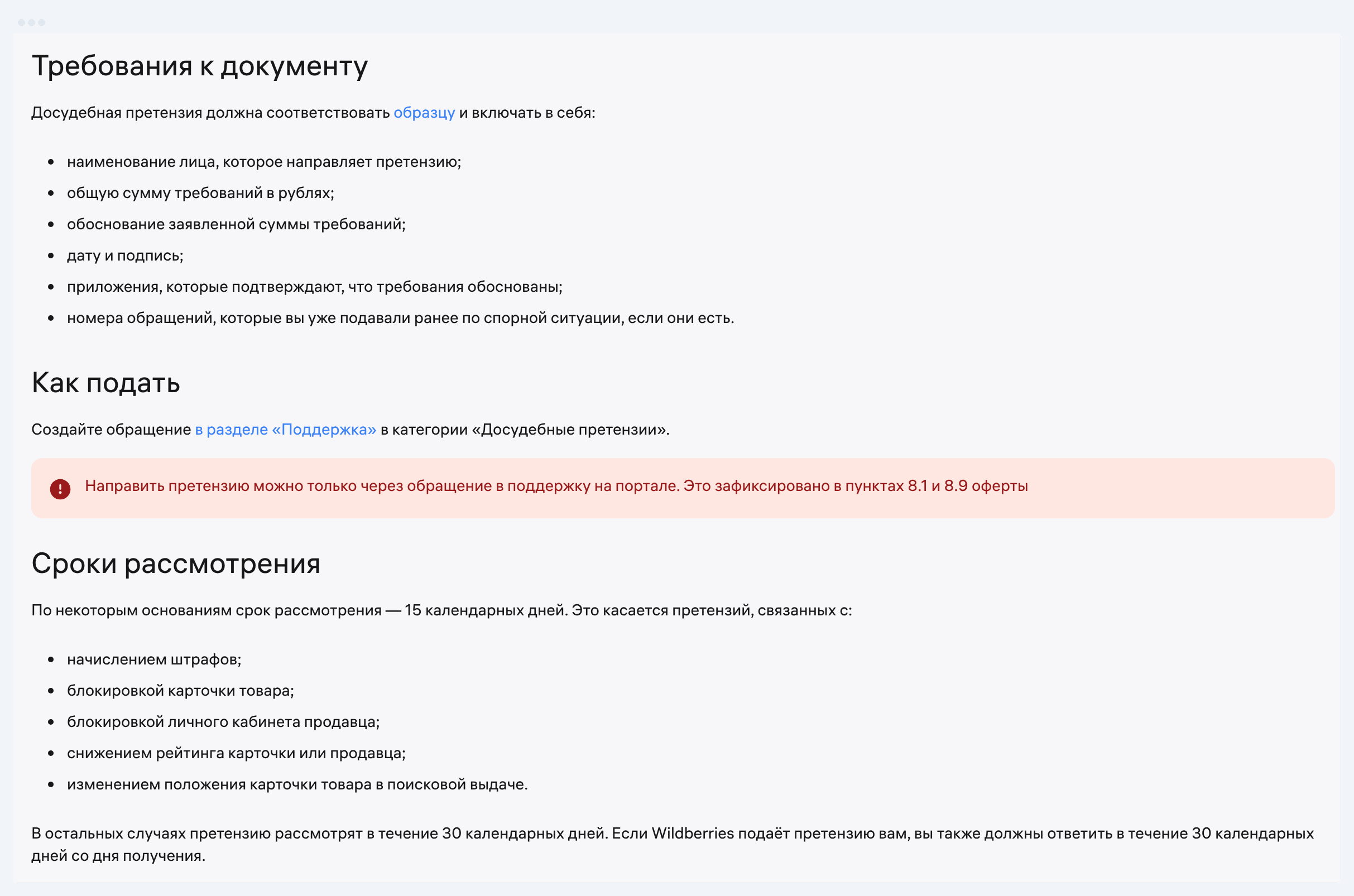
The pre-trial settlement instruction requires six elements in a claim: the claimant's name, the total amount claimed in rubles, the justification of the amount, the date and signature, attachments and the numbers of earlier requests about the same situation. A claim without them may be left unreviewed. WB asks you not to duplicate a claim while it is under review.
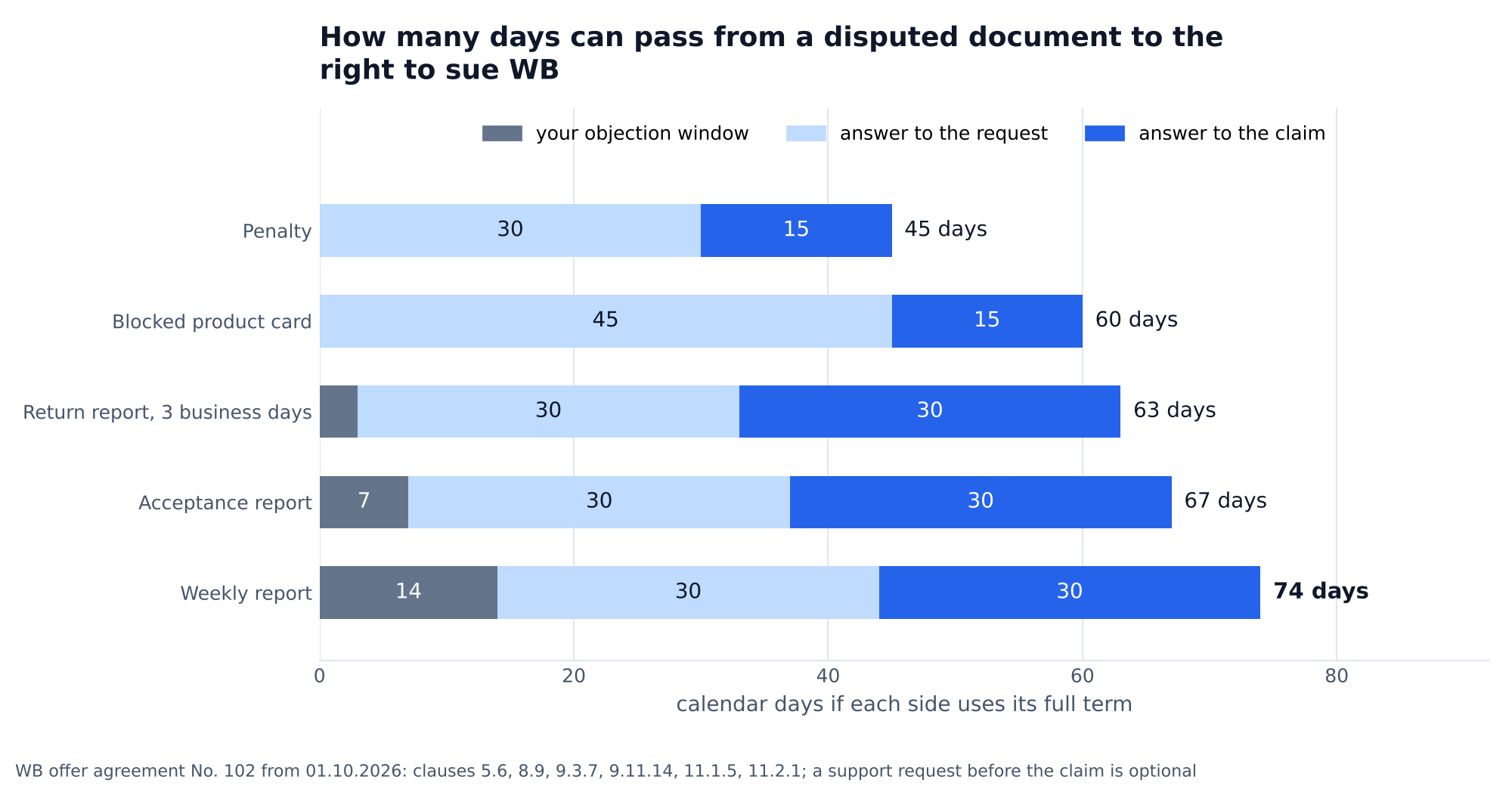
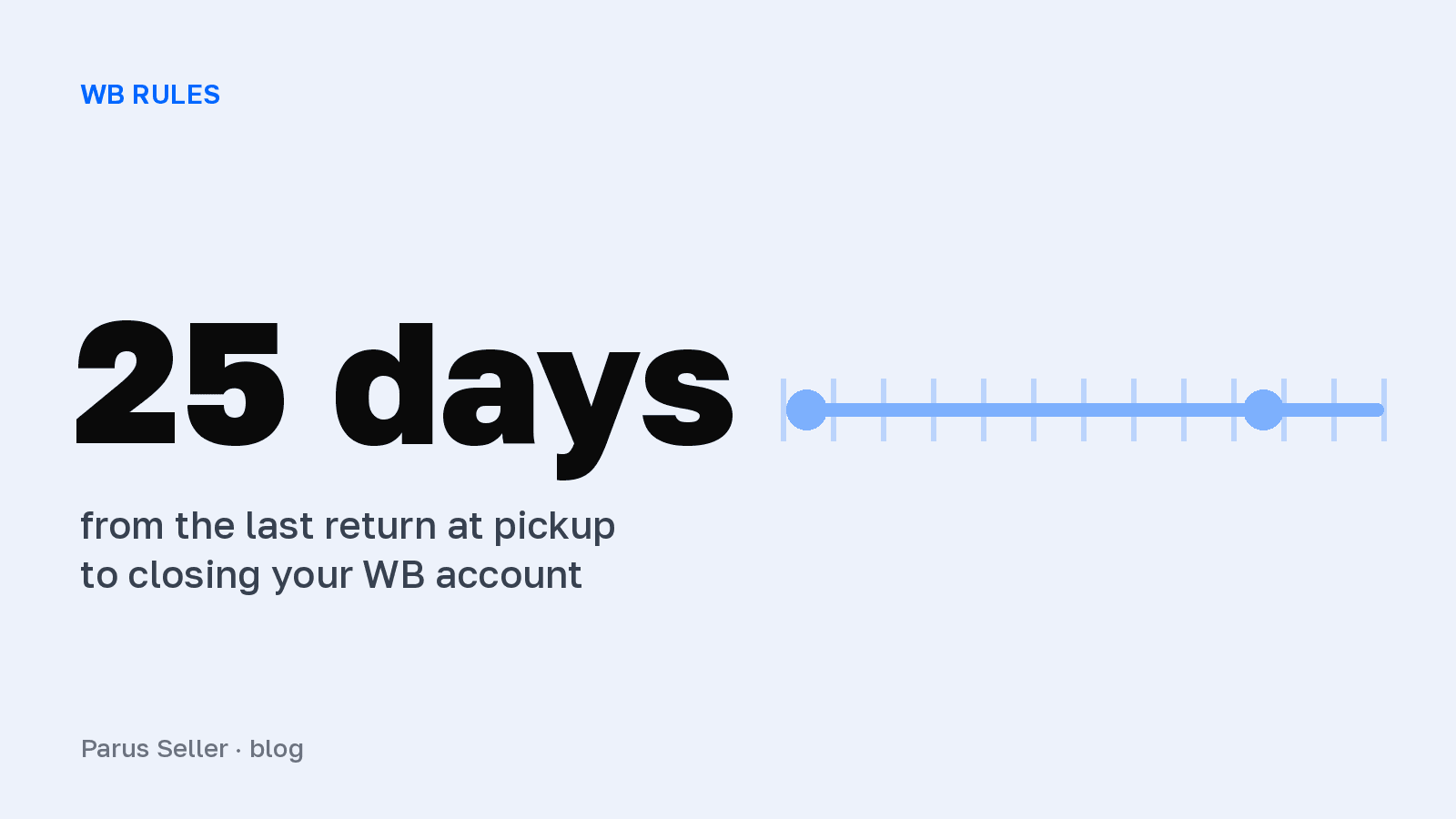
We chained the offer agreement's terms together: your objection window, the answer to the request and the answer to the claim. The weekly report has the longest path: 14 days for remarks, up to 30 days for a support answer and 30 for the claim, 74 days in total. A penalty has the shortest, 45 days, because a penalty claim is reviewed within 15. This is an upper bound, not a forecast: the offer agreement does not require writing to support before a claim, and filing the claim straight away cuts the path by 30 days.
The main trap of the chain is at its start. A seller has 3 business days for objections to a return report, 7 days for an acceptance report and 14 days for remarks on a weekly report. Miss them, and the document counts as agreed, and disputing an agreed document is much harder. All deadlines of both parties under the contract are collected in the article about the contract with Wildberries.
Rights holder complaints follow a separate road. A seller answers a «Цифровой арбитраж» request within 10 days, otherwise the card is blocked. You can disagree with the decision of WB's lawyers: category «Цифровой Арбитраж», topic «Пересмотр решения по обращениям Правообладателей» (Review of decisions on rights holder requests), review up to 30 days. WB advises doing it within 14 days of the block, after which the goods go back to you.
How to tell WB support from fraudsters
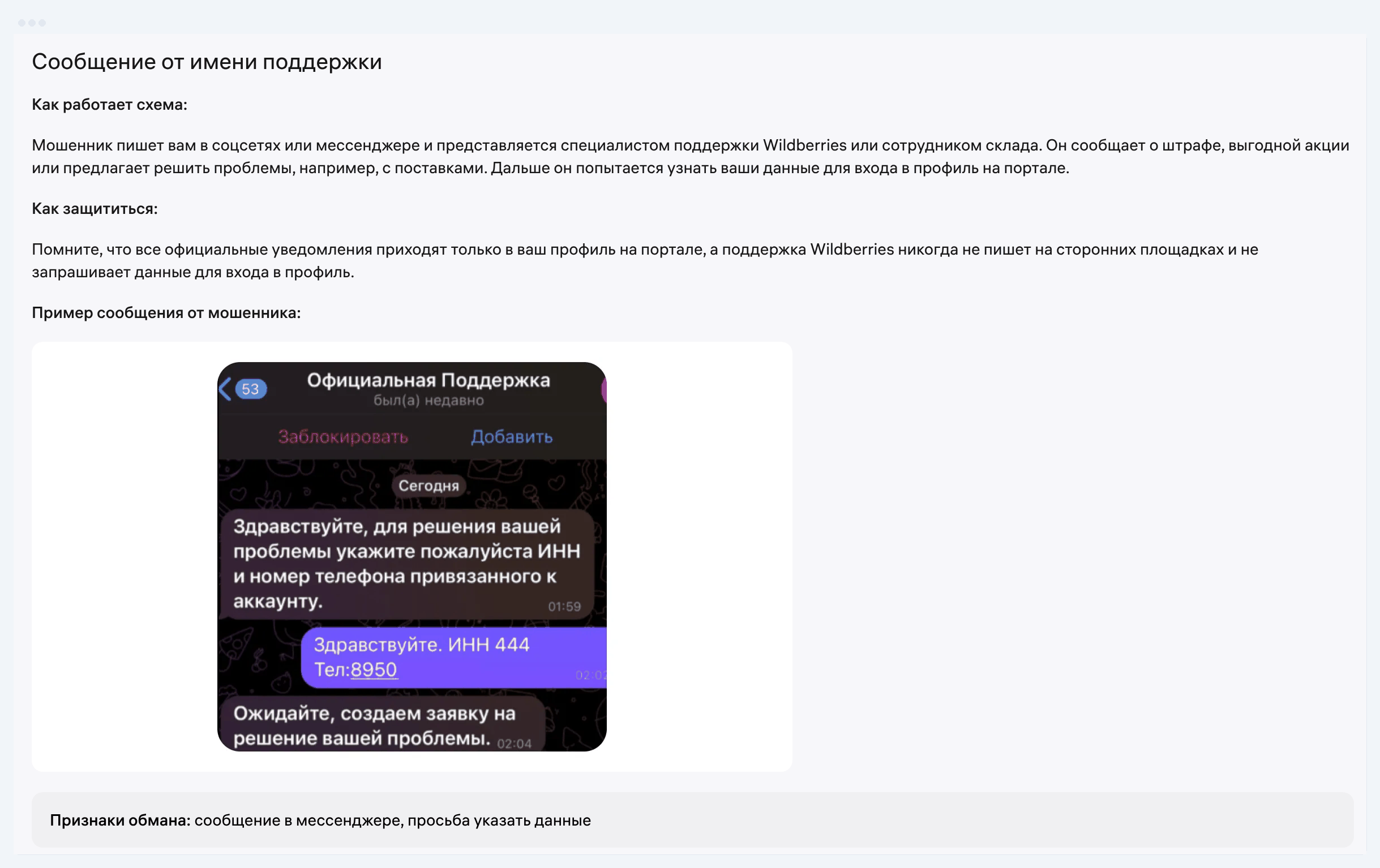
Genuine Wildberries support writes to a seller only in requests on the portal and never asks for login data. In the instruction «Как защититься от мошенников» (How to protect yourself from fraudsters) of 18 May 2026, WB asks you not to share the six-digit login code with anyone, not even with support. So any "WB specialist" in a messenger who asks for an SMS code is a fraudster.
| Sign | Genuine WB | Fraudster |
|---|---|---|
| Where it writes | requests and notifications in your portal profile | social networks, messengers |
| What it asks for | details on your request | SMS code, login phone number, API token |
| domains wb.ru and wildberries.ru, only to the address in «Мои данные» (My details) | a similar sender name, a different address | |
| Links | sends no links to third-party resources | a link to a site resembling the portal |
| Pretext | your question | "a penalty", "a great promotion", help with supplies |
Source: WB instruction «Как защититься от мошенников», updated 18.05.2026
There is a caveat about calls. Clause 9.3.8 of the offer agreement lets WB call a seller when needed and record the conversation. But even in a genuine call you must not give the login code, the instruction says so directly. If the account has been hijacked, WB restores access through a form on the login page. Changing the number requires a 7.77 ₽ payment order from your settlement account, and the answer arrives by email within 3 business days.
Frequently asked questions about WB seller support
Does WB support have a phone number for sellers? The WB instructions we read give no phone number for seller requests. The offer agreement treats correspondence through the portal as legally significant (clause 8.1), so conduct a dispute in writing in the «Поддержка» section.
How do I write to WB support without access to the account? On the portal login page open the menu in the top right corner and choose «Восстановить доступ». State the reason, INN, phone numbers and an email for the answer. Support replies to that email within 3 business days.
How long does WB seller support take to answer? Under the offer agreement, no longer than 30 days for a question in the «Поддержка» section. The term can grow if the seller has not given all the information. WB reviews pre-trial claims within 15 or 30 calendar days depending on the subject.
How do I file a claim against Wildberries? Create a request in the «Поддержка» section in the «Досудебные претензии» category. Attach a document with the amount, its justification, the date and signature, evidence and the numbers of earlier requests.
What if a dialog closed without a solution? Start a new dialog on the same topic and give the number of the closed one. The instruction allows a new dialog when the old one has the status «Завершён». If the second answer does not help either, move on to a pre-trial claim.